
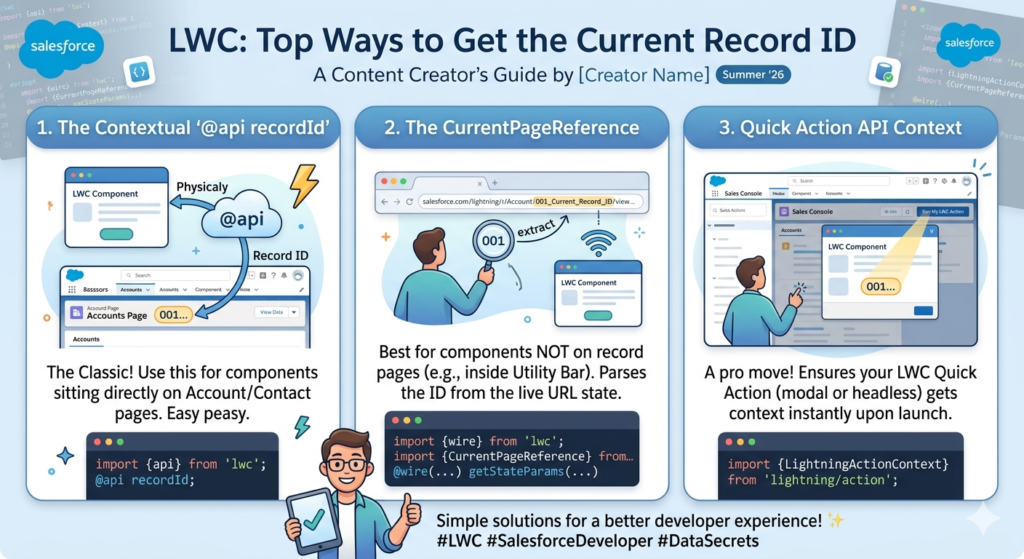
When working with Lightning Web Components in Salesforce, one of the most common requirements is getting the current record ID. Whether you are building a custom form, showing related data, updating records, or calling Apex methods, the record ID plays a very important role.
If you have started learning LWC recently, you might notice that there are multiple ways to access the current record ID. The good part is that Salesforce gives different options depending on where and how your component is being used.
In this blog, we will understand the different ways to get the current record ID in LWC with simple explanations and examples.
Why Record ID is Important in LWC
Before jumping into the methods, let’s first understand why developers use record IDs so often.
The record ID helps us:
- Fetch current record data
- Update or delete records
- Show related information
- Pass data to Apex classes
- Navigate between records
- Create dynamic components
Without the record ID, the component usually does not know which Salesforce record it should work with.
1. Using @api recordId (Most Common Method)
This is the easiest and most widely used way to get the current record ID in LWC.
When your component is placed on a Record Page, Salesforce automatically passes the current record ID to the component.
Example
HTML File
<template>
    <lightning-card title="Current Record">
        <p class="slds-p-around_medium">
            Record ID: {recordId}
        </p>
    </lightning-card>
</template>
JavaScript File
import { LightningElement, api } from 'lwc';

export default class RecordExample extends LightningElement {
    @api recordId;
}
How It Works
Here, @api recordId receives the current page record ID automatically.
For example:
- If the component is opened on an Account record page, it gets the Account ID.
- If the component is opened on a Contact record page, it gets the Contact ID.
This method works perfectly on:
- Record Pages
- App Pages with record context
- Experience Cloud record pages
2. Getting Record ID from Current Page Reference
Sometimes your component is not directly receiving recordId automatically. In such cases, you can use CurrentPageReference.
This method is useful when:
- Working with custom navigation
- Using components inside communities
- Reading URL parameters
Example
JavaScript File
import { LightningElement, wire } from 'lwc';
import { CurrentPageReference } from 'lightning/navigation';

export default class PageReferenceExample extends LightningElement {

    recordId;

    @wire(CurrentPageReference)
    getStateParameters(currentPageReference) {
        if (currentPageReference) {
            this.recordId = currentPageReference.state.recordId;
        }
    }
}
Explanation
CurrentPageReference gives access to page information including URL parameters and state values.
From there, we can read the recordId.
This method is very useful in advanced navigation scenarios.
3. Getting Record ID from URL
In some projects, developers directly extract the record ID from the URL.
This is not the preferred approach, but sometimes it becomes useful in custom implementations.
Example
import { LightningElement } from 'lwc';

export default class UrlExample extends LightningElement {

    recordId;

    connectedCallback() {
        let url = window.location.href;
        this.recordId = url.split('/').pop();
    }
}
Important Note
This method should be used carefully because Salesforce URLs can change depending on:
- Lightning Experience
- Communities
- Mobile App
- Console Navigation
So, avoid this method unless absolutely necessary.
4. Passing Record ID from Parent Component
Another common approach is passing the record ID from a parent LWC to a child LWC.
This method is useful when components are communicating with each other.
Parent Component
HTML
<c-child-component record-id={recordId}></c-child-component>import { LightningElement, api } from 'lwc';
export default class ParentComponent extends LightningElement {
@api recordId;
}Child Component
JavaScript
import { LightningElement, api } from 'lwc';

export default class ChildComponent extends LightningElement {
    @api recordId;
}
Explanation
The parent component receives the current record ID and then passes it to the child component using public properties.
This is a very clean and reusable approach.
5. Getting Record ID Inside Flow Screen Components
If your LWC is used inside a Flow screen, Salesforce can pass the record ID as an input variable.
Example
import { LightningElement, api } from 'lwc';

export default class FlowComponent extends LightningElement {
    @api recordId;
}
Meta XML Configuration
<targetConfigs>
    <targetConfig targets="lightning__FlowScreen">
        <property name="recordId" type="String" />
    </targetConfig>
</targetConfigs>
Explanation
In Flow Builder, you can map the current record ID to the component property.
This is very useful when creating reusable Flow screen components.
Best Practice for Using Record ID in LWC
Although there are multiple ways to get the current record ID, developers mostly prefer using:
@api recordId;Why?
Because it is:
- Simple
- Reliable
- Salesforce-supported
- Easy to maintain
Other methods should only be used when needed for special scenarios.
Common Mistakes Developers Make
Forgetting to Add Component on Record Page
Sometimes developers use @api recordId, but the value is coming as undefined.
This usually happens because the component is not placed on a Record Page.
Wrong Property Name
The property name must be exactly:
recordIdIf you use:
recordIDor
RecordIdit will not work.
Using URL-Based Logic Everywhere
Extracting IDs from URLs may work temporarily, but it is not future-proof.
Always prefer Salesforce-supported methods.
Final Thoughts
Getting the current record ID in LWC is one of the basic but most important concepts in Salesforce development. Almost every real-world component uses record IDs in some way.
If you are just starting with Lightning Web Components, begin with:
@api recordId;Once you become comfortable, then explore advanced approaches like CurrentPageReference, Flow integration, and parent-child communication.
The better you understand record handling in LWC, the easier it becomes to build dynamic and reusable Salesforce components.