
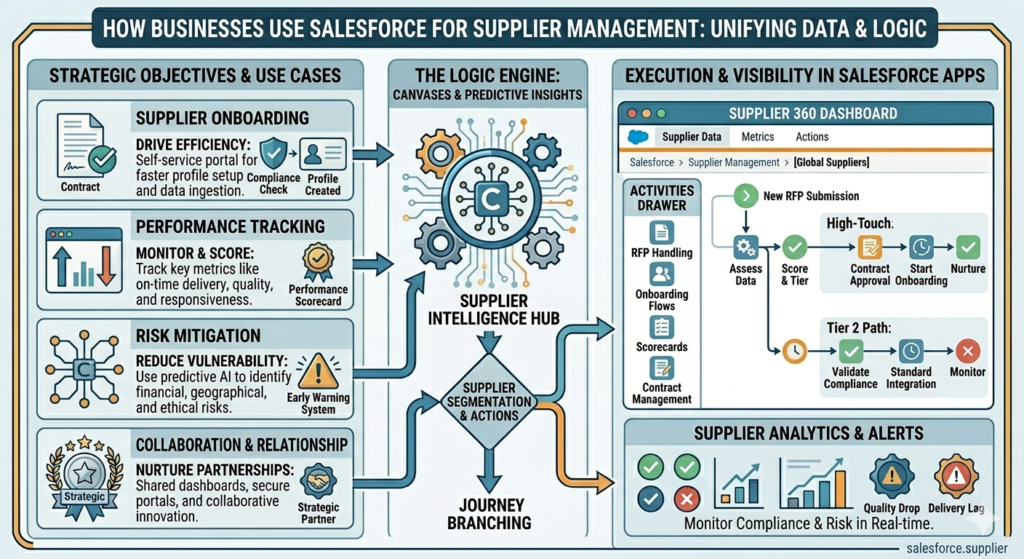
Managing suppliers manually becomes difficult as businesses grow. Teams often struggle with tracking supplier details, purchase requests, approvals, invoices, delivery timelines, and communication. Important updates get lost in emails and spreadsheets, which creates delays and confusion.
This is where Salesforce becomes very useful. With the right setup, Salesforce can automate supplier management and help businesses handle everything from supplier onboarding to approvals and performance tracking in one platform.
In this blog, we will understand how supplier management automation works in Salesforce, why companies are moving toward automation, and how businesses can create a smooth supplier management process without depending on manual work.
What is Supplier Management?
Supplier management is the process of handling relationships with vendors or suppliers who provide products or services to a business.
It includes:
- Managing supplier records
- Tracking contracts and agreements
- Handling supplier approvals
- Monitoring purchase requests
- Managing invoices and payments
- Tracking supplier performance
- Maintaining communication history
When all these activities are handled manually, teams spend too much time on repetitive tasks. Automation helps reduce that workload and improves accuracy.
Why Businesses Need Supplier Management Automation
Many companies still manage suppliers using spreadsheets, emails, and shared folders. This creates several problems:
Delayed Approvals
Purchase requests and supplier approvals often wait for manual review, which slows down operations.
Missing Documents
Contracts, invoices, and agreements get misplaced or become difficult to track.
Poor Communication
Different departments communicate with suppliers separately, creating confusion and duplicate work.
No Visibility
Managers cannot easily track supplier performance, pending approvals, or delivery timelines.
Data Errors
Manual data entry increases the chances of mistakes in invoices, orders, and supplier information.
Salesforce helps solve these issues by centralizing supplier data and automating business processes.
How Salesforce Automates Supplier Management
Salesforce provides different tools like Flows, Approval Processes, Reports, Dashboards, Apex, and Lightning Components that help businesses automate supplier operations.
Let’s understand the complete process step by step.
1. Supplier Onboarding Automation
Supplier onboarding is the first process where vendors submit their business information and documents.
Instead of manually collecting details through emails, Salesforce allows businesses to create automated onboarding forms.
How It Works
A supplier fills out a form containing:
- Company Name
- GST Number
- Contact Information
- Banking Details
- Product Categories
- Compliance Documents
Once submitted:
- Salesforce automatically creates a supplier record
- Documents are stored securely
- The procurement team gets notified
- Approval requests are triggered automatically
This removes manual data entry completely.
Benefits
- Faster supplier registration
- Centralized supplier database
- Reduced paperwork
- Better compliance tracking
2. Automated Approval Processes
Supplier approvals are one of the most time-consuming activities in procurement.
Salesforce can automate approvals using Flow Builder or Approval Processes.
Example Scenario
Suppose a new supplier is added.
Salesforce can automatically:
- Send approval requests to procurement managers
- Notify finance teams for verification
- Escalate approvals if delayed
- Update supplier status automatically after approval
The entire process becomes transparent and trackable.
Benefits
- Faster decision-making
- No approval delays
- Clear approval history
- Better accountability
3. Contract Management Automation
Managing supplier contracts manually creates risk because businesses may miss renewal dates or compliance deadlines.
Salesforce can automate contract management by storing contracts digitally and triggering reminders before expiration.
Automation Features
- Auto-reminders before contract expiry
- Renewal notifications
- Approval workflows for updated agreements
- Digital document storage
- Compliance tracking
Teams can quickly search contracts without checking multiple folders or emails.
4. Purchase Request and Order Automation
Businesses receive multiple purchase requests daily from different departments.
Salesforce automation helps streamline this process.
Example Workflow
- Employee submits purchase request
- Salesforce sends request for approval
- Approved request creates purchase order automatically
- Supplier receives notification
- Delivery status gets updated in real-time
Everything stays connected inside one system.
Benefits
- Faster procurement cycles
- Reduced manual work
- Real-time order tracking
- Better inventory planning
5. Invoice Management Automation
Invoice processing is another area where automation saves a lot of time.
Instead of manually matching invoices with purchase orders, Salesforce can automate validation and approvals.
Automated Invoice Workflow
- Supplier uploads invoice
- Salesforce validates invoice data
- Matching with purchase order happens automatically
- Finance team receives approval notification
- Payment status updates in real time
This reduces invoice errors and improves payment accuracy.
6. Supplier Communication Automation
Communication gaps often create delays between suppliers and businesses.
Salesforce helps automate communication using email templates, notifications, and scheduled updates.
Automated Notifications
Businesses can automatically send:
- Order confirmations
- Delivery reminders
- Payment updates
- Contract renewal alerts
- Approval notifications
This keeps suppliers informed without manual follow-ups.
7. Supplier Performance Tracking
Tracking supplier performance manually is difficult because data remains scattered.
Salesforce dashboards and reports help businesses measure supplier performance using real-time data.
Key Metrics Businesses Can Track
- Delivery timelines
- Product quality
- Invoice accuracy
- Contract compliance
- Response time
- Order completion rate
Managers can quickly identify high-performing suppliers and improve vendor relationships.
8. Integration with ERP and External Systems
Many businesses use ERP systems for finance and inventory management.
Salesforce integrates easily with:
- ERP systems
- Accounting software
- Inventory platforms
- Procurement tools
- Payment gateways
This creates a connected ecosystem where data flows automatically between systems.
Salesforce Features Used for Supplier Automation
Here are some important Salesforce tools commonly used in supplier management automation:
| Salesforce Feature | Purpose |
|---|---|
| Flow Builder | Automates business processes |
| Approval Processes | Handles supplier approvals |
| Reports & Dashboards | Tracks supplier performance |
| Apex | Creates advanced automation logic |
| Experience Cloud | Builds supplier portals |
| Email Alerts | Sends automated notifications |
| Lightning Components | Creates custom supplier interfaces |
Benefits of Automating Supplier Management in Salesforce
Improved Efficiency
Automation removes repetitive tasks and saves time for procurement teams.
Better Data Accuracy
Since data entry becomes automated, errors reduce significantly.
Faster Approvals
Automated workflows speed up supplier onboarding and purchasing processes.
Centralized Information
All supplier records, contracts, invoices, and communication remain in one platform.
Better Supplier Relationships
Quick communication and smooth processes improve supplier trust.
Real-Time Visibility
Managers can monitor supplier performance and procurement activities anytime.
Real Business Example
Imagine a manufacturing company working with hundreds of suppliers.
Earlier, the procurement team handled everything manually using spreadsheets and emails. Supplier approvals took several days, invoices got delayed, and tracking contracts became difficult.
After implementing Salesforce automation:
- Supplier onboarding time reduced by 70%
- Approval processes became faster
- Invoice tracking improved
- Procurement teams saved hours of manual work
- Supplier communication became more organized
This is why many businesses are moving toward automated supplier management systems.
Best Practices for Supplier Management Automation
Keep Supplier Data Clean
Maintain accurate supplier records to avoid duplicate data.
Use Role-Based Access
Ensure only authorized users can access sensitive supplier information.
Automate Notifications
Keep suppliers and internal teams updated automatically.
Create Dashboards
Track supplier performance using real-time reports.
Integrate Existing Systems
Connect Salesforce with ERP and finance systems for better operations.
Final Thoughts
Supplier management becomes complicated when businesses grow and supplier networks expand. Manual processes slow down operations, create errors, and reduce visibility.
Salesforce helps businesses automate supplier onboarding, approvals, invoices, communication, contracts, and performance tracking in a structured way. With automation, teams can focus more on strategic work instead of handling repetitive tasks.
Companies that invest in supplier management automation not only improve operational efficiency but also build stronger supplier relationships and faster procurement processes.
As businesses continue moving toward digital transformation, Salesforce supplier automation is becoming an important part of modern procurement management.