
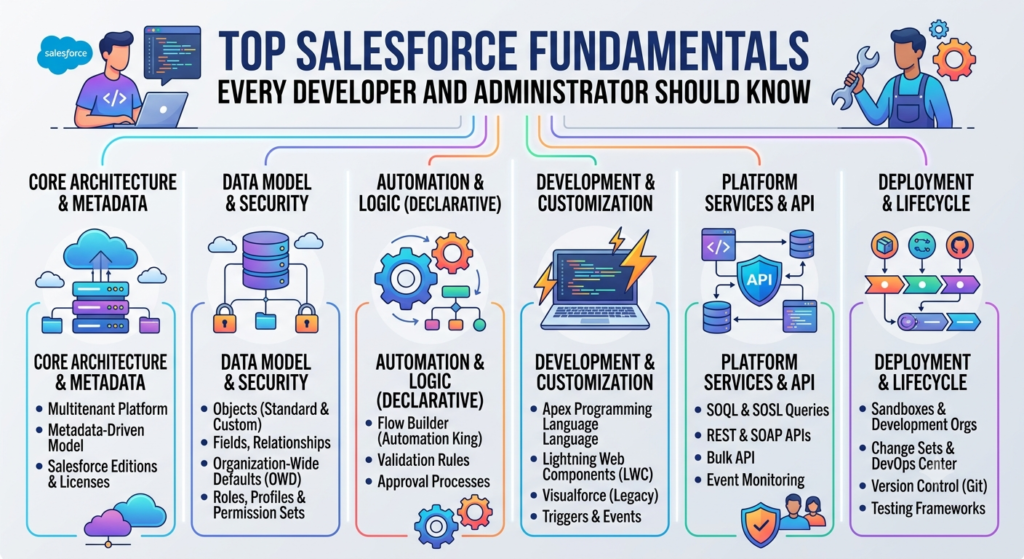
Salesforce is one of the most widely used CRM platforms in the world. Companies use Salesforce to manage customers, sales, service, marketing, business operations, and many other processes.
For a beginner, Salesforce can look complicated because it has many features such as Objects, Fields, Flows, Apex, Lightning Web Components, Security, Reports, Dashboards, and Integrations.
The good news is that you do not need to learn everything at once.
If you understand the Salesforce fundamentals, learning advanced topics becomes much easier.
This blog explains the most important Salesforce concepts that every Salesforce Administrator and Developer should know.
1. What is Salesforce?
Salesforce is a cloud-based Customer Relationship Management (CRM) platform.
In simple words, Salesforce helps organizations store customer information and manage business processes from one platform.
For example, a company may use Salesforce to:
- Store customer information
- Manage leads
- Track sales opportunities
- Create quotes
- Manage customer cases
- Automate business processes
- Create reports and dashboards
- Integrate with external applications
- Build custom applications
Because Salesforce is cloud-based, users can access their applications and data through the internet without managing traditional servers.
2. Salesforce Clouds
Salesforce provides different products called Clouds. Each Cloud is designed for a particular business need.
Some commonly used Salesforce Clouds are:
Sales Cloud
Sales Cloud helps organizations manage their sales process.
It is commonly used for:
- Leads
- Accounts
- Contacts
- Opportunities
- Quotes
- Activities
- Forecasting
Service Cloud
Service Cloud is used for customer support.
It includes features such as:
- Cases
- Knowledge
- Service Console
- Omni-Channel
- Entitlements
- Service Contracts
Experience Cloud
Experience Cloud helps organizations create portals and websites that connect external users with Salesforce data.
For example:
- Customer portals
- Partner portals
- Self-service portals
Marketing Cloud
Marketing Cloud is used for marketing activities such as customer journeys, email campaigns, and customer engagement.
Salesforce CPQ
Salesforce CPQ helps sales teams configure products, calculate prices, and generate accurate quotes.
CPQ stands for:
Configure → Price → Quote
3. Salesforce Data Model
Understanding the Salesforce data model is one of the most important skills for both Administrators and Developers.
The Salesforce data model defines how information is stored and connected.
The main building blocks are:
- Objects
- Fields
- Records
- Relationships
Let’s understand them one by one.
4. Objects
An Object is similar to a table in a traditional database.
Salesforce has two main types of objects:
Standard Objects
Standard Objects are provided by Salesforce.
Examples include:
- Account
- Contact
- Lead
- Opportunity
- Case
- Campaign
- Product
Custom Objects
Custom Objects are created according to business requirements.
For example, suppose a company wants to track employee information.
We could create:
Employee__c
The __c suffix generally indicates a custom object or custom field.
5. Fields
Fields store individual pieces of information on a record.
For example, an Account may have fields such as:
- Account Name
- Phone
- Website
- Industry
- Annual Revenue
Salesforce provides many field types.
Common field types include:
- Text
- Number
- Currency
- Date
- Date/Time
- Checkbox
- Picklist
- Multi-Select Picklist
- Phone
- URL
- Lookup
- Master-Detail
- Formula
- Roll-Up Summary
Choosing the correct field type is important because it affects how data is stored and used.
6. Records
A record represents one individual item stored in an object.
For example, suppose we have an Account object.
A record could be:
Account Name: ABC Technologies
Industry: Software
Phone: 9876543210
This is one Account record.
In simple terms:
Object = Table
Field = Column
Record = Row
This comparison is useful for beginners who already understand relational databases.
7. Relationships Between Objects
Salesforce allows objects to be connected with relationships.
The two most important relationships are:
Lookup Relationship
A Lookup relationship creates a connection between two objects.
For example:
Contact → Account
A Contact can be associated with an Account.
Lookup relationships are relatively flexible and do not create the same level of dependency as Master-Detail relationships.
Master-Detail Relationship
Master-Detail creates a stronger relationship between two objects.
The detail record depends on the master record.
For example:
Order → Order Item
If the master record is deleted, related detail records can also be deleted depending on the relationship behavior.
Master-Detail relationships also support features such as Roll-Up Summary fields.
8. Salesforce Record IDs
Every Salesforce record has a unique ID.
You may see IDs such as:
001XXXXXXXXXXXXSalesforce commonly uses 15-character and 18-character record ID formats.
The record ID is useful when working with:
- Apex
- SOQL
- APIs
- Data Loader
- Integrations
For example:
Account acc = [
    SELECT Id, Name
    FROM Account
    LIMIT 1
];
Here, acc.Id represents the unique ID of the Account record.
9. Salesforce Security Model
Security is one of the most important Salesforce fundamentals.
Salesforce security controls who can access:
- The Salesforce organization
- Objects
- Fields
- Records
- Specific data
The main security components include:
- Profiles
- Permission Sets
- Roles
- Organization-Wide Defaults
- Sharing Rules
- Role Hierarchy
- Manual Sharing
- Field-Level Security
Let’s understand the most important ones.
10. Profiles
A Profile defines the basic permissions for a user.
For example, a Profile can control whether a user can:
- Read an object
- Create records
- Edit records
- Delete records
- View certain fields
- Access applications
Profiles provide the baseline level of access.
11. Permission Sets
Permission Sets provide additional permissions without changing the user’s Profile.
For example, suppose a user does not have access to a particular object through their Profile.
Instead of creating another Profile, an Administrator can create a Permission Set and assign it to the user.
This makes security management more flexible.
A simple way to remember it:
Profile = Basic access
Permission Set = Additional access
12. Roles
Roles are mainly used to control record visibility through the role hierarchy.
For example:
Sales Director
      |
Sales Manager
      |
Sales Executive
A manager may need access to records owned by users below them in the hierarchy.
Roles help support this type of visibility.
13. Organization-Wide Defaults
Organization-Wide Defaults, often called OWD, define the default level of record access.
Common settings include:
- Public Read/Write
- Public Read Only
- Private
For example, if the Account OWD is Private, users may not automatically see all Account records.
Additional access can then be provided using:
- Role Hierarchy
- Sharing Rules
- Manual Sharing
- Teams
- Other sharing mechanisms
14. Field-Level Security
Field-Level Security controls whether users can see or edit individual fields.
For example, suppose an Account contains:
Annual Revenue
You may want only managers to view this information.
Field-Level Security can help control access to that field.
15. Salesforce Automation
Automation is another fundamental Salesforce concept.
Automation helps Salesforce perform tasks automatically instead of requiring users to perform everything manually.
The main automation tools include:
- Flow
- Approval Processes
- Validation Rules
- Workflow Rules
- Apex
Today, Flow is one of the most important automation tools for Salesforce Administrators.
16. Salesforce Flow
Flow can be used to automate business processes.
For example:
When an Opportunity changes to Closed Won, Salesforce can automatically:
- Create a task.
- Update the Account.
- Create a related record.
- Send an email.
- Call an action or integration.
Common types of Flow include:
Record-Triggered Flow
Runs when a record is created, updated, or deleted.
Screen Flow
Provides a user interface where users can enter information.
Scheduled Flow
Runs at a scheduled time.
Autolaunched Flow
Runs without a screen and can be called from other automation or processes.
17. Validation Rules
Validation Rules prevent users from saving incorrect data.
For example, suppose an Opportunity cannot be moved to Closed Won unless a Close Date is available.
A validation rule can enforce that requirement.
Example:
AND(
    ISPICKVAL(StageName, "Closed Won"),
    ISBLANK(CloseDate)
)
If the condition is true, Salesforce can display an error message.
Validation Rules are useful for maintaining data quality.
18. Approval Processes
Approval Processes are used when a record needs approval before a business action can continue.
For example:
A sales representative creates a discount request.
The request may need approval from:
Sales Manager → Finance Manager → Sales Director
Salesforce can automate this approval process.
Approval-related features are commonly used for:
- Discounts
- Opportunities
- Quotes
- Expenses
- Contracts
- Business exceptions
19. Salesforce Reports and Dashboards
Salesforce stores a lot of business data.
Reports help users analyze that data.
For example, a Sales Manager may want to know:
- How many Opportunities are open?
- How much revenue is expected?
- Which salesperson has the highest pipeline?
- Which Opportunities are closing this month?
A Dashboard can display this information visually.
It may contain:
- Charts
- Tables
- Metrics
- Graphs
- Summary information
A simple difference is:
Report = Data analysis
Dashboard = Visual presentation of data
20. Apex
Apex is Salesforce’s programming language.
It is similar to Java because it is object-oriented and strongly typed.
Developers use Apex when declarative tools are not enough.
Apex can be used to:
- Create complex business logic
- Update records
- Create records
- Delete records
- Perform calculations
- Integrate with external systems
- Process large amounts of data
- Create custom services
Example:
Account acc = new Account(
    Name = 'ABC Technologies'
);

insert acc;
This code creates a new Account.
21. Apex Triggers
A Trigger automatically executes Apex code when certain database events occur.
Common events include:
- Before Insert
- After Insert
- Before Update
- After Update
- Before Delete
- After Delete
For example, suppose a company wants to automatically update an Account when a Contact is created.
A Trigger could be used to implement that requirement.
However, developers should not use Triggers for every requirement. If Flow can safely handle the requirement, Flow may be a better choice.
22. Batch Apex
Batch Apex is used when processing a large number of records.
For example, suppose Salesforce has 500,000 records that need to be processed.
Processing all of them in one transaction may exceed governor limits.
Batch Apex divides the work into smaller batches.
Conceptually:
500,000 Records

       ↓

Batch 1 → 200 records
Batch 2 → 200 records
Batch 3 → 200 records
...
This allows Salesforce to process large datasets more safely.
23. Queueable Apex
Queueable Apex is used for asynchronous processing.
It is useful when a process does not need to finish immediately.
For example:
User saves record
       ↓
Main transaction completes
       ↓
Queueable Job
       ↓
Additional processing
Queueable Apex is commonly used for:
- Complex background processing
- Callouts
- Chained jobs
- Large processing tasks
24. Future Methods
Future methods allow Apex code to run asynchronously.
For example, a system may need to perform an external API call after a Salesforce transaction.
A future method can be used for certain asynchronous use cases.
However, developers should carefully choose between:
- Future
- Queueable
- Batch
- Scheduled Apex
depending on the requirement.
25. SOQL
SOQL stands for Salesforce Object Query Language.
It is used to retrieve Salesforce data.
Example:
List<Account> accounts = [
    SELECT Id, Name, Industry
    FROM Account
    WHERE Industry = 'Technology'
];
This query retrieves Accounts where Industry is Technology.
Every Salesforce Developer should understand:
- SELECT
- FROM
- WHERE
- ORDER BY
- LIMIT
- GROUP BY
- Relationship Queries
- Aggregate Queries
26. Governor Limits
Governor Limits are one of the most important Salesforce concepts for Developers.
Salesforce is a multi-tenant platform.
This means many customers share Salesforce infrastructure.
To ensure that one application does not consume too many resources, Salesforce applies limits.
For example, there are limits around:
- SOQL queries
- DML statements
- CPU time
- Heap size
- Callouts
- Query rows
Developers must write code that works within these limits.
27. Avoid SOQL Inside Loops
One common Salesforce development mistake is putting SOQL inside a loop.
Bad approach:
for(Contact con : contacts) {

    Account acc = [
        SELECT Id, Name
        FROM Account
        WHERE Id = :con.AccountId
    ];

}
This can quickly consume SOQL limits.
A better approach is to collect IDs first and query records in one operation.
This is called bulkification.
28. Bulkification
Bulkification means writing code that can process many records efficiently.
Salesforce triggers can receive multiple records at once.
Therefore, developers should never assume that a Trigger will process only one record.
A good Salesforce Developer should always design Apex to handle:
1 record
10 records
100 records
200 records
efficiently.
29. Lightning Web Components
Lightning Web Components, commonly called LWC, are used to build modern Salesforce user interfaces.
LWC uses web standards such as:
- HTML
- JavaScript
- CSS
A simple LWC structure contains:
myComponent.html
myComponent.js
myComponent.js-meta.xml
Sometimes a CSS file is also included.
LWC can communicate with Apex to retrieve or update Salesforce data.
30. Aura Components
Aura Components are an older Salesforce Lightning component framework.
Many existing Salesforce applications still use Aura.
A Salesforce Developer should understand both:
- Aura
- LWC
However, for new development, LWC is generally the preferred framework.
31. Visualforce
Visualforce is Salesforce’s older framework for creating custom user interfaces.
It is still found in many existing Salesforce implementations.
Visualforce can be used to:
- Create custom pages
- Display Salesforce data
- Create custom forms
- Generate documents
- Support legacy applications
Developers working on existing Salesforce projects should understand Visualforce even when the organization primarily uses LWC.
32. Salesforce APIs and Integrations
Salesforce rarely works alone in an enterprise environment.
Organizations often connect Salesforce with systems such as:
- ERP
- Payment systems
- Marketing platforms
- Data warehouses
- HR systems
- Customer portals
Common integration technologies include:
- REST API
- SOAP API
- Platform Events
- Change Data Capture
- Middleware
- External Services
For example:
Salesforce
    ↓
Middleware
    ↓
ERP
The middleware can transform and route data between systems.
33. Data Migration
Data Migration means moving data from one system to another.
For example:
Old CRM
   ↓
Data Extraction
   ↓
Data Cleaning
   ↓
Data Transformation
   ↓
Salesforce
Common Salesforce tools include:
- Data Loader
- Data Import Wizard
- Workbench
- Salesforce APIs
- ETL tools
Before migration, developers and administrators should consider:
- Data quality
- Duplicate records
- Field mapping
- Relationships
- Record ownership
- Security
- Validation Rules
- Automation
34. Salesforce Deployment
Salesforce development usually happens across multiple environments.
For example:
Developer Sandbox
       ↓
QA
       ↓
UAT
       ↓
Production
Teams use deployment tools to move changes between environments.
Common tools include:
- Salesforce CLI
- Salesforce DX
- Git
- CI/CD pipelines
- DevOps platforms
Source control is very important for professional Salesforce development.
35. Salesforce DX
Salesforce DX, or Salesforce Developer Experience, provides modern tools and practices for Salesforce development.
It supports:
- Source-driven development
- Salesforce CLI
- Scratch Orgs
- Version control
- Automated deployments
- CI/CD
- Package development
Salesforce Developers should understand Salesforce DX because modern Salesforce projects increasingly follow source-driven development practices.
36. Git and Version Control
Git is used to track changes to Salesforce source code.
For example:
Developer A
     ↓
     Git
     ↓
Developer B
     ↓
     Git
     ↓
CI/CD
     ↓
Production
Git helps teams:
- Track changes
- Review code
- Work collaboratively
- Create branches
- Merge changes
- Roll back changes
37. Salesforce Best Practices
Every Salesforce professional should follow development and configuration best practices.
Some important practices are:
Keep the Solution Simple
Do not write complicated Apex when Flow can safely solve the requirement.
Build Reusable Components
Avoid creating duplicate code.
Follow Naming Standards
Use clear and consistent names for:
- Classes
- Methods
- Flows
- Fields
- Objects
- Components
Protect Data
Always consider:
- CRUD
- Field-Level Security
- Sharing
- User permissions
Write Bulkified Apex
Always design Apex to handle multiple records.
Avoid Hardcoding
Use:
- Custom Metadata
- Custom Settings
- Custom Labels
- Named Credentials
where appropriate.
38. Testing in Salesforce
Testing is an important part of Salesforce development.
Apex code requires test classes.
A good test class should test:
- Positive scenarios
- Negative scenarios
- Bulk scenarios
- Error handling
- Different user contexts where relevant
Example:
@isTest
private class AccountTest {

    @isTest
    static void testAccountCreation() {

        Account acc = new Account(
            Name = 'Test Account'
        );

        insert acc;

        System.assertNotEquals(
            null,
            acc.Id
        );
    }
}
Testing helps developers identify problems before deployment.
39. Production Support
Salesforce Administrators and Developers often need to support production environments.
Common production issues include:
- Flow failures
- Apex errors
- Integration failures
- Permission issues
- Data problems
- Validation errors
- Deployment issues
- Performance problems
A good troubleshooting approach is:
Identify the Issue
       ↓
Reproduce the Problem
       ↓
Check Logs
       ↓
Find Root Cause
       ↓
Develop Solution
       ↓
Test
       ↓
Deploy
       ↓
Monitor
The goal should not only be to fix the immediate problem.
The goal should be to find the root cause and prevent the same problem from happening again.
40. Difference Between Salesforce Administrator and Developer
Although both roles work on Salesforce, their responsibilities are different.
Salesforce Administrator
An Administrator usually focuses more on configuration and business processes.
Common responsibilities include:
- User Management
- Security
- Profiles
- Permission Sets
- Reports
- Dashboards
- Flows
- Validation Rules
- Page Layouts
- Data Management
- Salesforce Configuration
Salesforce Developer
A Developer focuses more on programmatic development.
Common responsibilities include:
- Apex
- Triggers
- LWC
- Aura
- Visualforce
- SOQL
- Integrations
- APIs
- Asynchronous Apex
- Custom Applications
- Complex Automation
In real projects, Administrators and Developers often work closely together.
41. What Should a Salesforce Beginner Learn First?
If you are new to Salesforce, do not start with complex Apex or integrations immediately.
A good learning path is:
Step 1 – Salesforce Basics
Learn:
- What Salesforce is
- Salesforce Clouds
- Navigation
- Applications
- Objects
- Fields
- Records
Step 2 – Data Model
Learn:
- Standard Objects
- Custom Objects
- Lookup Relationships
- Master-Detail Relationships
- Schema Builder
Step 3 – Security
Learn:
- Profiles
- Permission Sets
- Roles
- OWD
- Sharing Rules
- Field-Level Security
Step 4 – Automation
Learn:
- Flow
- Validation Rules
- Approval Processes
- Automation concepts
Step 5 – Reporting
Learn:
- Reports
- Report Types
- Dashboards
- Filters
- Summary Reports
Step 6 – Development
Once you understand the platform, start learning:
- Apex
- SOQL
- Triggers
- LWC
- Asynchronous Apex
- APIs
Step 7 – Advanced Salesforce
Finally, learn:
- Integrations
- Salesforce CPQ
- DevOps
- Salesforce DX
- Platform Events
- Enterprise Architecture
- Performance Optimization
42. Important Salesforce Concepts for Interviews
If you are preparing for a Salesforce interview, make sure you understand these topics.
Administrator Topics
- Objects
- Fields
- Relationships
- Profiles
- Permission Sets
- Roles
- OWD
- Sharing Rules
- Flows
- Validation Rules
- Reports
- Dashboards
- Data Loader
Developer Topics
- Apex
- SOQL
- SOSL
- Triggers
- Batch Apex
- Queueable Apex
- Future Methods
- LWC
- Aura
- Visualforce
- Governor Limits
- Bulkification
- REST API
- SOAP API
- Testing
- Deployment
Advanced Topics
- Salesforce CPQ
- Platform Events
- Change Data Capture
- Enterprise Integration
- Salesforce DX
- CI/CD
- Design Patterns
- Performance Optimization
- Asynchronous Processing
43. Final Thoughts
Learning Salesforce does not mean memorizing hundreds of features.
The most important thing is to understand how different Salesforce features work together.
For example:
Data Model
     ↓
Security
     ↓
Automation
     ↓
Development
     ↓
Integration
     ↓
Testing
     ↓
Deployment
     ↓
Production Support
Once these fundamentals are clear, learning advanced Salesforce technologies becomes much easier.
Whether you want to become a Salesforce Administrator, Salesforce Developer, Salesforce CPQ Developer, Salesforce Consultant, or Salesforce Architect, a strong understanding of the fundamentals will give you a solid foundation.