
Introduction
Salesforce is one of the most widely used Customer Relationship Management (CRM) platforms in the world. Organizations use Salesforce to manage their sales, customer service, marketing, finance, and many other business processes. As businesses grow, Salesforce developers and administrators continuously make changes to the Salesforce environment. These changes may include creating custom objects, adding new fields, writing Apex classes and triggers, building Lightning Web Components (LWC), designing Flows, modifying page layouts, creating reports, and configuring security settings.
Making changes in a development environment is only the first step. Once the development is completed and tested, these changes need to be moved to another Salesforce environment, such as a Testing Sandbox, User Acceptance Testing (UAT) Sandbox, or Production. This process is known as deployment.
Salesforce provides a native deployment tool called Change Sets, but many organizations find Change Sets time-consuming and difficult to manage, especially for large projects involving multiple developers. This is where Gearset becomes extremely useful.
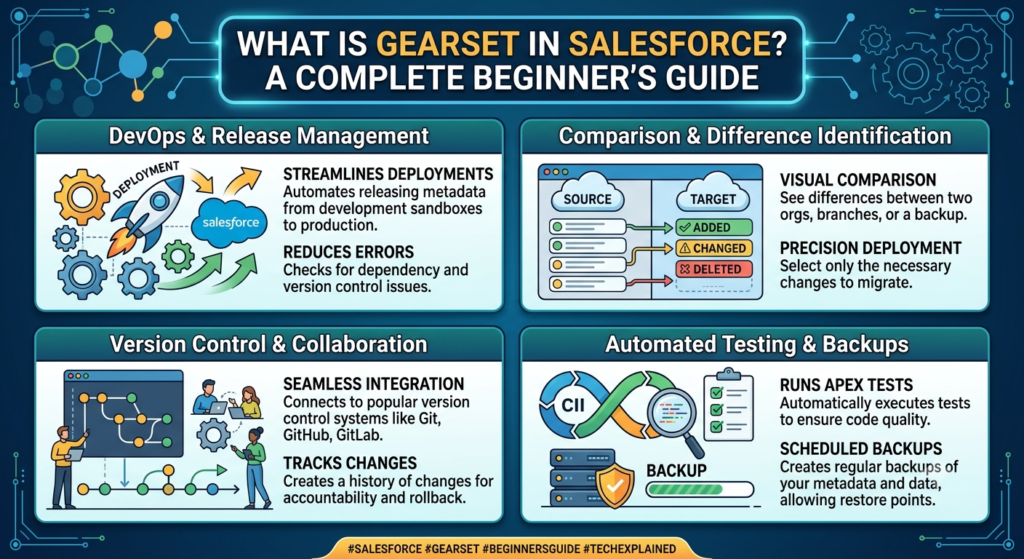
Gearset is one of the most popular Salesforce DevOps tools available today. It simplifies deployments, automates repetitive tasks, integrates with Git repositories, provides backup and recovery features, and significantly reduces deployment failures. Whether you are a beginner learning Salesforce or an experienced developer, understanding Gearset is an essential skill because many companies use it as part of their Salesforce development process.
In this blog, we will learn what Gearset is, why companies use it, how it works, its key features, benefits, and why it has become the preferred deployment tool for Salesforce teams.
What is Gearset?
Gearset is a cloud-based Salesforce DevOps and deployment tool that helps Salesforce teams compare, deploy, monitor, back up, and manage metadata across multiple Salesforce environments. Instead of manually selecting every component for deployment, Gearset automatically identifies changes, checks dependencies, validates deployments, and ensures that all required components are moved successfully.
In simple words, Gearset acts as a bridge between two Salesforce organizations. It compares the metadata in both environments, highlights the differences, and allows users to deploy only the required changes with just a few clicks.
For example, imagine that you have created a custom object called Employee, added several custom fields, developed an Apex Trigger, and built an LWC component in your Developer Sandbox. Your next task is to move all these changes to Production. If you use Change Sets, you must manually add every component and remember all its dependencies. If you forget even a single field or permission set, the deployment may fail.
With Gearset, you simply connect your source and target Salesforce orgs, compare the metadata, review the differences, validate the deployment, and click Deploy. Gearset automatically identifies dependencies, reducing manual effort and minimizing deployment errors.
Because of these capabilities, Gearset is widely used by Salesforce Developers, Administrators, DevOps Engineers, Architects, and Consultants across organizations of all sizes.
Understanding DevOps in Salesforce
Before learning Gearset, it is important to understand the concept of DevOps.
DevOps is a combination of two words:
- Development (Dev)
- Operations (Ops)
DevOps is a software development methodology that helps development and operations teams work together efficiently. Its primary goal is to automate software development, testing, deployment, and monitoring so that applications can be delivered faster with fewer errors.
In Salesforce projects, multiple developers often work on different features simultaneously. Without a proper deployment process, code conflicts, missing components, deployment failures, and production issues become common.
Salesforce DevOps solves these problems by introducing structured development practices such as version control, automated deployments, testing, continuous integration (CI), continuous delivery (CD), and backup management.
A typical Salesforce DevOps lifecycle includes:
- Requirement gathering
- Development
- Version control using Git
- Code review
- Automated testing
- Deployment validation
- Deployment to higher environments
- Production release
- Monitoring
- Backup and recovery
Gearset automates almost every stage of this lifecycle, making Salesforce development faster, safer, and more reliable.
Why Do Companies Need Gearset?
Every Salesforce organization has multiple environments. Developers usually work in a Developer Sandbox, testers verify changes in a QA Sandbox, business users validate features in a UAT Sandbox, and finally, approved changes are deployed to the Production environment.
Suppose a developer creates the following components:
- Custom Object
- Custom Fields
- Apex Class
- Apex Trigger
- Lightning Web Component
- Flow
- Validation Rule
- Permission Set
Using traditional Change Sets, the developer must manually remember every component, upload the Change Set, deploy it, resolve dependency errors, and repeat the process if deployment fails.
This approach becomes difficult as the project grows.
Gearset simplifies this entire workflow. It automatically compares source and target organizations, identifies changed metadata, detects missing dependencies, validates deployments, and provides detailed error reports before deployment.
As a result, developers spend less time fixing deployment issues and more time building business solutions.
Problems Solved by Gearset
One of the biggest challenges in Salesforce development is deployment management. Developers frequently encounter issues such as missing metadata, failed deployments, version conflicts, accidental deletions, and inconsistent environments.
Gearset addresses these challenges in several ways.
First, it automatically detects metadata dependencies. If an Apex class references a custom field that has not been selected for deployment, Gearset warns the developer before deployment begins.
Second, it validates deployments in advance, allowing developers to identify errors before changes reach Production.
Third, Gearset integrates with Git repositories, enabling teams to maintain version control and collaborate efficiently.
Fourth, Gearset automatically backs up Salesforce metadata and data, allowing organizations to recover deleted or modified components whenever necessary.
Features of Gearset
Gearset provides several powerful features that make Salesforce deployments easier, faster, and more reliable. It allows users to compare metadata between two Salesforce orgs, automatically detect missing dependencies, validate deployments before moving changes, and deploy metadata with just a few clicks. It also integrates with Git repositories for version control, supports automated CI/CD pipelines, performs regular backups of Salesforce metadata and data, and offers rollback options in case of deployment failures. Additionally, Gearset provides detailed deployment reports, monitoring, and security checks to ensure smooth and error-free releases.
Gearset Architecture
Gearset follows a simple cloud-based architecture. It connects securely to your Salesforce orgs and Git repositories without requiring any software installation. The source environment (Developer Sandbox or Git) is compared with the target environment (QA, UAT, or Production). Gearset identifies the differences, validates the deployment, checks dependencies, runs Apex tests if required, and deploys the selected metadata to the target org.
Flow:
Developer Sandbox/Git
          ↓
      Gearset
          ↓
 Compare Metadata
          ↓
 Validate Changes
          ↓
 Deploy to QA/UAT
          ↓
 Deploy to Production
Metadata Comparison
One of Gearset’s most useful features is Metadata Comparison. It compares two Salesforce environments and highlights the differences between them. Developers can easily see which components have been added, modified, or deleted, making it simple to select only the required changes for deployment. This reduces manual effort and minimizes deployment errors.
Git Integration
Gearset integrates seamlessly with popular Git repositories such as GitHub, GitLab, Bitbucket, and Azure DevOps. Developers can commit changes, create pull requests, compare branches, and deploy directly from Git. This ensures proper version control, team collaboration, and traceability of every Salesforce change.
Deployment Process
Deploying with Gearset is simple and efficient. First, connect the source and target Salesforce orgs. Next, compare the metadata and review the differences. Select the components you want to deploy, validate the deployment to identify any issues, and then deploy the changes. Gearset automatically handles dependencies and provides detailed deployment reports after completion.
CI/CD (Continuous Integration & Continuous Delivery)
Gearset supports CI/CD, allowing Salesforce teams to automate deployments. Whenever developers commit code to Git, Gearset can automatically validate, test, and deploy the changes to different environments. This reduces manual work, speeds up releases, and ensures high-quality deployments.
Backup & Recovery
Gearset provides automatic backup for Salesforce metadata and data. If a component is accidentally deleted or modified, administrators can quickly restore it from a previous backup. This feature protects critical business data and reduces the risk of data loss.
Real-Time Example
Suppose a developer creates a new Lightning Web Component, Apex Class, Custom Object, and Flow in the Developer Sandbox. Using Gearset, the developer compares the Sandbox with the UAT org, selects the required components, validates the deployment, and deploys them successfully. After testing, the same deployment can be promoted to Production with minimal effort and reduced risk.
Best Practices
- Always validate deployments before Production.
- Use Git for version control.
- Take backups before major releases.
- Review dependency warnings carefully.
- Follow Salesforce coding standards.
- Test changes in Sandbox and UAT before Production.
- Automate deployments using CI/CD pipelines.
- Perform code reviews before merging changes.