
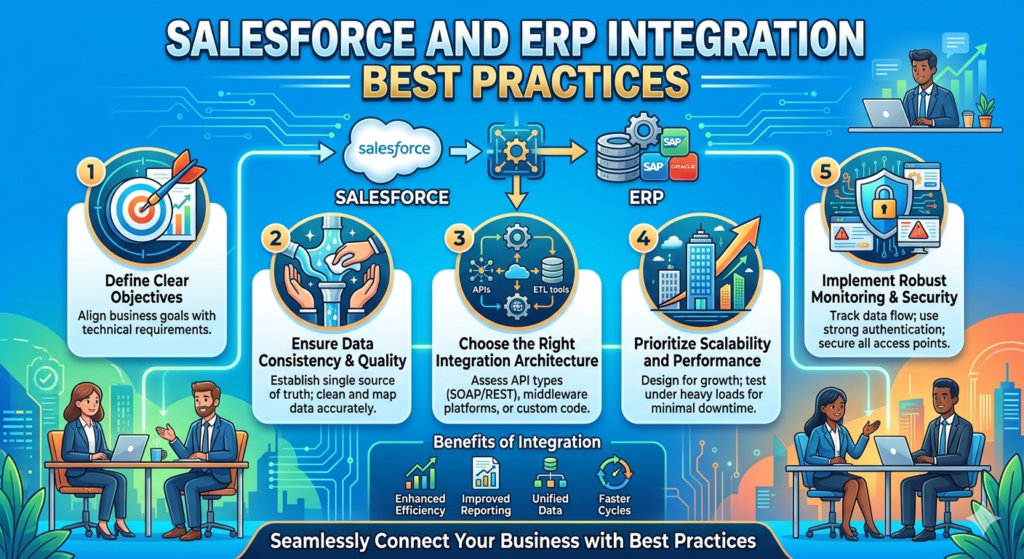
Every growing business eventually reaches a point where managing data across multiple systems becomes difficult. Sales teams work inside Salesforce, finance teams depend on ERP software, operations use inventory systems, and customer support manages service platforms. When these systems are disconnected, businesses start facing delays, duplicate data, reporting issues, and communication gaps.
This is why Salesforce and ERP integration has become one of the most important digital transformation strategies for modern companies.
When Salesforce and an ERP system work together, businesses get a complete view of customers, orders, payments, inventory, invoices, and operations in one connected ecosystem. Sales teams can see real-time stock availability, finance teams can track orders faster, and leadership gets accurate reports without manually combining spreadsheets from different departments.
But integration is not just about connecting two systems. A poorly planned integration can create more problems than benefits. Data mismatches, slow synchronization, broken workflows, and security issues are common challenges when businesses rush the process.
What Is Salesforce and ERP Integration?
Salesforce is mainly used for customer relationship management, sales, marketing, and customer service. ERP systems handle business operations like finance, inventory, procurement, manufacturing, and supply chain management.
Some commonly used ERP systems include:
- SAP
- Oracle ERP
- Microsoft Dynamics
- NetSuite
- Infor
- Sage
When Salesforce and ERP systems are integrated, data automatically flows between both platforms.
For example:
- Customer orders created in Salesforce can appear in ERP instantly
- Inventory updates from ERP can reflect in Salesforce
- Invoice information can sync automatically
- Payment status can be visible to sales teams
This removes manual work and keeps every department aligned.
Why Businesses Need Salesforce and ERP Integration
Many companies initially manage systems separately. But as the business grows, disconnected systems create operational problems.
Imagine a sales rep closing a deal in Salesforce without knowing the product is out of stock in the ERP system. Or a finance team manually updating invoices because order information never synced properly.
These situations waste time and create customer frustration.
Integration solves these problems by creating a single source of truth across departments.
The biggest benefits include:
- Faster order processing
- Better customer experience
- Reduced manual data entry
- Accurate reporting
- Real-time business visibility
- Improved operational efficiency
When data moves automatically, teams can focus more on business growth instead of administrative tasks.
Start with Clear Integration Goals
One of the biggest mistakes businesses make is starting integration without defining clear objectives.
Before connecting Salesforce with ERP, businesses should identify:
- Which data needs to sync
- Which department will use the integration
- What problems need to be solved
- Which workflows should become automated
For example, some companies only need:
- Customer sync
- Invoice visibility
- Product availability updates
Others may require:
- Real-time order management
- Procurement automation
- Financial reporting integration
- Multi-system synchronization
Having clear goals prevents unnecessary complexity.
Decide Which System Will Be the Master
This is one of the most important integration decisions.
Both systems may contain similar data fields like:
- Customer information
- Products
- Pricing
- Orders
But if both systems continuously overwrite each other’s data, conflicts happen quickly.
That’s why businesses must decide:
- Which system owns customer data
- Which system controls pricing
- Which platform manages inventory
- Which system handles financial records
For example:
- Salesforce may manage customer interactions
- ERP may remain the master for inventory and finance
This avoids confusion and keeps data accurate.
Use APIs Instead of Manual Imports
Older businesses often rely on CSV exports and manual uploads between systems. This approach becomes risky and inefficient over time.
Modern integrations should use APIs wherever possible.
APIs allow systems to communicate automatically in real time.
Benefits of API-based integration include:
- Faster synchronization
- Better scalability
- Reduced manual work
- Improved accuracy
- Real-time updates
Most ERP systems today provide REST or SOAP APIs that work well with Salesforce integration platforms.
Choose the Right Integration Method
Not every integration project requires the same architecture.
Businesses usually choose between:
Point-to-Point Integration
Direct connection between Salesforce and ERP.
Best for:
- Small businesses
- Simple workflows
- Limited systems
But this becomes difficult to maintain as systems increase.
Middleware Integration
Uses integration platforms like:
- MuleSoft
- Dell Boomi
- Jitterbit
- Informatica
Middleware acts as a bridge between systems.
Best for:
- Large enterprises
- Complex workflows
- Multiple applications
- Scalable architectures
This approach is more flexible and easier to manage long term.
Keep Data Mapping Simple
Data mapping means matching fields between Salesforce and ERP.
For example:
- Customer Name → Account Name
- Order Number → Sales Order ID
- Invoice Amount → Payment Total
Many businesses overcomplicate mapping during integration.
Instead, focus only on essential fields first.
Simple mapping:
- Reduces errors
- Improves performance
- Makes troubleshooting easier
Additional fields can always be added later.
Prioritize Data Quality Before Integration
Integration does not fix bad data.
If duplicate customers, incorrect emails, outdated records, or missing values already exist, those issues will spread across both systems after synchronization.
Before integration begins:
- Clean duplicate records
- Standardize formats
- Remove inactive data
- Validate mandatory fields
Good integration always starts with clean data.
Plan for Error Handling
Even well-designed integrations can fail sometimes.
Network issues, API limits, invalid records, or system downtime may interrupt synchronization.
That’s why businesses should create proper error-handling mechanisms.
Good integration systems should:
- Log failed records
- Send automatic alerts
- Retry failed syncs
- Track integration history
- Provide monitoring dashboards
Without monitoring, businesses may not even realize data stopped syncing.
Focus on Security and Access Control
Salesforce and ERP systems often contain highly sensitive information like:
- Financial data
- Customer records
- Pricing information
- Payment details
Integration should always follow proper security practices.
Important best practices include:
- Use secure authentication
- Encrypt sensitive data
- Limit API access
- Apply role-based permissions
- Monitor integration activities
Security should never be treated as an afterthought.
Avoid Real-Time Sync Everywhere
Many businesses assume every integration must be real time.
But real-time synchronization increases:
- API usage
- System load
- Complexity
- Maintenance effort
Not all data requires instant updates.
For example:
- Inventory availability may need real-time sync
- Daily financial reports may work fine with scheduled updates
Choosing the right synchronization frequency improves system performance.
Test Everything Properly
Integration testing is critical.
Businesses should test:
- Data accuracy
- Workflow automation
- Error handling
- User permissions
- Performance under heavy load
Testing should happen in sandbox environments before production deployment.
A small integration issue in production can affect sales, finance, and customer service operations together.
Train Teams After Integration
Technology alone does not guarantee success.
Employees should understand:
- How synchronized data works
- Which system to update
- What information appears automatically
- How to report integration issues
Proper training reduces confusion and improves adoption.
Real-World Example
Imagine an eCommerce company using Salesforce for sales and SAP ERP for inventory and finance.
Before integration:
- Sales reps manually checked stock
- Finance teams manually generated invoices
- Customers experienced shipping delays
- Reports were often inaccurate
After Salesforce and ERP integration:
- Inventory updates became automatic
- Orders synced instantly
- Invoice generation became faster
- Sales teams received real-time product availability
- Customers got better delivery timelines
The business reduced operational delays and improved customer satisfaction significantly.
Common Integration Challenges
Even successful projects face challenges like:
- Legacy ERP limitations
- Data inconsistency
- API restrictions
- Complex business logic
- Slow synchronization
- Security concerns
The key is proper planning, scalable architecture, and continuous monitoring.
Integration should be treated as a long-term business strategy, not just a one-time technical task.
Final Thoughts
Salesforce and ERP integration can completely transform how businesses operate. When customer data, sales processes, inventory, finance, and operations work together, companies gain better visibility, faster workflows, and stronger decision-making capabilities.
But successful integration requires more than just connecting systems. Businesses need proper planning, clean data, strong security, clear ownership rules, and scalable architecture.