
Imagine you’re ordering food online.
You place your order, make the payment, and wait for the restaurant to respond.
Instead of sending a long explanation, the app simply tells you:
- ✅ Order Confirmed
- ⏳ Payment Pending
- ❌ Payment Failed
- 🚫 Restaurant Not Available
These are basically status messages that help you understand what happened.
APIs work in a very similar way.
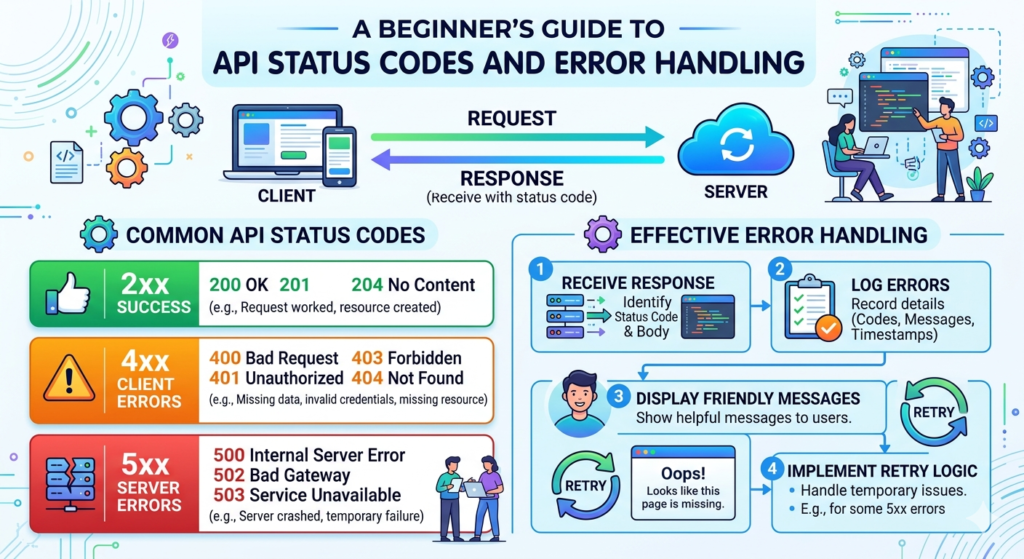
Whenever one application talks to another through an API, the server sends back a status code to tell the client whether the request was successful or if something went wrong.
If you’re just starting with APIs, Salesforce integrations, or web development, understanding these status codes is one of the most important skills you can learn.
In this blog, we’ll understand API status codes in simple English with real-life examples.
What is an API?
API stands for Application Programming Interface.
Think of an API as a waiter in a restaurant.
- You (Client) place an order.
- The waiter (API) carries your request.
- The kitchen (Server) prepares the food.
- The waiter brings back the response.
Sometimes everything works perfectly.
Sometimes the kitchen is busy.
Sometimes the item isn’t available.
The waiter tells you exactly what happened.
That’s exactly what API status codes do.
What are API Status Codes?
An API status code is a 3-digit number returned by the server after processing a request.
These numbers tell us whether:
- The request was successful
- Something needs to be fixed
- The server has a problem
- Authentication failed
- Data wasn’t found
Instead of reading long error messages, developers can quickly understand what happened just by looking at the status code.
Categories of API Status Codes
There are five main categories.
1xx – Informational
These codes mean the request has been received and the process is continuing.
These are rarely seen in everyday API development.
Example:
100 Continue
The server has received the request and is waiting for the remaining data.
2xx – Success Codes
These are everyone’s favorite status codes because they mean everything worked successfully.
200 OK
The request was successful.
Example:
You request customer details.
The server successfully returns the customer information.
GET /customers/1001

Response:
200 OK
201 Created
A new resource has been created successfully.
Example:
Creating a new Account in Salesforce.
POST /accounts

Response:
201 Created
202 Accepted
The request has been accepted but is still being processed.
This is common in asynchronous processing.
204 No Content
The request was successful but there is nothing to return.
Example:
Deleting a record.
DELETE /account/101

Response:
204 No Content
3xx – Redirection Codes
These codes tell the client that the requested resource has moved.
Developers don’t encounter these very often unless working with websites or authentication flows.
Example:
301 Moved Permanently
The resource has permanently moved to another URL.
302 Found
The resource has temporarily moved.
4xx – Client Errors
These are the most common errors developers face.
They usually mean the problem is on the client side.
Let’s understand each one.
400 Bad Request
The request itself is incorrect.
Maybe:
- Missing required field
- Invalid JSON
- Wrong data type
- Invalid request format
Example:
POST /contacts

{
"name":
}
The JSON is invalid.
Response:
400 Bad Request
How to Fix
- Validate input data
- Check JSON format
- Ensure required fields are present
401 Unauthorized
Authentication is missing or invalid.
Example:
Forgot to send the access token.
Authorization Header Missing

Response

401 Unauthorized
Solution
- Generate a new token
- Check OAuth authentication
- Verify credentials
403 Forbidden
Authentication is valid, but you don’t have permission.
Example:
A standard user tries to delete an admin-only record.
Response:
403 Forbidden
404 Not Found
The requested resource doesn’t exist.
Example:
GET /account/999999
No account exists.
Response:
404 Not Found
405 Method Not Allowed
The API endpoint exists, but you’re using the wrong HTTP method.
Example:
Using
PUT
instead of
POST
409 Conflict
The request conflicts with existing data.
Example:
Trying to create a customer with an email that already exists.
429 Too Many Requests
You’ve exceeded the API rate limit.
Many APIs limit the number of requests you can make within a certain time.
Response:
429 Too Many Requests
Solution
- Retry after some time
- Use exponential backoff
- Optimize API calls
5xx – Server Errors
These errors mean the problem is on the server side.
Usually, there isn’t much the client can do except retry or notify the support team.
500 Internal Server Error
The server encountered an unexpected problem.
Example:
A bug in the application caused processing to fail.
501 Not Implemented
The requested functionality hasn’t been implemented yet.
502 Bad Gateway
One server received an invalid response from another server.
This often happens in systems where multiple services communicate with each other.
503 Service Unavailable
The server is temporarily unavailable.
Reasons include:
- Maintenance
- High traffic
- Server overload
Usually, retrying after a few minutes works.
504 Gateway Timeout
The server waited too long for another server to respond.
This is common in integrations involving multiple systems.
Common API Status Codes Every Developer Should Remember
| Status Code | Meaning |
|---|---|
| 200 | Success |
| 201 | Resource Created |
| 204 | Success with No Content |
| 400 | Bad Request |
| 401 | Unauthorized |
| 403 | Forbidden |
| 404 | Resource Not Found |
| 405 | Method Not Allowed |
| 409 | Conflict |
| 429 | Too Many Requests |
| 500 | Internal Server Error |
| 502 | Bad Gateway |
| 503 | Service Unavailable |
| 504 | Gateway Timeout |
Best Practices for API Error Handling
Knowing the status codes is only half the job. You also need to handle errors gracefully.
Here are some good practices:
- Always validate input before sending a request.
- Use meaningful error messages instead of generic ones.
- Log API requests and responses for debugging.
- Retry temporary failures like 503 or 504 with delays.
- Avoid retrying 400 or 404 errors without fixing the request.
- Keep authentication tokens secure and refresh them when needed.
- Respect API rate limits to avoid 429 errors.
- Monitor integrations regularly so issues can be identified early.
API Status Codes in Salesforce Integrations
If you’re working with Salesforce, you’ll see these status codes often while integrating with external systems using REST APIs.
For example:
- Creating a record successfully returns 201 Created.
- Updating or retrieving records usually returns 200 OK.
- Invalid OAuth tokens result in 401 Unauthorized.
- Invalid request payloads return 400 Bad Request.
- Accessing a deleted or non-existent record returns 404 Not Found.
- Exceeding API limits may lead to 429 Too Many Requests.
- Temporary Salesforce platform issues can return 503 Service Unavailable.
Understanding these responses helps you troubleshoot integrations much faster.
Final Thoughts
API status codes might seem like small numbers, but they tell an important story about every request your application makes.
Instead of guessing why an API call failed, these codes point you in the right direction. Once you understand the common status codes and how to respond to them, debugging becomes much easier and your integrations become more reliable.
Whether you’re learning web development, working with Salesforce, or building your first API integration, mastering status codes is a valuable skill that will help you throughout your development journey.
The next time you see a 404, 401, or 500 response, don’t panic. Read the status code, understand what it means, identify the cause, and apply the right fix. With practice, handling API errors will become second nature.