
If you are starting your journey with Salesforce OmniStudio, one of the first things you’ll hear about is Data Mapper. It plays a very important role in moving and transforming data between Salesforce and OmniStudio components.
At first, terms like Turbo Extract, Extract, Transform, and Load may sound confusing. But don’t worry! In this blog, we’ll break everything down in simple English so that even a beginner can understand it easily.
What is Data Mapper?
Data Mapper is an OmniStudio tool that helps us work with data without writing complex Apex code.
Think of it as a bridge that helps:
- Fetch data from Salesforce
- Transform data into the required format
- Update Salesforce records
- Pass data between OmniStudio components
In simple words, Data Mapper helps us move data from one place to another efficiently.
Why Do We Need Data Mapper?
Imagine you are building a customer onboarding process.
You may need to:
- Get customer information from Salesforce
- Modify the data
- Create new records
- Update existing records
Doing all this with custom code can take time.
Data Mapper makes these tasks faster and easier using a low-code approach.
Types of Data Mapper Components
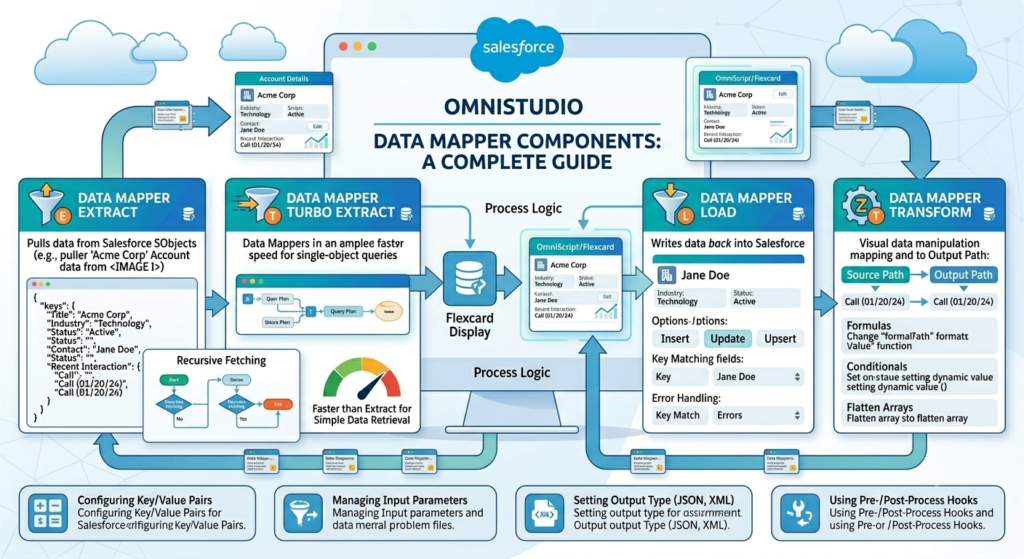
Data Mapper consists of four major components:
- Turbo Extract
- Extract
- Transform
- Load
Let’s understand each one.
1. Data Mapper Turbo Extract
Turbo Extract is the fastest way to retrieve Salesforce record data.
It directly fetches data from a Salesforce object without requiring complex configurations.
When to Use Turbo Extract?
Use Turbo Extract when:
- You need data from a single Salesforce object.
- No complex relationships are involved.
- Performance is important.
Example
Suppose you want to fetch Account details.
You provide:
- Object = Account
- Record Id = 001XXXXXXXXXX
Turbo Extract quickly returns:
- Account Name
- Phone
- Industry
- Website
Benefits
✔ Faster performance
✔ Easy configuration
✔ Less processing time
Limitation
Turbo Extract works best for simple data retrieval and does not support complex object relationships.
2. Data Mapper Extract
Extract is used when you need more flexibility while retrieving data.
Unlike Turbo Extract, it can fetch data from multiple related objects.
When to Use Extract?
Use Extract when:
- You need data from parent and child objects.
- Complex data structures are required.
- Multiple objects are involved.
Example
Suppose you need:
- Account Details
- Related Contacts
- Related Opportunities
An Extract Data Mapper can retrieve all this information in a single response.
Benefits
✔ Supports multiple objects
✔ Handles relationships
✔ More flexible than Turbo Extract
Limitation
Since it processes more information, it may be slightly slower than Turbo Extract.
3. Data Mapper Transform
Transform helps change data from one format to another.
Sometimes the source data format does not match what your OmniScript, FlexCard, or Integration Procedure expects.
That’s where Transform comes in.
When to Use Transform?
Use Transform when:
- You need to rename fields.
- You need to combine values.
- You need to restructure JSON data.
- You need to prepare data for another system.
Example
Source Data:
{
  "FirstName": "John",
  "LastName": "Smith"
}
After Transformation:
{
  "FullName": "John Smith"
}
The Transform component combines two fields into one.
Benefits
✔ Cleaner data structure
✔ Easy mapping
✔ Better integration support
4. Data Mapper Load
Load is used to create or update Salesforce records.
After collecting data from users through OmniScripts or external systems, Load sends that data into Salesforce.
When to Use Load?
Use Load when:
- Creating new records
- Updating existing records
- Saving user-entered information
Example
A customer fills out a registration form.
The Data Mapper Load creates:
- Account Record
- Contact Record
- Case Record
directly in Salesforce.
Benefits
✔ Easy record creation
✔ Supports updates
✔ Reduces custom Apex development
Real-Life Example
Let’s understand how all four components work together.
Imagine a customer onboarding process.
Step 1: Extract Customer Data
Use Turbo Extract or Extract to retrieve customer information.
Step 2: Modify the Data
Use Transform to prepare the data in the required format.
Step 3: Save the Data
Use Load to create or update records in Salesforce.
This creates a complete data flow without writing much code.
Turbo Extract vs Extract
Many beginners get confused between these two.
| Feature | Turbo Extract | Extract |
|---|---|---|
| Speed | Faster | Slightly Slower |
| Multiple Objects | No | Yes |
| Relationships | Limited | Supported |
| Configuration | Simple | More Flexible |
| Best Use Case | Single Object Retrieval | Complex Data Retrieval |
Simple Rule
If you only need data from one object, use Turbo Extract.
If you need data from multiple related objects, use Extract.
Best Practices
When working with Data Mapper:
Use Turbo Extract Whenever Possible
It provides better performance.
Keep Transform Logic Simple
Avoid unnecessary transformations.
Use Meaningful Names
Give clear names to your Data Mapper components.
Test with Real Data
Always test with realistic Salesforce records.
Avoid Overcomplicated Mappings
Simple designs are easier to maintain.
Final Thoughts
Data Mapper is one of the most powerful tools in OmniStudio. It allows developers and administrators to retrieve, transform, and save data without writing large amounts of code.
To quickly summarize:
- Turbo Extract → Fast retrieval from a single object.
- Extract → Flexible retrieval from multiple related objects.
- Transform → Changes data into the required format.
- Load → Creates or updates Salesforce records.
Once you understand these four components, building OmniStudio solutions becomes much easier. Whether you’re working on OmniScripts, FlexCards, or Integration Procedures, Data Mapper will be a tool you’ll use almost every day.
If you’re a fresher learning OmniStudio, start practicing with simple examples first. As you gain experience, you’ll see how powerful Data Mapper can be in building scalable and efficient Salesforce solutions.