
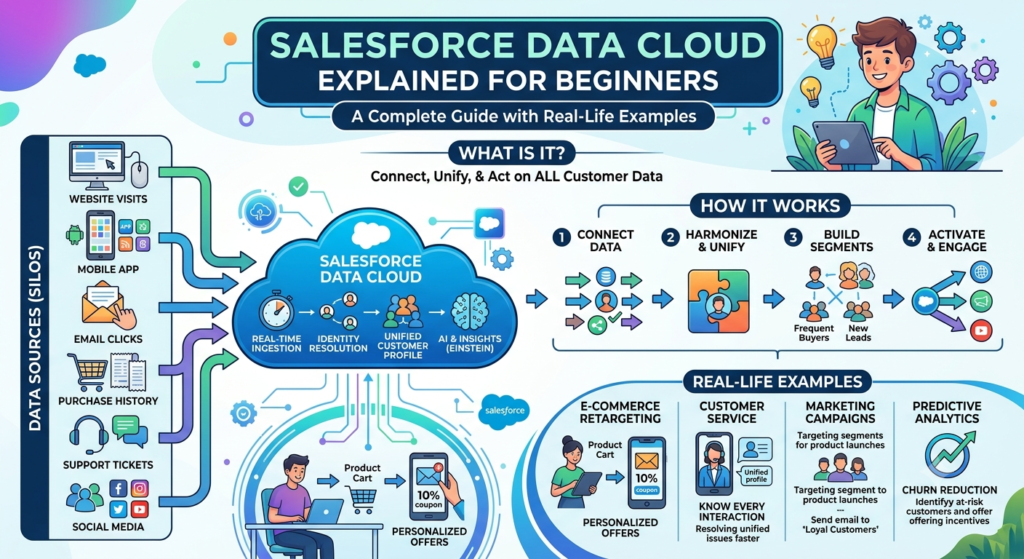
In today’s digital world, businesses collect customer information from many different places. Some data comes from websites, some from mobile apps, some from Salesforce CRM, and some from external systems like SAP or Google Analytics.
But here’s the problem.
All this customer data is stored in different systems, making it difficult to understand the complete customer journey.
This is where Salesforce Data Cloud comes in.
If you’re new to Salesforce or preparing for interviews, this guide will help you understand Salesforce Data Cloud in the simplest way possible.
What is Salesforce Data Cloud?
Salesforce Data Cloud is a Customer Data Platform (CDP) that helps businesses collect, organize, unify, and use customer data from multiple sources.
Instead of keeping customer information in different applications, Data Cloud combines everything into one central location.
This creates a single customer profile, allowing every department in the company to work with the same up-to-date information.
Think of it like this:
Imagine a customer shops on your website, contacts customer support, downloads your mobile app, and responds to your marketing emails.
Without Data Cloud, all this information stays in different systems.
With Data Cloud, everything is connected into one complete customer profile.
This complete profile is known as the Customer 360 View.
Why Do Companies Need Salesforce Data Cloud?
Many organizations face a common problem.
Customer information is spread across different applications.
For example:
- Customer details are stored in Salesforce CRM.
- Orders are managed in an Order Management System.
- Website activity is tracked using Google Analytics.
- Mobile app data is stored separately.
- Customer complaints are available in Service Cloud.
Since these systems don’t automatically communicate with each other, employees often see only a small part of the customer’s journey.
Salesforce Data Cloud solves this problem by bringing all the information together.
Everyone in the organization works with the same customer data.
This improves collaboration, customer experience, and business decisions.
Benefits of Salesforce Data Cloud
Salesforce Data Cloud offers many advantages to businesses.
Some of the major benefits include:
- Creates a complete 360-degree customer view.
- Combines customer data from multiple systems.
- Removes duplicate customer records.
- Helps businesses personalize customer experiences.
- Supports AI, analytics, and reporting.
- Improves marketing performance.
- Enables better customer engagement.
- Helps sales teams close more deals.
- Improves customer service quality.
Real-Life Example
Let’s understand this with a simple example.
Imagine you own an online shopping website.
One customer buys products from your website regularly.
Here’s where the customer’s information is stored:
| System | Information Stored |
|---|---|
| Salesforce CRM | Customer Profile |
| Order Management | Purchase History |
| Website | Browsing Activity |
| Mobile App | App Usage |
| Service Cloud | Customer Support Cases |
| Marketing Cloud | Email Campaign Responses |
Without Salesforce Data Cloud, you would need to open multiple systems to understand the customer.
With Data Cloud, everything appears in one place.
You can instantly view:
- Customer information
- Order history
- Shipping details
- Payment history
- Support cases
- Website activity
- Mobile app usage
- Marketing interactions
This complete view helps businesses provide better customer experiences.
Who Uses Salesforce Data Cloud?
Salesforce Data Cloud is useful for many teams inside an organization.
Let’s see how different departments use it.
1. Marketing Teams
Marketing teams use Data Cloud to create personalized marketing campaigns.
Instead of sending the same email to every customer, they can send targeted offers based on customer behavior.
Example
If a customer recently bought running shoes, the marketing team can recommend:
- Sports socks
- Shoe cleaning kits
- Fitness accessories
Similarly, if someone adds products to their shopping cart but doesn’t complete the purchase, Data Cloud can automatically trigger a reminder email.
Benefits
- Personalized campaigns
- Better customer targeting
- Higher email open rates
- Increased sales
2. Sales Teams
Sales representatives need complete customer information before contacting customers.
With Data Cloud, they can quickly see:
- Previous purchases
- Recent inquiries
- Customer interests
- Support history
Example
Suppose a customer recently purchased a laptop.
The sales representative can recommend:
- Laptop bag
- Wireless mouse
- Keyboard
- Laptop stand
This improves cross-selling and upselling opportunities.
Benefits
- Better product recommendations
- Faster customer understanding
- Improved conversion rates
3. Customer Service Teams
Support agents often spend valuable time asking customers to repeat information.
Salesforce Data Cloud eliminates this problem.
Before answering a call, the support agent can already see:
- Previous complaints
- Order history
- Return requests
- Delivery details
- Purchase records
Example
A customer calls regarding a delayed delivery.
The support agent immediately sees:
- Order number
- Shipping status
- Delivery address
- Previous conversations
The issue gets resolved much faster.
Benefits
- Faster issue resolution
- Better customer satisfaction
- Improved support experience
4. Data Analysts
Business analysts use Data Cloud to study customer behavior.
They can discover useful insights like:
- Customer buying patterns
- Seasonal sales trends
- Most popular products
- Customer lifetime value
- Churn prediction
These insights help businesses make smarter decisions.
5. IT Teams
IT teams use Data Cloud to connect multiple systems securely.
Their responsibilities include:
- Data integration
- Data synchronization
- Maintaining data quality
- Data governance
- Security management
How Salesforce Data Cloud Works
Salesforce Data Cloud follows six major steps to convert raw customer data into meaningful business insights.
Let’s understand each step.
Step 1: Data Ingestion
The first step is collecting customer data.
This process is called Data Ingestion.
Data can come from many sources, including:
- Salesforce CRM
- Sales Cloud
- Service Cloud
- Marketing Cloud
- Commerce Cloud
- Websites
- Mobile Apps
- SAP
- Oracle
- Snowflake
- Amazon S3
- External APIs
- Social media platforms
Data can be imported in two ways:
Batch Processing
Data is loaded at scheduled times.
Example:
Every night at midnight, all customer orders are imported.
Real-Time Streaming
Data is transferred immediately.
Example:
A customer places an order, and Data Cloud receives the information instantly.
Step 2: Data Modeling
Different systems often use different field names for the same information.
For example:
CRM:
- First Name
- Last Name
Website:
- Customer Name
Mobile App:
- Username
Although these fields represent the same customer, their names are different.
Data Modeling maps these different fields into one standard structure.
This makes reporting and analytics much easier.
Step 3: Identity Resolution
One customer can exist multiple times in different systems.
For example:
Website:
John Smith
CRM:
Jonathan Smith
Mobile App:
John S.
Although the names are slightly different, they all belong to the same person.
Identity Resolution intelligently identifies matching records and merges them into one customer profile.
Benefits
- Removes duplicate records
- Improves reporting accuracy
- Creates a Customer 360 profile
- Enhances customer understanding
Step 4: Insights
Once all customer data is unified, Salesforce Data Cloud starts analyzing it.
This analysis generates valuable business insights.
Some examples include:
- Customer behavior
- Purchase patterns
- Product popularity
- Revenue trends
- Customer churn risk
Example
The system notices that customers who buy smartphones often purchase phone cases within one week.
The marketing team can automatically recommend phone cases after every smartphone purchase.
Step 5: Segmentation
Segmentation means dividing customers into groups based on similar characteristics.
Businesses can create customer segments using:
- Age
- Location
- Purchase history
- Spending habits
- Interests
- Loyalty level
Example Customer Segments
High Value Customers
Customers who spent more than ₹1,00,000 last year.
Inactive Customers
Customers who haven’t purchased anything in the last six months.
New Customers
Customers who registered during the last 30 days.
Segmentation helps businesses send the right message to the right customer.
Step 6: Activation
After customer data has been analyzed and segmented, businesses can finally take action.
This process is called Activation.
Some common actions include:
- Sending personalized emails
- Showing personalized website content
- Displaying product recommendations
- Sending SMS campaigns
- Creating automated customer journeys
Example
A customer adds shoes to the shopping cart but leaves without purchasing.
Salesforce Data Cloud can automatically:
- Send a reminder email
- Offer a discount coupon
- Show personalized advertisements
These actions encourage the customer to complete the purchase.
Why is Salesforce Data Cloud Important?
Today’s customers interact with businesses through many different channels.
Without a unified platform, companies struggle to understand their customers.
Salesforce Data Cloud helps businesses by:
- Bringing customer data together
- Providing a complete Customer 360 view
- Supporting personalized marketing
- Improving customer service
- Helping sales teams close more deals
- Delivering valuable business insights
- Enabling AI-powered customer experiences
In simple words, Salesforce Data Cloud turns scattered customer information into meaningful insights that help businesses build stronger relationships with their customers.
Final Thoughts
Salesforce Data Cloud is becoming one of the most important products in the Salesforce ecosystem. As businesses focus more on personalization and AI-driven customer experiences, the demand for professionals with Data Cloud knowledge continues to grow.