
When businesses interact with customers, they often need to collect information, guide users through processes, and automate tasks. Whether it is applying for a loan, creating an insurance claim, onboarding a customer, or submitting a service request, these processes usually involve multiple steps and a lot of data.
Traditionally, developers had to write large amounts of code to build such experiences. This increased development time and made maintenance more difficult. Salesforce OmniStudio changed this approach by providing powerful low-code tools, and one of the most important tools within OmniStudio is OmniScript.
OmniScript helps organizations create guided user experiences without requiring extensive coding. It allows businesses to build step-by-step digital processes that are easy for users to follow while ensuring data is collected accurately and efficiently.
What is OmniScript?
OmniScript is a low-code tool available in Salesforce OmniStudio that helps developers and administrators create guided workflows for users. It acts as a digital form or wizard that takes users through a process one step at a time.
Instead of showing users a long form with dozens of fields, OmniScript breaks the process into smaller and more manageable sections. This makes the experience easier, faster, and less overwhelming.
Users only see the information that is relevant to them based on their previous responses. This creates a personalized and user-friendly experience while reducing errors during data entry.
Why OmniScript Was Introduced
Many business processes are complex and involve multiple decisions. For example, an insurance company may need customers to provide different information depending on the type of claim they are submitting.
Without OmniScript, developers would have to build custom Lightning components, write Apex code, and create complex logic to handle different scenarios.
OmniScript simplifies this process by allowing organizations to create dynamic workflows using drag-and-drop functionality. Businesses can launch solutions much faster while reducing development effort.
This is one of the main reasons why industries such as insurance, healthcare, telecommunications, banking, and public sector organizations rely heavily on OmniStudio.
How OmniScript Works in OmniStudio
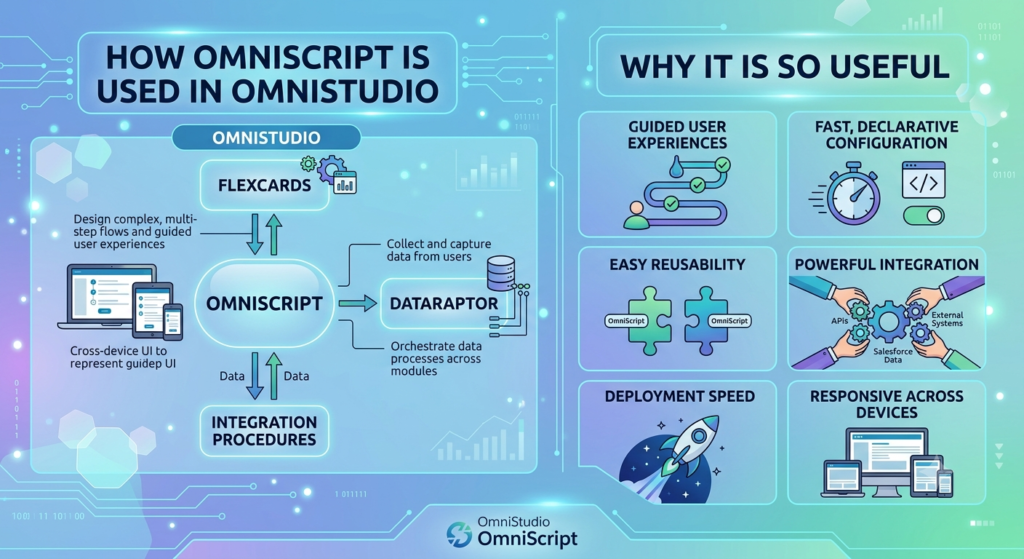
OmniScript is often considered the front-end experience layer within OmniStudio. It is responsible for interacting directly with users and collecting information.
When a user opens an OmniScript, they are guided through a series of steps. Each step can contain different types of fields such as text boxes, picklists, checkboxes, radio buttons, date fields, and file uploads.
As users provide information, OmniScript can perform validations, display conditional questions, retrieve data from Salesforce, and trigger backend processes.
Behind the scenes, OmniScript works closely with other OmniStudio components such as DataRaptors, Integration Procedures, and FlexCards to create complete business solutions.
OmniScript and DataRaptor Integration
One of the most common uses of OmniScript is collecting and displaying Salesforce data.
DataRaptors help OmniScript retrieve information from Salesforce objects and populate fields automatically. This means users do not have to manually enter information that already exists in the system.
For example, when a customer enters their account number, OmniScript can use a DataRaptor to retrieve customer details such as name, address, and contact information.
This saves time, improves accuracy, and enhances the overall customer experience.
OmniScript and Integration Procedures
Business processes often require data from multiple systems, not just Salesforce.
Integration Procedures help OmniScript communicate with external applications, APIs, and databases without slowing down the user experience.
For example, during a loan application process, OmniScript may need to verify customer information from an external credit-checking system. Instead of making multiple API calls directly from the user interface, Integration Procedures handle the communication efficiently in the background.
This improves performance and ensures a smoother experience for users.
Conditional Logic Makes Processes Smarter
One of the most powerful features of OmniScript is conditional logic.
Not every user needs to answer the same questions. OmniScript can dynamically show or hide sections based on user responses.
For example, if a customer selects “Business Account,” OmniScript can display business-related questions. If they select “Personal Account,” those questions remain hidden.
This creates a personalized experience and prevents users from seeing unnecessary fields.
As a result, forms become shorter, easier to complete, and more user-friendly.
Real-Life Example of OmniScript
Imagine a telecommunications company that wants customers to upgrade their mobile plans online.
Instead of contacting customer support, users can launch an OmniScript. The script guides them through selecting a new plan, reviewing available offers, verifying account information, and confirming the upgrade.
Behind the scenes, OmniScript retrieves account data, checks eligibility, calculates pricing, and updates records in Salesforce.
The entire process happens within a single guided experience, reducing the need for manual intervention.
This improves customer satisfaction while reducing operational costs for the company.
Benefits of Using OmniScript
One of the biggest advantages of OmniScript is speed. Organizations can build complex business processes much faster than traditional custom development.
It also improves the customer experience by presenting information in a simple and organized manner. Users are guided step by step, making it easier to complete forms and requests.
Another major benefit is flexibility. Business teams can modify processes with minimal coding whenever requirements change.
OmniScript also promotes consistency. Every user follows the same process, reducing errors and ensuring compliance with business rules.
Additionally, its seamless integration with other OmniStudio tools allows businesses to create powerful end-to-end solutions without building everything from scratch.
Industries That Benefit from OmniScript
Many industries use OmniScript to simplify customer interactions.
Insurance companies use it for policy applications and claims processing.
Banks use it for account opening, loan applications, and customer onboarding.
Healthcare organizations use it for patient registration and service requests.
Telecommunications companies use it for plan upgrades, service activation, and customer support processes.
Government agencies use OmniScript to help citizens submit applications and access services online.
In each case, OmniScript helps reduce complexity and improve the user experience.
Best Practices for Building OmniScripts
A successful OmniScript should focus on simplicity. Long and complicated workflows can confuse users and reduce completion rates.
It is important to organize steps logically and only ask for information that is truly necessary.
Developers should use conditional logic to personalize experiences and reduce clutter on the screen.
Data retrieval should be optimized through DataRaptors and Integration Procedures to maintain good performance.
Testing is also critical to ensure all paths, validations, and integrations work correctly before deployment.
Following these best practices helps create efficient and user-friendly OmniScripts.
Conclusion
OmniScript is one of the most powerful components within Salesforce OmniStudio. It allows organizations to build guided digital experiences without extensive coding while simplifying complex business processes.
By combining user-friendly interfaces with powerful backend integrations, OmniScript helps businesses collect information, automate workflows, and improve customer interactions. Whether it is customer onboarding, service requests, insurance claims, or account management, OmniScript makes these processes easier for both users and organizations.
As more businesses focus on digital transformation and self-service experiences, OmniScript continues to play a key role in helping organizations deliver fast, efficient, and personalized solutions on the Salesforce platform.