
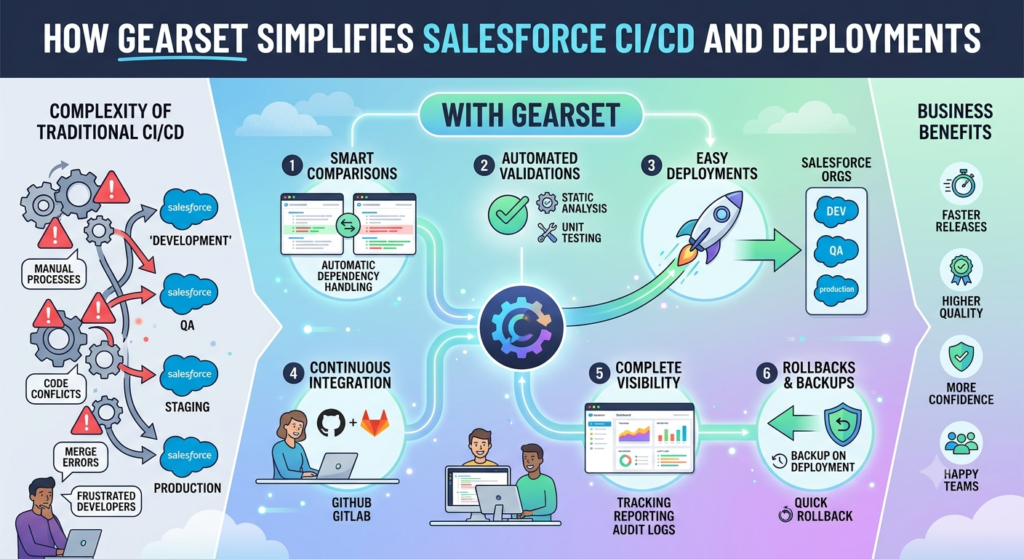
If you have ever worked on a Salesforce project, you know that deploying changes from one environment to another is not always easy. A small mistake can break a feature, overwrite someone else’s work, or even cause downtime for users. As Salesforce projects grow, managing deployments manually becomes more difficult and time-consuming.
This is where Gearset comes in. Gearset is one of the most popular DevOps tools for Salesforce. It helps developers, administrators, QA teams, and release managers automate deployments, track changes, compare environments, and maintain high-quality releases without the stress of manual processes.
What is Gearset?
Gearset is a Salesforce DevOps platform that automates the process of comparing, deploying, backing up, and monitoring Salesforce metadata and data.
Instead of manually creating Change Sets or using complicated command-line tools, Gearset provides an easy-to-use interface where you can compare two Salesforce environments, review the differences, and deploy only the required changes.
Whether you’re working in a small team or a large enterprise with multiple developers, Gearset helps reduce deployment errors and saves valuable time.
Understanding CI/CD in Simple Words
Before learning how Gearset works, let’s understand what CI/CD actually means.
Continuous Integration (CI)
Continuous Integration means developers regularly merge their code into a shared repository instead of waiting until the end of a project.
Whenever someone makes changes, automated checks can verify that everything still works properly.
This helps identify issues early rather than discovering them during the final deployment.
Continuous Delivery (CD)
Continuous Delivery ensures that tested changes are always ready for deployment.
Instead of spending hours preparing releases manually, deployments become repeatable and predictable.
This allows businesses to release new features more frequently with less risk.
Why Traditional Salesforce Deployments Are Difficult
Many Salesforce teams still rely on Change Sets for deployments.
Although Change Sets work for simple projects, they become difficult to manage when:
- Multiple developers are working simultaneously.
- Hundreds of metadata components are involved.
- Different sandboxes need to stay synchronized.
- Frequent releases are required.
- Rollback is needed after deployment failures.
Manual deployments often lead to problems such as:
- Missing metadata
- Dependency errors
- Overwritten configurations
- Longer release cycles
- Human mistakes
As organizations grow, these problems become more common.
How Gearset Solves These Problems
1. Easy Metadata Comparison
One of Gearset’s strongest features is metadata comparison.
Instead of guessing what has changed, Gearset compares two Salesforce environments and clearly shows:
- New components
- Modified components
- Deleted components
This makes it easy to understand exactly what will be deployed.
For example, if a developer updates:
- Apex Classes
- Flows
- Validation Rules
- Lightning Web Components
- Custom Objects
Gearset highlights every difference before deployment.
This gives teams confidence that nothing important is missed.
2. Smart Deployment Process
Deployments involve more than simply moving files.
Salesforce components often depend on each other.
For example:
An Apex class may use a custom field.
That custom field belongs to a custom object.
That object may require a permission set.
If one component is missing, deployment can fail.
Gearset automatically detects many dependencies and includes them during deployment.
This reduces deployment failures significantly.
3. Automated Validation
Before deploying changes to production, Gearset allows teams to validate deployments.
Validation checks whether deployment will succeed without actually making changes.
If problems exist, they can be fixed before the production release.
This reduces deployment risks and improves confidence.
4. Backup and Recovery
One of the biggest fears during deployment is losing important metadata.
Gearset automatically creates backups before deployment.
If something unexpected happens, previous versions can be restored quickly.
This feature provides an extra layer of security for production environments.
5. Deployment History
Every deployment is recorded.
Teams can easily see:
- Who deployed
- When deployment happened
- Which components were included
- Whether deployment succeeded or failed
This helps during audits and troubleshooting.
6. Git Integration
Modern Salesforce development usually uses Git repositories such as GitHub, GitLab, Azure DevOps, or Bitbucket.
Gearset integrates directly with these repositories.
Developers can compare:
- Sandbox vs Git
- Git vs Production
- Branch vs Branch
This keeps source control synchronized with Salesforce development.
7. Automated CI/CD Pipelines
Instead of manually deploying every release, Gearset allows teams to create deployment pipelines.
A common pipeline looks like this:
Developer Sandbox → Integration Sandbox → QA Sandbox → UAT Sandbox → Production
Whenever approved changes are available, Gearset can automatically move them through the pipeline.
This reduces manual effort and ensures every environment stays consistent.
8. Static Code Analysis
Gearset can analyze Apex code before deployment.
It identifies issues such as:
- Poor coding practices
- Security concerns
- Performance problems
Finding these issues early improves code quality.
9. Deployment Monitoring
After deployment, Gearset provides detailed logs and reports.
Teams can quickly identify:
- Failed components
- Test failures
- Missing dependencies
- Validation errors
Instead of searching through long deployment logs, everything is presented clearly.
Real-World Use Case
Imagine a healthcare company that uses Salesforce to manage patient appointments, doctor schedules, and billing information.
The development team consists of:
- 6 Salesforce Developers
- 2 Salesforce Administrators
- 3 QA Engineers
- 1 Release Manager
Every week, new features are developed.
Some examples include:
- New patient registration process
- Appointment reminders
- Doctor dashboard improvements
- Billing automation
- New reports
Initially, the team uses Change Sets.
Soon they face several problems.
Developer A updates validation rules.
Developer B modifies Lightning Pages.
Developer C creates new Apex classes.
During deployment:
- Some components are forgotten.
- Dependencies are missing.
- Deployment fails.
- QA has to repeat testing.
- Production release gets delayed.
The company starts losing valuable time every release.
After Implementing Gearset
Now the team follows a proper CI/CD process.
Each developer works in an individual sandbox.
Changes are committed to Git.
Gearset automatically compares metadata.
Validation runs before deployment.
QA receives updated environments automatically.
After approval, production deployment happens through Gearset.
The results are impressive:
- Deployment time reduces from several hours to less than 30 minutes.
- Manual errors decrease significantly.
- Rollbacks become much easier.
- Developers spend more time building features instead of fixing deployment issues.
- Business users receive new functionality faster.
This is why many Salesforce consulting companies and enterprise organizations choose Gearset for release management.
Benefits of Using Gearset
Organizations using Gearset often experience:
- Faster Salesforce deployments
- Fewer deployment failures
- Better collaboration between developers and administrators
- Improved release quality
- Easier rollback process
- Better visibility into deployment history
- Strong integration with Git
- Automated CI/CD pipelines
- Reduced manual work
- Greater confidence during production releases
Best Practices When Using Gearset
To get the most value from Gearset:
- Use Git as the single source of truth.
- Keep separate sandboxes for development, testing, and UAT.
- Validate deployments before production.
- Review metadata differences carefully.
- Run Apex tests during deployments.
- Schedule regular metadata backups.
- Automate repetitive deployment tasks.
- Monitor deployment reports after every release.
- Keep deployment pipelines simple and well documented.
Is Gearset Suitable for Small Teams?
Absolutely.
Many people believe DevOps tools are only useful for large companies.
In reality, even a team of two or three Salesforce developers can benefit from Gearset.
Small teams save time by avoiding manual deployments, while larger organizations benefit from automation, governance, and better collaboration.
Final Thoughts
Salesforce development has evolved significantly over the years. As projects become more complex, manual deployment methods like Change Sets often struggle to keep up with the pace of modern development.
Gearset simplifies the entire release process by providing an easy way to compare environments, manage metadata, automate deployments, integrate with Git, validate changes, and build reliable CI/CD pipelines.
Whether you’re a Salesforce Administrator managing configuration changes or a developer working on complex customizations, Gearset helps reduce deployment risks, improve collaboration, and deliver new features faster. By adopting Gearset, teams can spend less time worrying about deployments and more time creating solutions that deliver value to their users and customers.