
Have you ever written an Apex trigger that worked perfectly in sandbox, passed all test classes, but suddenly failed in production?
Errors like:
-
Too many SOQL queries: 101
-
CPU time limit exceeded
These are very common in Salesforce. And most of the time, the reason is simple — not following best practices.
In this blog, we will not just list the best practices, but understand them in a practical, real-world way so you can actually apply them in your projects.
Why Apex Best Practices Matter
Salesforce is a multi-tenant platform. That means resources are shared.
To keep everything running smoothly, Salesforce enforces limits like:
-
100 SOQL queries
-
150 DML operations
-
CPU time limits
If your code is not optimized, it will break.
Best practices help you:
-
Write clean code
-
Avoid errors
-
Build scalable applications
-
Handle bulk data properly
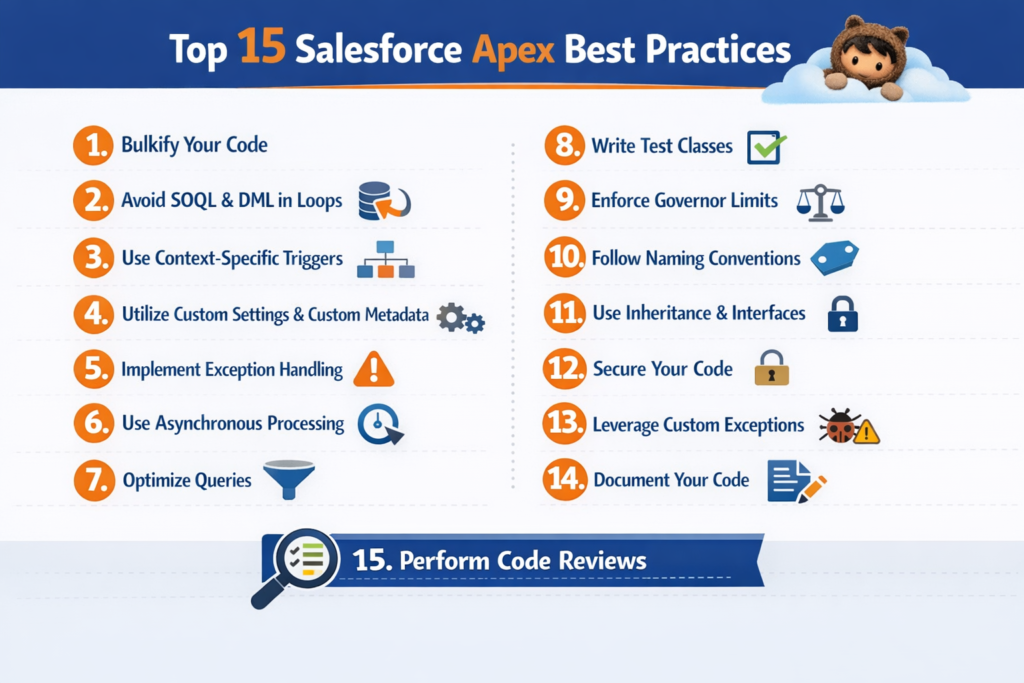
Top 15 Salesforce Apex Best Practices
Let’s go step by step.
1. Always Use One Trigger Per Object
Never create multiple triggers on the same object.
Why?
-
Hard to debug
-
Execution order is unpredictable
Best Approach:
Keep one trigger and move logic to a handler class.
AccountHandler.handle(Trigger.new, Trigger.oldMap);
}
This keeps your trigger clean and manageable.
2. Bulkify Your Code (Most Important Rule)
Salesforce processes records in bulk.
If your code works only for one record, it will fail in real scenarios.
Wrong Approach:
-
Processing one record at a time
Correct Approach:
-
Handle multiple records together
for(Account acc : Trigger.new){
contacts.add(new Contact(LastName=’Test’, AccountId=acc.Id));
}
insert contacts;
3. Never Use SOQL Inside Loops
This is one of the biggest mistakes.
Problem:
Each loop runs a query → hits limit quickly
Solution:
Query once, use many times.
for(Account acc : Trigger.new){
accIds.add(acc.Id);
}
List<Contact> cons = [SELECT Id, AccountId FROM Contact WHERE AccountId IN :accIds];
4. Avoid DML Inside Loops
Same logic as SOQL.
Wrong:
insert new Contact(LastName=’Test’);
}
Correct:
Collect records → Insert once
5. Use Collections (Set, List, Map)
Collections make your code faster and cleaner.
Why use Map?
-
Fast lookup
-
Avoid nested loops
[SELECT Id, Name FROM Account WHERE Id IN :accIds]
);
6. Write Reusable Code (Avoid Repetition)
Do not write same logic again and again.
Create utility classes.
public static List<Account> getActiveAccounts(){
return [SELECT Id FROM Account WHERE IsActive__c = true];
}
}
7. Always Respect Governor Limits
You must know limits while coding.
Example:
System.debug(Limits.getDMLStatements());
This helps you track usage.
8. Implement Proper Error Handling
Always use try-catch blocks.
insert new Account(Name=’Test’);
} catch(Exception e){
System.debug(e.getMessage());
}
This prevents system crashes and helps debugging.
9. Write Strong Test Classes
Code coverage is important, but quality matters more.
What to test:
-
Positive scenarios
-
Negative scenarios
-
Bulk data
Use @testSetup for reusable data.
10. Avoid Hardcoding Values
Never hardcode:
-
IDs
-
URLs
-
Config values
Use:
-
Custom Metadata
-
Custom Settings
11. Keep Trigger Logic Minimal
Trigger should only call handler methods.
Why?
-
Clean code
-
Easy testing
-
Better structure
12. Use Asynchronous Apex for Heavy Tasks
For long processes, use:
-
Future methods
-
Queueable Apex
-
Batch Apex
public static void processAsync(){
// long running logic
}
This avoids CPU limit issues.
13. Optimize SOQL Queries
Fetch only required data.
Bad:
Fetching unnecessary fields
Good:
Always filter your queries.
14. Follow Naming Conventions
Good naming improves readability.
Bad:
Good:
Use:
-
PascalCase for classes
-
camelCase for variables
15. Document Your Code
Always write meaningful comments.
This method fetches active accounts with opportunities
*/
This helps other developers understand your logic.
Real-Time Scenario (Interview Ready)
Scenario:
You need to update 500 Accounts and create related Contacts.
Wrong Approach:
-
Insert contact inside loop
-
Query inside loop
Correct Approach:
-
Get all accounts
-
Loop through them
-
Prepare contact list
-
Insert once
This follows all best practices.
Common Mistakes Developers Make
-
Writing code for single record
-
Using SOQL inside loop
-
Ignoring limits
-
Hardcoding values
-
Not writing proper test classes
Pro Tips for Better Apex Coding
-
Think in bulk always
-
Keep logic modular
-
Use handler pattern
-
Test with large data
-
Review logs regularly
Final Thoughts
Apex best practices are not just guidelines, they are essential for survival in Salesforce development.
If you follow them properly, you will:
-
Avoid governor limits
-
Improve performance
-
Write clean and scalable code
-
Build production-ready applications