
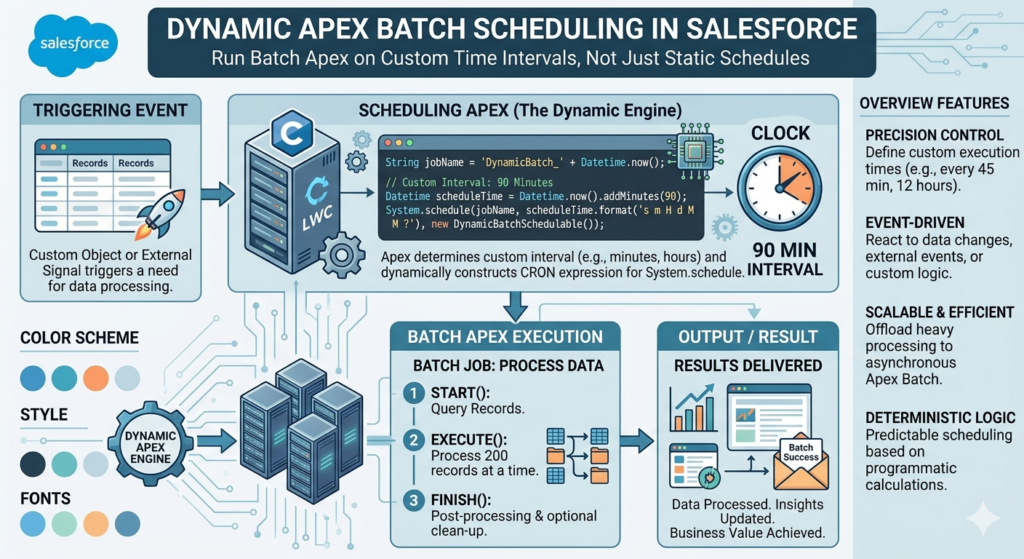
In Salesforce projects, there are many situations where large amounts of data need to be processed automatically. Sometimes records need to be updated every hour, old logs need to be deleted every night, or integrations need to sync data multiple times in a day. Doing these tasks manually is not practical, especially when the data volume keeps increasing.
This is where Apex Batch Jobs become useful. Batch Apex helps developers process thousands or even millions of records in smaller chunks without hitting governor limits. But running batch jobs manually every time is not efficient. Businesses usually want these jobs to run automatically at specific times or custom intervals.
In this blog, we will understand how Dynamic Apex Batch Scheduling works in Salesforce, why it is important, and how developers can schedule batch jobs dynamically based on business requirements.
What is Batch Apex in Salesforce?
Batch Apex is a Salesforce feature that allows developers to process large data sets asynchronously. Instead of handling all records in one transaction, Salesforce divides the records into smaller batches.
This approach helps avoid governor limit issues and improves system performance.
Batch Apex is mainly used for:
- Updating large amounts of records
- Data cleanup
- Integration processing
- Sending scheduled notifications
- Archiving records
- Recalculating data periodically
A Batch Apex class usually contains three methods:
start()execute()finish()
The execute() method processes records in chunks.
Why Scheduling is Important for Batch Jobs
A batch job becomes more powerful when it runs automatically.
For example:
- Every day at midnight
- Every 30 minutes
- Every Monday morning
- Every 2 hours
- Every month-end
Without scheduling, an admin or developer would have to trigger the batch manually again and again.
Salesforce provides Scheduled Apex for this purpose. Scheduled Apex allows developers to schedule jobs using CRON expressions.
However, many real-world projects require dynamic scheduling instead of hardcoded schedules.
Problem with Static Scheduling
Normally developers write something like this:
System.schedule(
    'Daily Batch Job',
    '0 0 1 * * ?',
    new MySchedulerClass()
);
This works, but the schedule is fixed.
Now imagine the business says:
- Run the job every 15 minutes
- Change timing without deployment
- Allow admins to configure schedules
- Run different jobs at different intervals
- Pause or resume jobs dynamically
With static scheduling, developers must modify code and deploy again.
This creates maintenance issues.
What is Dynamic Batch Scheduling?
Dynamic Batch Scheduling means scheduling Apex batch jobs based on configurable values instead of hardcoded timings.
In this approach:
- Schedule timings are stored in Custom Metadata or Custom Settings
- Admins can change intervals without deployment
- Different environments can have different schedules
- Jobs can be controlled dynamically
This creates a flexible and scalable solution.
Real-Time Business Example
Suppose a company has an integration with an external ERP system.
Requirements are:
- During office hours, sync data every 30 minutes
- At night, sync every 2 hours
- On weekends, run only once daily
If schedules are hardcoded, developers must keep updating the code.
Dynamic scheduling solves this problem completely.
Components Required for Dynamic Scheduling
A complete dynamic scheduling solution usually contains:
- Batch Apex Class
- Scheduler Class
- Custom Metadata or Custom Settings
- Dynamic CRON Expression Logic
- Job Management Logic
Let us understand each part.
Step 1: Create a Batch Apex Class
First, create the batch class.
global class AccountBatchJob implements Database.Batchable<SObject> {

    global Database.QueryLocator start(Database.BatchableContext bc) {
        return Database.getQueryLocator(
            'SELECT Id, Name FROM Account'
        );
    }

    global void execute(Database.BatchableContext bc, List<Account> scope) {

        for(Account acc : scope) {
            acc.Description = 'Processed';
        }

        update scope;
    }

    global void finish(Database.BatchableContext bc) {
        System.debug('Batch Job Completed');
    }
}
This batch updates account records in chunks.
Step 2: Create Scheduler Class
Now create a scheduler class.
global class DynamicBatchScheduler implements Schedulable {

    global void execute(SchedulableContext sc) {

        AccountBatchJob batchJob = new AccountBatchJob();

        Database.executeBatch(batchJob, 200);
    }
}
This class triggers the batch job automatically.
Step 3: Store Schedule Configuration Dynamically
Now comes the important part.
Instead of hardcoding the schedule, store it in Custom Metadata.
Example fields:
| Field Name | Example Value |
|---|---|
| Job_Name__c | Account Batch |
| Cron_Expression__c | 0 0/30 * * * ? |
| Is_Active__c | True |
This allows admins to update schedules directly from Salesforce UI.
No deployment is required.
Understanding CRON Expressions
Salesforce scheduling uses CRON expressions.
Example:
0 0/30 * * * ?Meaning:
- Run every 30 minutes
Another example:
0 0 1 * * ?Meaning:
- Run daily at 1 AM
CRON expressions define:
- Seconds
- Minutes
- Hours
- Day of month
- Month
- Day of week
This makes scheduling very flexible.
Step 4: Read Configuration Dynamically
Now create logic that fetches the schedule dynamically.
Dynamic_Schedule__mdt config = [
    SELECT Cron_Expression__c, Is_Active__c
    FROM Dynamic_Schedule__mdt
    WHERE DeveloperName = 'Account_Batch'
    LIMIT 1
];
Now the scheduler reads values from metadata.
Step 5: Schedule Job Dynamically
if(config.Is_Active__c) {

    System.schedule(
        'Dynamic Account Batch',
        config.Cron_Expression__c,
        new DynamicBatchScheduler()
    );
}
Now admins can change the CRON expression anytime.
How Admins Benefit from This Approach
Dynamic scheduling is very useful for Salesforce admins.
They can:
- Change timings without developers
- Pause jobs temporarily
- Increase or decrease frequency
- Manage schedules from UI
- Avoid deployments for small changes
This improves flexibility for the entire organization.
Handling Existing Scheduled Jobs
One important thing developers must manage is duplicate scheduled jobs.
Before scheduling a new job, old scheduled jobs should be removed.
Example:
List<CronTrigger> jobs = [
    SELECT Id, CronJobDetail.Name
    FROM CronTrigger
    WHERE CronJobDetail.Name = 'Dynamic Account Batch'
];

for(CronTrigger ct : jobs) {
    System.abortJob(ct.Id);
}
This prevents duplicate execution.
Complete Dynamic Scheduling Flow
The complete process works like this:
- Admin updates schedule in Custom Metadata
- Scheduler reads metadata
- Existing job gets removed
- New CRON expression is applied
- Batch job starts automatically
This creates a fully configurable framework.
Best Practices for Dynamic Batch Scheduling
1. Use Custom Metadata Instead of Hardcoding
Custom Metadata is deployable and easy to maintain.
It is better than hardcoded values.
2. Avoid Too Many Frequent Jobs
Running jobs every minute can affect org performance.
Schedule wisely.
3. Add Error Logging
Always log failures.
This helps during debugging.
Example:
- Custom Logging Object
- Platform Events
- Debug Logs
4. Use Batch Size Properly
Large batch sizes may cause CPU timeout issues.
Recommended batch size:
Database.executeBatch(batchJob, 200);5. Avoid Duplicate Scheduling
Always check and abort existing jobs before creating new ones.
Advantages of Dynamic Batch Scheduling
Dynamic scheduling provides many benefits.
Better Flexibility
Admins can control schedules without code changes.
Reduced Deployment Dependency
Small timing changes do not require deployment.
Improved Maintenance
Centralized configuration makes management easier.
Scalable Architecture
Multiple jobs can be controlled dynamically.
Better Automation
Business processes run automatically at desired intervals.
Common Use Cases
Dynamic batch scheduling is widely used in:
- ERP integrations
- Data synchronization
- Daily report generation
- Record cleanup
- Email processing
- Log archiving
- Scheduled calculations
- Customer data refresh
Challenges Developers Should Consider
Although dynamic scheduling is powerful, developers should handle some challenges carefully.
Governor Limits
Too many scheduled jobs may hit Salesforce limits.
Job Overlapping
A new batch should not start before the previous one finishes.
Error Handling
Failed jobs should be monitored properly.
Security
Only authorized users should modify schedules.
Future Enhancement Ideas
Developers can build advanced scheduling frameworks with features like:
- UI-based scheduler management
- Multiple batch support
- Pause and resume options
- Schedule history tracking
- Retry mechanism
- Notification system
- Dynamic batch size configuration
This creates an enterprise-level automation framework.
Conclusion
Dynamic Apex Batch Scheduling is one of the most useful approaches for building scalable Salesforce automation solutions. Instead of relying on hardcoded schedules, developers can create flexible systems where admins control job timings directly from Salesforce configuration.
This approach reduces deployment dependency, improves maintainability, and makes automation much more business-friendly.
In modern Salesforce projects, where integrations and large data processing are common, dynamic scheduling helps organizations manage operations efficiently without constant developer involvement.
A well-designed dynamic scheduling framework not only improves performance but also creates a smarter and more adaptable Salesforce ecosystem.