
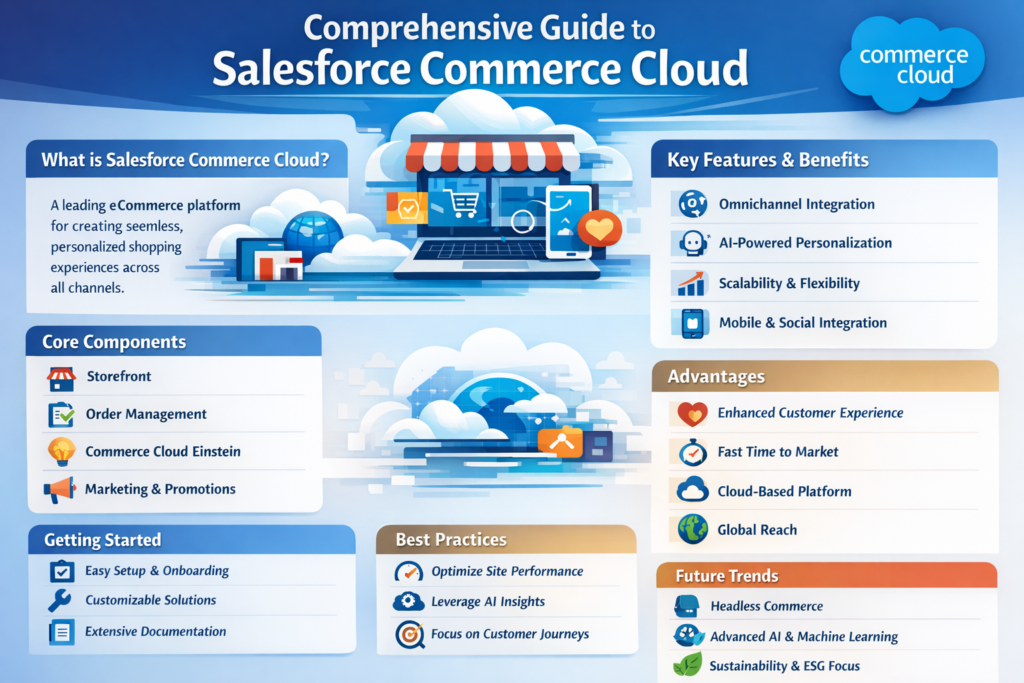
In today’s digital world, having a strong online store is not optional—it’s a necessity. Businesses need a platform that is fast, scalable, and easy to manage. This is where Salesforce Commerce Cloud comes into the picture.
In this blog, we will understand everything step by step in simple English so that even beginners can easily follow along.
1. What is Salesforce Commerce Cloud?
Salesforce Commerce Cloud (SFCC) is a cloud-based platform that helps businesses create and manage online stores. It allows companies to sell products online, manage customers, and deliver a personalized shopping experience.
In simple terms, it is a complete solution to build an eCommerce website without worrying about servers or infrastructure.
2. Why Businesses Use Commerce Cloud
Let’s understand why this platform is popular:
a. Cloud-Based Platform
No need to install anything. Everything runs on the cloud.
b. Scalability
You can handle small traffic as well as huge traffic during sales like festivals.
c. Personalization
You can show different products to different users based on their behavior.
d. Mobile Friendly
Websites automatically work well on mobile devices.
e. AI-Powered Recommendations
It suggests products to customers, improving sales.
3. Types of Commerce Cloud
Salesforce Commerce Cloud mainly has two types:
1. B2C Commerce
Used for businesses that sell directly to customers (like clothing websites).
2. B2B Commerce
Used for businesses that sell to other businesses (like wholesalers).
4. Key Features of Salesforce Commerce Cloud
Let’s break down the important features:
a. Storefront Management
You can design your website layout, banners, and pages easily.
b. Product Catalog Management
Add products, categories, pricing, and inventory.
c. Order Management
Track and manage customer orders in real-time.
d. Customer Management
Store customer data and track their buying behavior.
e. Promotions and Discounts
Create offers like coupons, discounts, and seasonal sales.
f. Multi-Site Management
Manage multiple websites from a single platform.
5. Architecture Overview (Simple Understanding)
Salesforce Commerce Cloud works on a strong architecture:
a. Backend (Business Manager)
This is where admins manage products, orders, and settings.
b. Frontend (Storefront)
This is what customers see when they visit the website.
c. APIs
APIs connect different systems like payment gateways, shipping, etc.
6. Important Components in Commerce Cloud
1. Business Manager
Admin panel to manage everything.
2. Storefront Reference Architecture (SFRA)
A ready-made framework to build your online store quickly.
3. Demandware Script (Server-side JavaScript)
Used for backend logic.
4. OCAPI & SCAPI
APIs used to interact with data and services.
7. Step-by-Step Process to Build an Online Store
Let’s understand how a developer builds a store using Commerce Cloud:
Step 1: Setup Environment
Create sandbox and development instances.
Step 2: Configure Business Manager
Add products, categories, pricing, and inventory.
Step 3: Customize Storefront
Use SFRA to design UI and user experience.
Step 4: Integrate Payment Gateway
Connect services like cards, wallets, etc.
Step 5: Setup Shipping Methods
Define delivery options and charges.
Step 6: Add Promotions
Create discounts and offers.
Step 7: Testing
Test everything including checkout, login, and payment.
Step 8: Deployment
Push code to production environment.
8. Personalization in Commerce Cloud
One of the best features is personalization.
Example:
-
If a user searches for shoes, the system will show more shoe-related products.
-
Returning users see customized offers.
This improves user experience and increases sales.
9. Integration Capabilities
Commerce Cloud can connect with:
-
Payment gateways (Stripe, PayPal)
-
CRM systems
-
Marketing tools
-
Inventory systems
This makes it a complete ecosystem for eCommerce.
10. Advantages of Salesforce Commerce Cloud
-
Fast website performance
-
Secure platform
-
Easy to scale
-
Built-in AI features
-
Seamless integration with other Salesforce products
11. Challenges You Should Know
-
Cost can be high for small businesses
-
Requires skilled developers
-
Customization can be complex
12. Best Practices for Success
-
Keep your UI simple and clean
-
Optimize images for fast loading
-
Use personalization wisely
-
Regularly test your checkout process
-
Monitor performance and errors
13. Who Should Learn Commerce Cloud?
This platform is best for:
-
Salesforce Developers
-
eCommerce Developers
-
Business Owners
-
Digital Marketers
If you already know Salesforce, learning Commerce Cloud is a great career move.
14. Final Thoughts
Salesforce Commerce Cloud is a powerful platform for building modern eCommerce websites. It helps businesses deliver better shopping experiences and increase sales through smart features and automation.
If you are planning to build a career in eCommerce or Salesforce, this is definitely a skill worth learning.