
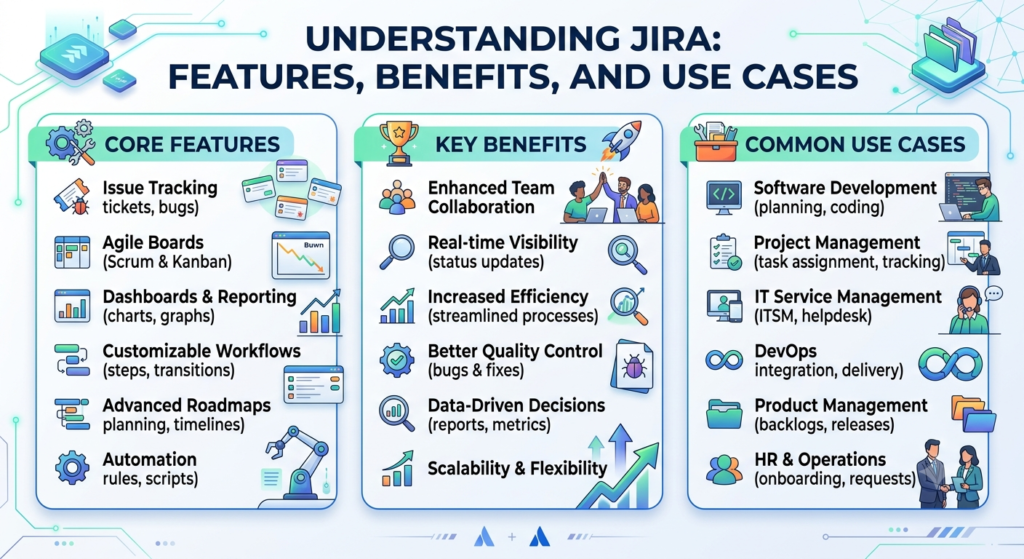
Project management becomes much easier when every task is organized, assigned, and tracked in one place. Whether you are developing software, managing a marketing campaign, or handling HR tasks, keeping track of work manually can be difficult. This is where Jira helps.
Jira is one of the most popular project management and issue-tracking tools used by organizations of all sizes. It helps teams plan projects, manage tasks, track progress, and collaborate efficiently.
In this blog, we will learn what Jira is, its key features, benefits, and real-world use cases in simple English that is easy for beginners to understand.
What is Jira?
Jira is a project management and issue-tracking tool developed by Atlassian. It was originally created to track software bugs, but today it is used for many different types of projects.
With Jira, teams can:
- Create tasks
- Assign work to team members
- Track project progress
- Manage deadlines
- Generate reports
- Collaborate with team members
Instead of managing work through emails or spreadsheets, Jira keeps everything organized in one platform.
Why Do Companies Use Jira?
Imagine your team receives 200 customer requests every week.
Without Jira:
- Requests may get lost.
- Team members may forget deadlines.
- Managers cannot track progress.
- Multiple people may work on the same task.
With Jira:
- Every request becomes a ticket.
- Each ticket is assigned to the correct employee.
- Progress is tracked automatically.
- Everyone knows what needs to be done.
This improves productivity and communication.
Simple Example
Suppose a customer reports that they cannot log into a website.
Instead of sending multiple emails, the support engineer creates a Jira issue.
The issue contains:
- Problem description
- Priority
- Assigned developer
- Due date
- Status
- Comments
- Attachments
The developer fixes the issue, updates the status, and the customer support team gets notified.
Everything happens in one place.
Main Features of Jira
Let’s understand the most useful features of Jira.
1. Issue Tracking
The most important feature of Jira is Issue Tracking.
An issue can represent:
- Bug
- Task
- Story
- Epic
- Improvement
- Support request
Each issue contains important information like:
- Summary
- Description
- Priority
- Assignee
- Reporter
- Status
- Comments
- Attachments
Example
A tester finds a login bug.
Instead of sending an email, they create an issue in Jira.
The developer receives the task immediately and starts working on it.
2. Project Management
Jira allows teams to manage complete projects.
A project contains multiple issues that work together to achieve a goal.
Example project:
Website Development
Tasks include:
- Design homepage
- Develop login page
- Create dashboard
- Test application
- Deploy website
Managers can easily see project progress.
3. Agile Boards
Jira supports Agile methodologies like Scrum and Kanban.
Scrum Board
Used when work is completed in fixed time periods called Sprints.
Example:
Sprint Duration: 2 Weeks
Tasks move through stages like:
To Do → In Progress → Testing → Done
Kanban Board
Used for continuous work without fixed sprints.
Example:
Customer Support Team
Incoming Tickets
↓
Open
↓
Working
↓
Resolved
↓
Closed
Kanban helps visualize work.
4. Workflow Management
A workflow shows how an issue moves from start to finish.
Example workflow:
Open
↓
Assigned
↓
Development
↓
Testing
↓
Ready for Deployment
↓
Closed
Companies can customize workflows according to their business process.
5. Task Assignment
Managers can assign work to employees.
Each task shows:
- Who created it
- Who is working on it
- Due date
- Current status
This avoids confusion.
6. Dashboards
Jira dashboards display project information in charts and graphs.
Managers can see:
- Number of completed tasks
- Pending work
- Sprint progress
- Team performance
- High-priority issues
This helps in making better decisions.
7. Reports
Jira provides many built-in reports.
Popular reports include:
- Burndown Chart
- Velocity Report
- Sprint Report
- Pie Chart
- Workload Report
These reports help managers monitor project health.
8. Automation
Jira can automate repetitive tasks.
Example:
When a developer marks an issue as “Done”:
Automatically
- Notify the tester
- Assign issue to QA
- Update dashboard
This saves time.
9. Notifications
Whenever an issue changes, Jira sends notifications.
Example:
Developer completes task.
↓
Tester receives email.
↓
Testing starts immediately.
Communication becomes faster.
10. Integrations
Jira integrates with many popular tools.
Examples:
- GitHub
- Bitbucket
- Slack
- Microsoft Teams
- Confluence
- Jenkins
- Azure DevOps
These integrations improve team collaboration.
Types of Issues in Jira
Jira supports different issue types.
Epic
A large feature made up of multiple stories.
Example:
Online Shopping Website
Story
A user requirement.
Example:
Customer should be able to search products.
Task
General work item.
Example:
Create Product Dashboard.
Bug
Something is not working correctly.
Example:
Payment page crashes.
Sub-task
A smaller task inside another task.
Example:
Task:
Build Login Page
Subtasks:
- Create UI
- Write Backend Code
- Test Login
Benefits of Using Jira
Better Organization
Everything stays in one place.
No more searching through emails.
Improved Collaboration
Developers, testers, managers, and business teams work together.
Everyone knows the project status.
Better Visibility
Managers can monitor work in real time.
No need to ask employees for daily updates.
Faster Delivery
Since work is organized, projects finish faster.
Easy Tracking
Every task has:
- Owner
- Deadline
- Priority
- Progress
Nothing gets missed.
Custom Workflows
Every company works differently.
Jira allows businesses to create workflows that match their processes.
Better Reporting
Managers can generate reports in seconds instead of creating them manually.
Improved Productivity
Automation reduces repetitive work.
Employees spend more time on important tasks.
Real-World Use Cases of Jira
Jira is not only for software development. Many teams across an organization use it to manage their work efficiently.
Use Case 1: Software Development
A company is building an e-commerce website.
The project includes:
- Login
- Product Catalog
- Shopping Cart
- Payment Gateway
- Order Management
Each feature is created as an Epic.
Individual development tasks become Stories.
Bugs reported during testing are tracked separately.
The development team tracks progress using Scrum boards and delivers features in every sprint.
Use Case 2: Customer Support
A customer reports that the payment page is not working.
The support executive creates a Jira ticket.
The ticket is assigned to the development team.
Once the issue is fixed, the QA team verifies it.
Finally, the ticket is marked as Closed.
Everyone involved can see the complete history of the issue.
Use Case 3: HR Team
The HR team receives a request to onboard a new employee.
A Jira task is created.
The task is divided into subtasks:
- Prepare offer letter
- Create email account
- Arrange laptop
- Schedule induction
- Complete documentation
Each subtask is assigned to the responsible team member, ensuring a smooth onboarding process.
Use Case 4: Marketing Team
The marketing team is launching a new product.
Tasks include:
- Create social media posts
- Design banners
- Write blog content
- Record promotional videos
- Schedule campaigns
Using Jira, the team can assign tasks, set deadlines, and monitor campaign progress from one dashboard.
Use Case 5: IT Help Desk
An employee reports that their office laptop is not working.
A Jira ticket is created with details of the issue.
The IT support engineer is assigned the ticket.
After troubleshooting and resolving the problem, the ticket is closed.
This creates a complete record of the issue for future reference.
Who Uses Jira?
Jira is widely used by different teams, including:
- Software Developers
- QA Engineers
- Scrum Masters
- Product Owners
- Project Managers
- Business Analysts
- DevOps Engineers
- Customer Support Teams
- HR Teams
- Marketing Teams
- IT Support Teams
Its flexibility makes it suitable for both technical and non-technical departments.
Best Practices for Using Jira
To get the most value from Jira, consider these best practices:
- Create clear and descriptive issue titles.
- Write detailed issue descriptions with relevant information.
- Set priorities based on business impact.
- Keep workflows simple and easy to follow.
- Update issue statuses regularly.
- Use labels and components for better organization.
- Review dashboards and reports frequently.
- Automate repetitive tasks wherever possible.
- Close completed issues to keep projects organized.
- Encourage team members to add comments and updates instead of relying on emails.
Conclusion
Jira is much more than a bug-tracking tool. It is a complete project management platform that helps teams organize work, collaborate effectively, and deliver projects on time.
From software development and customer support to HR and marketing, Jira can be adapted to suit many different business processes. Features such as issue tracking, Agile boards, workflows, dashboards, automation, and integrations make it a powerful solution for teams of all sizes.
If you are new to Jira, start by creating a simple project, adding a few tasks, and exploring its boards and reports. As you become familiar with the platform, you can take advantage of advanced features like automation, custom workflows, and integrations to improve productivity even further.
Whether you are managing a small team or a large enterprise project, learning Jira is a valuable skill that can help you organize work more efficiently and contribute to successful project delivery.