
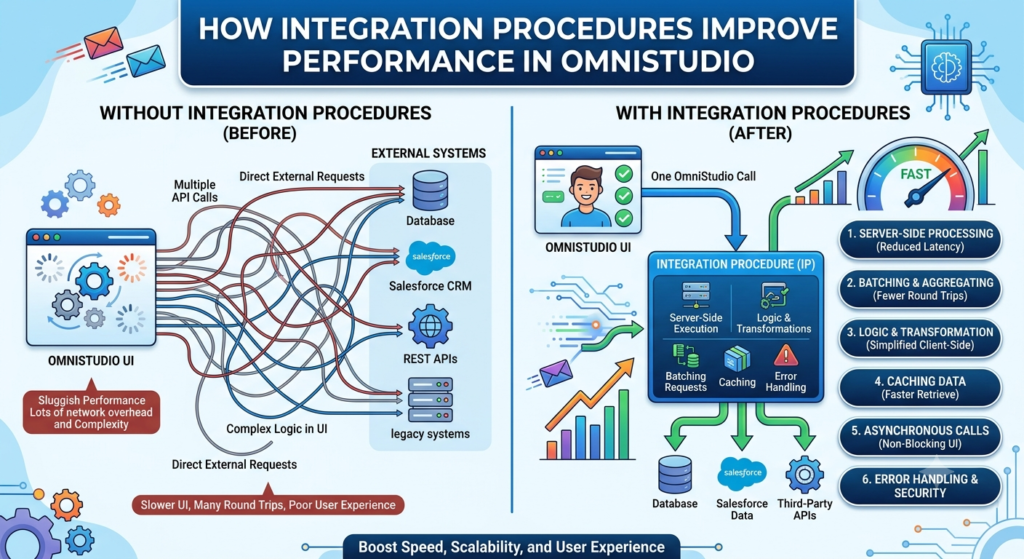
When developers start working with Salesforce OmniStudio, one of the biggest challenges they face is performance. Nobody likes a slow application, especially when users are waiting for data to load.
This is where Integration Procedures (IPs) come into the picture.
Integration Procedures are one of the most powerful features of OmniStudio. They help retrieve, process, and return data quickly without making unnecessary server calls.
In this blog, we’ll understand what Integration Procedures are, why they are important, and how they help improve performance in OmniStudio.
What is an Integration Procedure?
An Integration Procedure is a server-side service in OmniStudio that performs multiple actions and returns the required data in a single response.
Think of it as a smart assistant.
Instead of asking Salesforce for information multiple times, the Integration Procedure collects everything you need and sends it back in one go.
This makes the application faster and more efficient.
Why Were Integration Procedures Introduced?
Imagine you are building a customer service application.
To display customer information, you need:
- Account Details
- Contact Details
- Recent Cases
- Active Products
Without an Integration Procedure, your application might make four separate calls to Salesforce.
More calls mean:
- More waiting time
- More processing
- Poor user experience
With an Integration Procedure, all these requests can be handled together and returned in a single response.
As a result, the screen loads much faster.
How Integration Procedures Improve Performance
Let’s look at the main reasons why Integration Procedures are considered a performance booster in OmniStudio.
1. Reduce Server Calls
One of the biggest performance improvements comes from reducing the number of server requests.
Without Integration Procedure:
Request 1 → Account Data
Request 2 → Contact Data
Request 3 → Case Data
Request 4 → Product Data
With Integration Procedure:
Single Request → All Required Data
Fewer requests mean faster response times.
2. Execute Multiple Actions in One Place
Integration Procedures can perform multiple tasks within a single process.
For example:
- Retrieve data
- Transform data
- Call external APIs
- Create records
- Update records
All of these actions can happen within one Integration Procedure.
Instead of spreading logic across different components, everything stays organized in one place.
3. Faster OmniScript Performance
OmniScripts often need data from Salesforce before displaying information to users.
If every step makes separate server calls, the OmniScript becomes slow.
By using Integration Procedures, OmniScripts can retrieve all required data at once.
This results in:
- Faster page loading
- Better user experience
- Improved responsiveness
Users can move through the process more smoothly.
4. Supports Data Caching
One of the most useful features of Integration Procedures is caching.
Caching means storing previously retrieved data temporarily.
Let’s say hundreds of users are requesting the same product information.
Instead of querying Salesforce every time, the Integration Procedure can return the cached data.
Benefits include:
- Reduced server load
- Faster responses
- Better scalability
This is especially useful for frequently accessed information.
5. Reduces Apex Development
Many developers write Apex code to handle complex business logic.
However, Integration Procedures can perform many of these tasks using clicks instead of code.
This leads to:
- Faster development
- Easier maintenance
- Reduced technical debt
Less code often means fewer performance issues and easier troubleshooting.
6. Improves External System Integrations
Many organizations connect Salesforce with external systems.
Examples include:
- Banking systems
- Insurance platforms
- ERP applications
- Payment gateways
Integration Procedures can handle these API calls efficiently.
Instead of the UI making direct API requests, the Integration Procedure acts as a middle layer.
This improves:
- Security
- Performance
- Error handling
Real-Life Example
Let’s imagine a telecom company.
A customer service agent opens a customer profile.
The screen needs to display:
- Customer Information
- Active Plans
- Recent Bills
- Support Cases
Without Integration Procedure:
The application makes separate requests for each piece of information.
The screen may take several seconds to load.
With Integration Procedure:
One request retrieves everything.
The screen loads much faster, allowing the agent to assist customers more efficiently.
This is why many large organizations rely heavily on Integration Procedures.
Common Components Used in Integration Procedures
Integration Procedures provide several useful elements.
Data Mapper Extract
Retrieves Salesforce data.
Data Mapper Load
Creates or updates records.
Data Mapper Transform
Converts data into the required format.
Remote Action
Executes Apex methods.
HTTP Action
Calls external APIs.
Response Action
Returns the final response to the user.
By combining these elements, developers can build powerful and efficient processes.
Best Practices for Better Performance
If you want your Integration Procedures to perform well, keep these tips in mind:
Use Caching Whenever Possible
Caching reduces repeated server requests.
Return Only Required Data
Avoid sending unnecessary fields.
Smaller responses load faster.
Keep Logic Organized
Use clear naming conventions and structured flows.
Avoid Unnecessary Actions
Every action adds processing time.
Only include what is needed.
Reuse Integration Procedures
Instead of creating duplicate processes, build reusable services.
Integration Procedure vs Apex
Many beginners ask:
“Should I use Apex or Integration Procedures?”
The answer depends on the requirement.
Use Integration Procedures when:
- Low-code solutions are possible
- Data orchestration is needed
- Multiple services need to be combined
- Performance optimization is important
Use Apex when:
- Complex business logic is required
- Custom processing is needed
- Platform limitations exist
In many projects, both work together to deliver the best solution.
Final Thoughts
Performance is one of the most important aspects of any application, and Integration Procedures play a major role in making OmniStudio solutions faster and more efficient.
They help by:
- Reducing server calls
- Combining multiple actions
- Improving OmniScript performance
- Supporting caching
- Simplifying integrations
- Reducing Apex development