
When working with collections in Apex, developers often rely on structures like Lists, Sets, and Maps to manage groups of data efficiently. Among these, a Set is commonly used when we want to store unique values and avoid duplicates automatically.
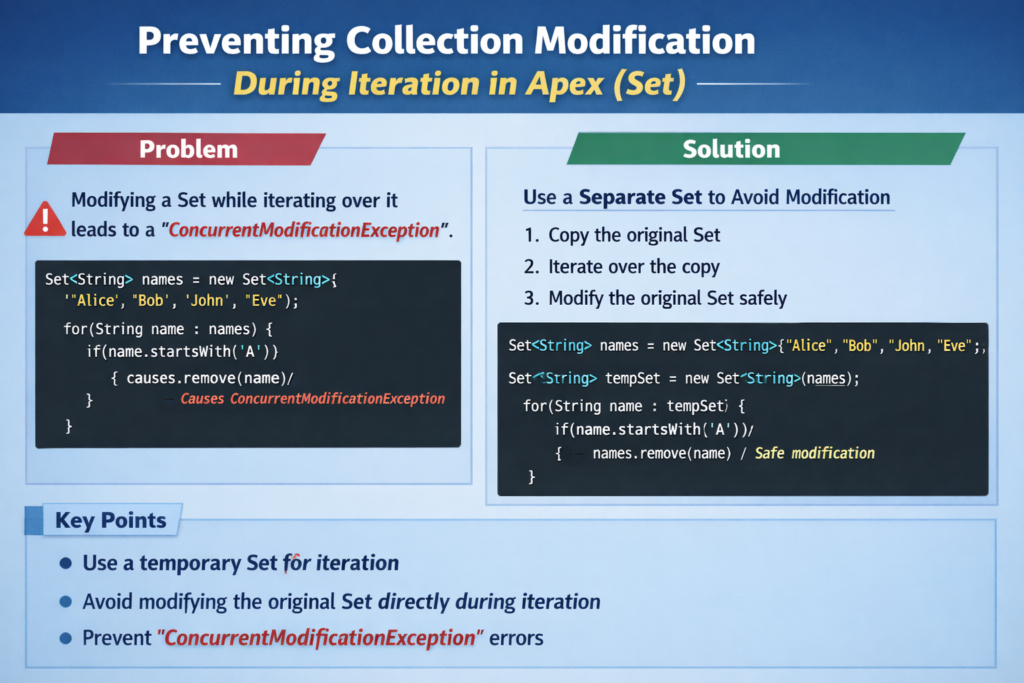
However, many Salesforce developers face a common runtime issue when working with Sets: modifying a collection while iterating over it. This mistake can cause unexpected errors in Apex and may break the logic of your code.
In this blog, we will understand what this problem is, why it happens, and how we can prevent it while writing clean and efficient Apex code.
Understanding Sets in Apex
Before diving into the issue, it is important to understand what a Set is.
A Set in Apex is a collection type that:
-
Stores unique values
-
Does not allow duplicate elements
-
Is unordered
-
Provides fast lookup operations
Example:
cities.add(‘Delhi’);
cities.add(‘Mumbai’);
cities.add(‘Delhi’); // Duplicate, will not be added
System.debug(cities);
Output:
Even though we attempted to add “Delhi” twice, it only appears once in the Set.
The Problem: Modifying a Set During Iteration
A common mistake developers make is modifying a Set while looping through it.
Example of problematic code:
for(Integer num : numbers){
if(num % 2 == 0){
numbers.remove(num);
}
}
At first glance, this code may look correct. The goal is simple: remove even numbers from the Set.
But when this code runs, Apex throws a runtime error:
Why This Error Happens
When a loop starts iterating through a collection, Apex creates an internal iterator to track each element.
If the collection changes during the iteration (for example, adding or removing elements), the iterator becomes invalid. This leads to inconsistent behavior, so Apex blocks the operation and throws an exception.
This rule applies to:
-
Sets
-
Lists
-
Maps
In simple terms, you cannot change a collection while looping through it directly.
Real-Life Scenario
Imagine you are working on a trigger or batch class where you collect record IDs in a Set. Later, you want to remove some IDs based on certain conditions.
If you try to remove them directly while iterating over the same Set, your code will fail during runtime.
That is why developers need to use safer patterns to modify collections.
Safe Ways to Modify a Set During Iteration
There are multiple approaches to solve this problem. Let’s look at the most commonly used solutions.
1. Use a Temporary Set
One of the safest methods is to create another Set that stores the values you want to remove.
Example:
Set<Integer> numbersToRemove = new Set<Integer>();
for(Integer num : numbers){
if(num % 2 == 0){
numbersToRemove.add(num);
}
}
numbers.removeAll(numbersToRemove);
System.debug(numbers);
Output:
Why This Works
Instead of modifying the original Set during iteration, we:
-
Identify elements to remove
-
Store them in a temporary Set
-
Remove them after the loop finishes
This prevents the runtime exception.
2. Iterate Over a Clone of the Set
Another useful approach is to iterate over a copy of the Set while modifying the original one.
Example:
for(Integer num : new Set<Integer>(numbers)){
if(num % 2 == 0){
numbers.remove(num);
}
}
System.debug(numbers);
Why This Works
Here, the loop iterates over a separate copy of the Set. Since we are modifying the original Set and not the one being iterated, the iterator remains safe.
3. Convert Set to List
Sometimes developers convert the Set to a List and iterate over the List instead.
Example:
for(Integer num : new List<Integer>(numbers)){
if(num % 2 == 0){
numbers.remove(num);
}
}
System.debug(numbers);
This technique works well because the loop runs on a different collection structure.
Best Practices for Handling Collections in Apex
To avoid issues when working with collections, follow these best practices:
1. Never Modify Collections Inside the Same Loop
Always avoid adding or removing elements while directly iterating through the same collection.
2. Use Helper Collections
Create temporary Sets or Lists to store elements that need modification.
3. Write Clean and Readable Code
Sometimes developers try to shorten code but end up creating logic errors. Prioritize clarity.
4. Test With Edge Cases
Always test scenarios where collections contain:
-
No values
-
Duplicate attempts
-
Large datasets
This ensures your logic works reliably.
Performance Considerations
Using Sets correctly can improve performance significantly in Apex.
Benefits include:
-
Faster lookups
-
Avoiding duplicate values
-
Reduced processing time in loops
However, improper handling of collections can lead to:
-
Runtime exceptions
-
Poor code maintainability
-
Difficult debugging
So it is always important to use the right pattern when modifying collections.
Conclusion
Working with Sets in Apex is a powerful way to manage unique data efficiently. However, developers must be careful when iterating through collections.
Trying to modify a Set during iteration will result in a runtime exception. The safest approach is to either use a temporary collection, iterate over a clone, or convert the Set to a List.
By following these best practices, you can write cleaner, safer, and more scalable Apex code.
If you are building triggers, batch classes, or complex business logic in Salesforce, understanding how collection iteration works will help you avoid common errors and improve code quality.