
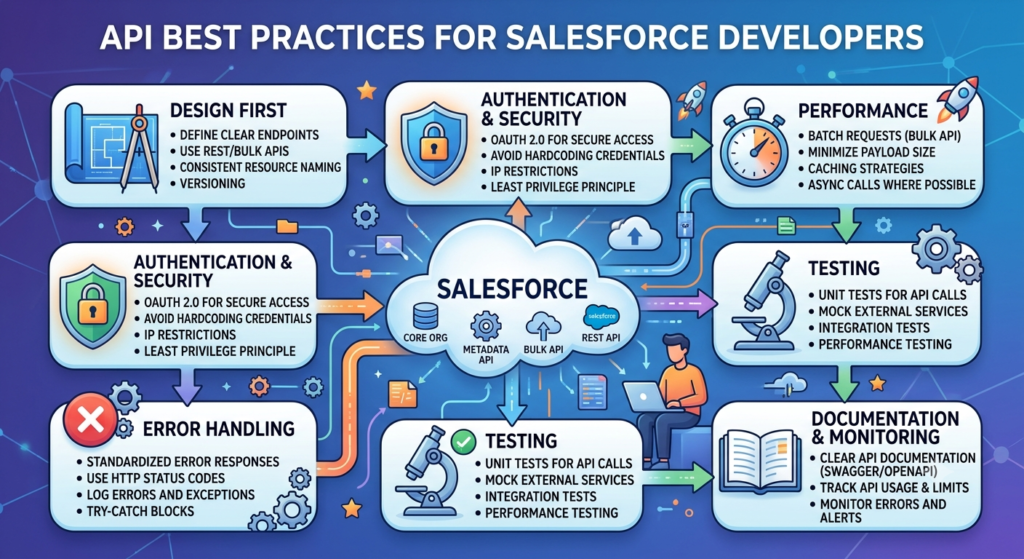
Salesforce APIs play a major role in connecting Salesforce with other applications, websites, mobile apps, and external systems. Whether you are integrating an ERP system, a payment gateway, a marketing platform, or a custom application, APIs make data exchange smooth and reliable. However, simply making API calls is not enough. Following the right API practices helps developers build secure, scalable, and high-performing integrations that can handle business growth without issues.
Understand the Right API for the Job
Salesforce provides multiple APIs, and choosing the correct one can significantly improve performance. REST API is commonly used for lightweight integrations and mobile applications. SOAP API works well for enterprise-level systems that require strict contracts and structured communication. Bulk API is ideal when processing large volumes of records, while Streaming API helps receive real-time updates.
Before starting any integration project, take time to understand the business requirement and select the API that best fits the use case. Using the wrong API can increase complexity and reduce performance.
Minimize API Calls Whenever Possible
Every Salesforce organization has API limits. Excessive API calls can quickly consume available resources and affect system performance. Instead of making multiple requests for individual records, developers should combine requests whenever possible.
Using composite APIs allows multiple operations to be executed in a single request. Similarly, Bulk API can process thousands of records in fewer calls compared to traditional REST requests. Reducing unnecessary API traffic not only improves efficiency but also helps avoid hitting daily limits.
Implement Proper Error Handling
Many integrations fail because developers focus only on successful responses and ignore potential errors. External systems may experience downtime, network issues, authentication failures, or data validation errors.
Always capture API response codes and create meaningful error logs. Proper error handling helps developers quickly identify the root cause of issues and reduce troubleshooting time. It also ensures that failed transactions can be retried safely without affecting business processes.
Secure Your API Integrations
Security should never be treated as an afterthought. Salesforce contains valuable business and customer information, making security one of the most important aspects of any integration.
Use OAuth 2.0 for authentication whenever possible instead of storing usernames and passwords directly in code. Sensitive credentials should be stored securely using Named Credentials or protected configuration settings. Developers should also follow the principle of least privilege by granting only the permissions required for the integration to function.
Regular security reviews and monitoring can help identify vulnerabilities before they become serious problems.
Use Bulk Operations for Large Data Volumes
Organizations often need to import or update thousands of records. Processing large datasets through individual API calls can slow down the system and increase API consumption.
Salesforce Bulk API is designed specifically for high-volume operations. It processes records asynchronously and handles large data loads more efficiently. By using bulk operations, developers can improve performance and reduce processing time for large-scale integrations.
Avoid Hardcoded Values
One common mistake in Salesforce integrations is hardcoding URLs, credentials, object names, or configuration values directly in the code. This creates maintenance challenges whenever environments change.
Instead, store configurable values in Custom Metadata Types, Custom Settings, or Named Credentials. This approach makes deployments easier and reduces the risk of errors when moving between development, testing, and production environments.
Monitor API Usage Regularly
Monitoring API activity is essential for maintaining healthy integrations. Salesforce provides API usage reports and monitoring tools that help developers track consumption patterns.
Regular monitoring helps identify unusual activity, performance bottlenecks, and integrations that consume excessive resources. Early detection allows teams to take corrective action before users experience any issues.
Optimize Data Queries
Poorly designed queries can negatively impact API performance. Developers should avoid retrieving unnecessary fields and records during API operations.
Use selective SOQL queries and request only the data required for a specific process. Limiting data retrieval reduces response times, lowers resource consumption, and improves overall integration efficiency.
Design for Scalability
Business requirements change over time. An integration that works perfectly today may struggle when transaction volumes increase in the future.
Developers should design APIs with scalability in mind. This includes handling larger datasets, supporting additional integrations, and ensuring that performance remains stable as the organization grows. Building scalable solutions from the beginning saves significant redevelopment effort later.
Maintain Clear Documentation
Good documentation is often overlooked but becomes extremely valuable when new developers join a project or when integrations need updates.
Document authentication methods, endpoints, request structures, response formats, error codes, and business logic. Clear documentation reduces onboarding time and helps teams maintain integrations more effectively.
Final Thoughts
Salesforce APIs are powerful tools that enable organizations to connect systems, automate processes, and improve business efficiency. However, successful integrations depend on more than just writing code. By choosing the right API, reducing unnecessary calls, implementing strong security measures, handling errors properly, and designing for scalability, developers can build integrations that are reliable and future-ready.
Following these API best practices not only improves system performance but also creates a better experience for users, administrators, and development teams. As Salesforce environments continue to grow and evolve, well-designed APIs become the foundation of successful digital transformation initiatives.