Unlock Faster Salesforce Navigation with SF Helper Suite
Salesforce is powerful — but let’s be honest… navigating through Setup pages can sometimes feel like a maze.
If you’re a Salesforce Admin, Developer, or Consultant, chances are you’ve spent countless hours clicking endlessly through menus to find Object Manager, Flows, Profiles, Permission Sets, Debug Logs, and more.
And after a while, the repetitive navigation becomes not only frustrating — but also a serious productivity drain.
That’s where SF Helper Suite comes in.
💡 What Is SF Helper Suite?
SF Helper Suite is a smart, lightweight Chrome extension built to make your Salesforce experience faster, smoother, and dramatically more efficient.
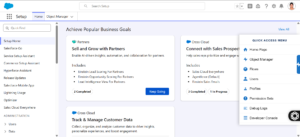
Instead of navigating deep into Setup each time, this tool gives you a clean and fixed sidebar that appears on every Salesforce page — Classic or Lightning — offering instant, one-click access to the most commonly used setup areas.
No searching.
No scrolling.
No wasted time.
Just click and go. 🚀
⚡ One-Click Access to Everything You Need
With SF Helper Suite installed, your most essential tools are always available — exactly when you need them.
Here’s what you can open instantly from the sidebar:
👉 Object Manager
👉 Flow Builder
👉 Profiles
👉 Permission Sets
👉 Users
👉 Debug Logs
👉 Home Page
👉 Developer Console
Everything is centralized in one place — simple, intuitive, and built for speed.
🎯 Who Is It Built For?
SF Helper Suite was thoughtfully designed for:
-
🧑💻 Salesforce Developers
-
🛠️ Admins
-
📊 Consultants
-
🧪 QA/Test Teams
-
📚 Learners & Trainees
Basically — anyone who works in Salesforce regularly and wants to save time.
🔥 Why Salesforce Pros Already Love This Extension
Here’s what makes the SF Helper Suite stand out:
1. Massive Time Saver
Reduce your setup navigation time by 50% or more — instantly.
2. Boost Productivity
Spend your time building automation, debugging, and delivering — not searching through menus.
3. Always Accessible
The sidebar remains visible no matter which page you’re on — meaning the tools follow you.
4. Safe & Secure
-
No data stored
-
No tracking
-
Works in Production, Sandbox, Scratch Orgs & VDI
5. Perfect for Training & Demos
Great for new users or consultants demonstrating Salesforce without navigation delays.
🌟 The Purpose Behind SF Helper Suite
Salesforce professionals juggle configurations, development tasks, and setups daily. The repetitive navigation often slows momentum — especially when working across multiple objects, flows, or metadata components.
SF Helper Suite exists with one simple mission:
👉 To make Salesforce navigation fast, effortless, and frustration-free.
Whether you’re:
-
Building automation in Flow Builder,
-
Tweaking Profiles and Permission Sets,
-
Troubleshooting Debug Logs,
-
Testing new functionality,
-
Or switching between admin tools —
SF Helper Suite keeps everything just one click away.
🚀 Final Thoughts
Salesforce already empowers thousands of teams worldwide — and SF Helper Suite makes working inside Salesforce even better.
It’s simple.
It’s smart.
It’s a true productivity accelerator.
If you’re ready to cut down on unnecessary clicks and improve your daily workflow — it’s time to give it a try.
🔗 Download and experience the productivity boost:
https://lnkd.in/gEwVCPwc