
In today’s digital world, customers expect transactions to be fast, secure, and hassle-free. Whether you’re running an eCommerce store, a subscription-based business, or a service company, collecting payments efficiently is critical for business growth. If your business already uses Salesforce as a CRM platform, connecting it with a payment gateway can make the entire payment process smoother and more automated.
Salesforce helps businesses manage customer relationships, sales opportunities, support cases, and business operations. However, when it comes to accepting online payments, businesses need a payment gateway such as Stripe, PayPal, Razorpay, Authorize.Net, or Braintree. By integrating these payment gateways with Salesforce, organizations can manage customer information and payment transactions from a single platform.
What is a Payment Gateway?
A payment gateway is a technology that securely processes online payments between customers and businesses. It acts as a bridge between a customer’s payment method and the merchant’s bank account. Whenever a customer makes a payment online, the payment gateway encrypts sensitive information and ensures that the transaction is completed safely.
Popular payment gateways include Stripe, PayPal, Razorpay, Square, Authorize.Net, and Braintree. These platforms support various payment methods such as credit cards, debit cards, UPI, digital wallets, and bank transfers.
Why Integrate Salesforce with a Payment Gateway?
Many companies manage customer information in Salesforce but handle payments in separate systems. This often creates manual work, duplicate data entry, and reporting challenges. Integrating Salesforce with a payment gateway solves these issues by bringing customer and payment information together.
With a connected system, sales teams can generate payment links directly from Salesforce, customer payment records can be updated automatically, and finance teams can easily track transaction history without switching between multiple applications.
The integration also improves customer experience because payments become faster and more convenient. Businesses can automate invoicing, subscription renewals, receipts, and payment confirmations, reducing administrative work and minimizing errors.
Benefits of Salesforce Payment Gateway Integration
One of the biggest advantages of integration is real-time payment tracking. Whenever a payment is completed, Salesforce can automatically update customer records, opportunities, orders, or invoices.
Another major benefit is automation. Instead of manually recording payments, businesses can use workflows and automation tools within Salesforce to update records instantly. This saves time and allows employees to focus on higher-value tasks.
Data accuracy also improves significantly. Since information flows automatically between systems, the chances of human error are greatly reduced. Finance teams can generate reports more easily, and management gets better visibility into revenue and payment performance.
Security is another important advantage. Most payment gateways follow strict security standards and encryption protocols. By integrating trusted payment providers with Salesforce, businesses can process payments while maintaining compliance and protecting customer information.
Common Methods to Connect Salesforce with Payment Gateways
There are multiple ways to connect Salesforce with a payment gateway depending on business requirements and technical complexity.
Using Native Salesforce Apps
Many payment providers offer ready-made applications on Salesforce AppExchange. These apps provide pre-built functionality that can be installed and configured with minimal development effort.
Native apps often include payment forms, transaction management, recurring billing support, and reporting capabilities. This option is ideal for businesses that need a quick implementation without extensive customization.
Using APIs
For organizations with unique business requirements, API-based integration provides greater flexibility. Most payment gateways offer REST or SOAP APIs that allow developers to create custom integrations with Salesforce.
Through APIs, Salesforce can send payment requests, retrieve transaction details, update payment status, and synchronize customer data in real time. This approach offers complete control over the integration process and user experience.
Using Middleware Platforms
Middleware tools such as MuleSoft, Boomi, and Jitterbit can simplify integration between Salesforce and payment gateways. These platforms act as connectors that transfer data between systems without requiring extensive custom coding.
Middleware solutions are especially useful when businesses need to connect multiple applications along with Salesforce and the payment gateway.
Steps to Connect Salesforce with a Payment Gateway
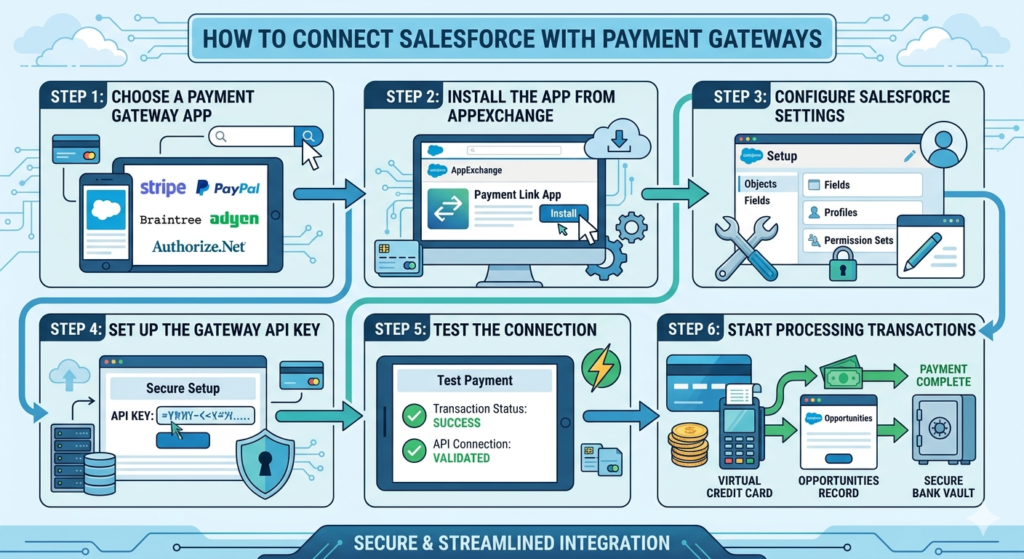
The first step is selecting the right payment gateway based on your business needs, transaction volume, geographic coverage, and supported payment methods.
Once the payment gateway is selected, create developer or business accounts in both Salesforce and the payment platform. Review the API documentation and obtain the required authentication credentials such as API keys, client IDs, and secret keys.
Next, configure Salesforce to communicate with the payment gateway. This may involve creating Named Credentials, Remote Site Settings, Apex classes, and custom objects to store transaction information.
After the connection is established, develop the required payment functionality. Businesses may choose to create payment links, embedded payment forms, recurring billing processes, or automated invoice generation depending on their requirements.
Testing is a crucial phase before going live. Use sandbox environments provided by Salesforce and payment providers to validate payment processing, refunds, failed transactions, and error handling scenarios.
Once testing is complete, deploy the integration to the production environment and monitor transaction performance regularly.
Best Practices for Payment Gateway Integration
Security should always be a top priority. Sensitive payment information should never be stored directly in Salesforce unless compliance requirements are fully met. Instead, use tokenization methods provided by payment gateways.
Implement proper error handling and logging mechanisms so that failed transactions can be identified and resolved quickly. This helps maintain a positive customer experience and reduces support requests.
It is also important to automate notifications. Customers should receive payment confirmations, receipts, and status updates automatically after every transaction.
Regular monitoring and maintenance ensure that the integration continues to perform efficiently as business requirements evolve.
Real-World Use Cases
Many businesses use Salesforce payment integrations for different purposes. eCommerce companies use them to process online orders and manage customer purchase history. Subscription-based businesses automate recurring billing and renewal payments. Educational institutions collect student fees, while healthcare organizations process patient payments securely.
Professional service companies can generate invoices from Salesforce and allow clients to make payments through secure payment links. This reduces collection delays and improves cash flow management.
Final Thoughts
Connecting Salesforce with a payment gateway is more than just a technical integration. It creates a seamless experience for customers, sales teams, and finance departments. By bringing customer management and payment processing into a single ecosystem, businesses can reduce manual effort, improve accuracy, increase operational efficiency, and deliver a better customer experience.
Whether you choose a ready-made AppExchange solution, a custom API integration, or a middleware platform, a well-designed Salesforce payment gateway integration can become a valuable asset for your business growth and digital transformation journey.