
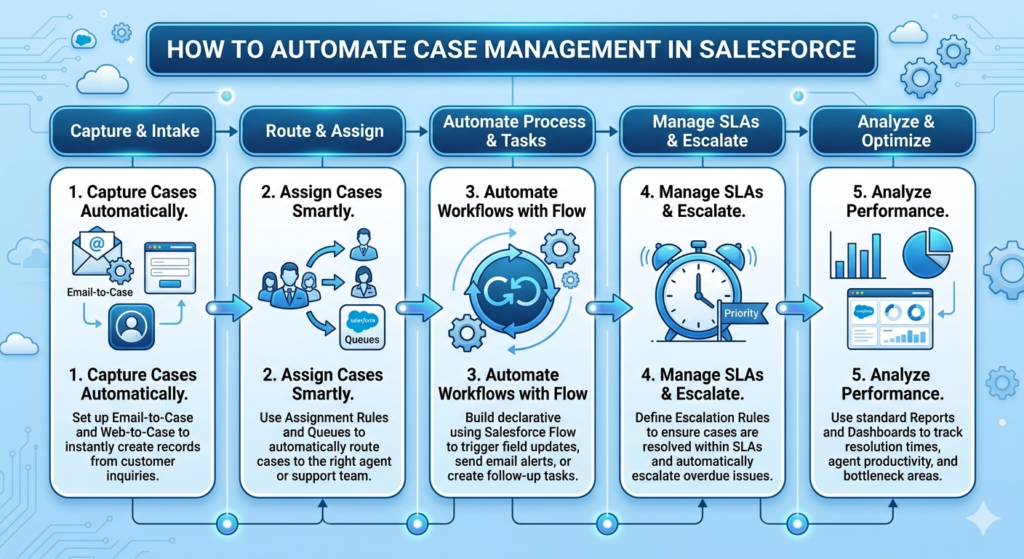
Managing customer issues manually can become stressful very quickly, especially when support teams receive a large number of cases every day. Tracking emails, assigning tickets manually, sending updates to customers, and monitoring pending issues can consume a lot of time. This is why many companies use Salesforce to automate their case management process.
Case management automation helps businesses handle customer issues faster, reduce manual work, and improve customer satisfaction. Instead of depending completely on support agents for every small task, Salesforce can automatically manage many parts of the process.
Today, customers expect quick responses and smooth support experiences. If businesses take too long to resolve issues, customers may lose trust. Automation helps support teams stay organized and respond more efficiently.
What is Case Management in Salesforce?
In Salesforce, a Case is basically a customer issue, query, complaint, or support request. Companies use cases to track customer problems from the moment they are reported until they are resolved.
For example, cases can be created when:
- A customer sends a support email
- Someone raises a complaint
- A technical issue is reported
- A refund request is submitted
- A service issue needs attention
Salesforce allows support teams to manage all these requests in one centralized system.
Why Automating Case Management is Important
Many businesses still manage support processes manually, which creates several problems like:
- Delayed responses
- Missed customer requests
- Uneven workload among agents
- Lack of tracking
- Slow issue resolution
- Poor customer experience
Automation helps remove these challenges by making the entire process faster and more structured.
Instead of manually assigning cases and sending updates, Salesforce can handle these tasks automatically.
Automatic Case Creation
One of the first steps in automation is automatic case creation. Salesforce can create cases automatically from different channels such as:
- Emails
- Website forms
- Chat systems
- Social media platforms
- Customer portals
For example, if a customer sends an email to the support team, Salesforce can instantly create a new case and assign a case number without manual effort.
This ensures no customer request gets missed.
Auto-Assigning Cases to Support Agents
Manually assigning cases can waste time, especially when support teams are large. Salesforce allows businesses to automate case assignment using Assignment Rules.
Cases can be assigned based on:
- Issue type
- Product category
- Customer region
- Priority level
- Agent expertise
- Support availability
For example, technical issues can automatically go to the technical support team, while billing issues can be routed to the finance support team.
This improves response time and workload management.
Automating Customer Responses
Customers usually expect confirmation immediately after raising a support request. Salesforce can automatically send acknowledgment emails when a case is created.
These automated emails may include:
- Case number
- Support team details
- Expected response time
- Next steps
This gives customers confidence that their issue has been received and is being processed.
Using Salesforce Flow for Automation
Today, most businesses use Salesforce Flow to automate case management processes because it is flexible and powerful.
With Flow, admins can automate tasks such as:
- Updating case status
- Sending notifications
- Escalating high-priority issues
- Creating follow-up tasks
- Triggering approval processes
- Scheduling reminders
Flows help businesses reduce repetitive work and improve overall efficiency.
Case Escalation Automation
Some customer issues are more urgent than others. If high-priority cases are not handled quickly, customer satisfaction can drop significantly.
Salesforce allows businesses to create escalation rules that automatically escalate cases if they are not resolved within a certain time.
For example:
- If a case remains open for 24 hours, notify the manager
- If a VIP customer raises an issue, mark it as high priority
- Escalate unresolved technical issues automatically
This ensures important cases receive proper attention.
SLA Tracking and Automation
Many companies work with Service Level Agreements (SLAs), where support teams must respond within a specific timeframe.
Salesforce automation helps track SLA deadlines and notify agents before breaches happen.
This improves accountability and helps businesses maintain service quality.
Automating Internal Notifications
Support teams often need quick updates about case activity. Salesforce can automatically notify agents and managers whenever important actions happen.
Notifications can be triggered when:
- A new case is assigned
- Case priority changes
- A customer replies
- A case gets escalated
- An issue is resolved
This keeps everyone informed without requiring manual communication.
Creating Better Customer Experiences
Customers mainly care about one thing — getting their issues resolved quickly and smoothly.
Automation helps improve customer experience because:
- Cases are handled faster
- Customers receive timely updates
- Support agents stay organized
- Communication becomes more consistent
- Important issues are not ignored
A well-automated support process makes the business look more professional and reliable.
Reporting and Performance Tracking
Salesforce dashboards and reports help managers monitor support team performance in real time.
Businesses can track:
- Open vs closed cases
- Average resolution time
- Escalated cases
- Agent productivity
- Customer satisfaction trends
- SLA compliance
These insights help companies identify areas that need improvement.
Best Practices for Case Automation
While automation is extremely useful, businesses should avoid making support feel too robotic. Human interaction is still important for complex issues.
A few best practices include:
- Keep automated emails simple and friendly
- Avoid over-automation
- Create clear escalation paths
- Regularly review automation workflows
- Train support teams properly
- Monitor customer feedback
The goal should always be to improve support quality, not just reduce manual work.
Final Thoughts
Automating case management in Salesforce helps businesses create a faster, smarter, and more organized support process. From automatic case creation and assignment to escalations and customer notifications, automation reduces manual effort and improves efficiency across the support team.
In today’s competitive market, customer experience plays a major role in business success. Companies that respond quickly and handle customer issues smoothly are more likely to build long-term trust and loyalty.
Salesforce case automation helps businesses deliver better support experiences while allowing teams to focus on solving real customer problems instead of handling repetitive administrative tasks.