
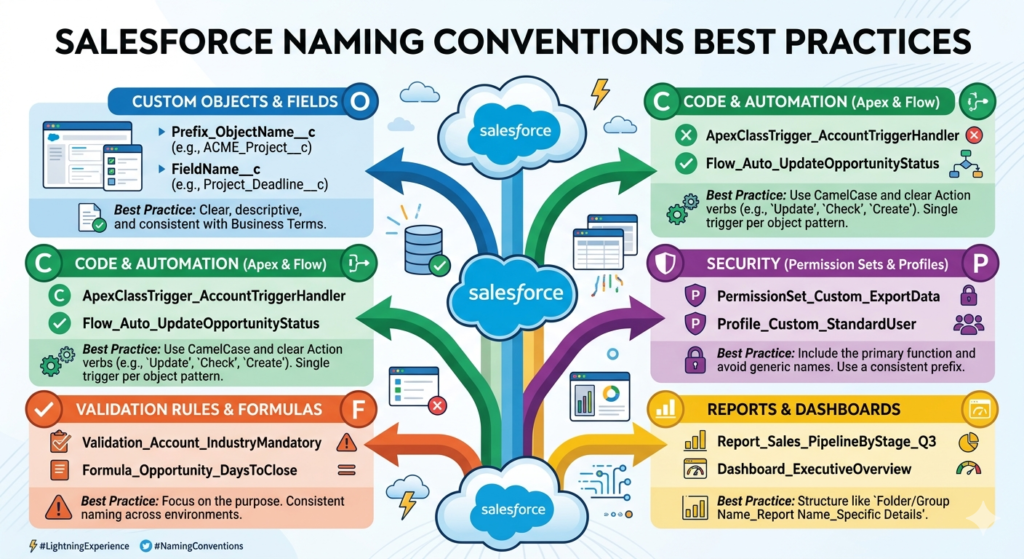
When you start working on a Salesforce project, one thing that looks small but creates a huge impact over time is naming conventions. Whether you are building objects, fields, Apex classes, or flows, how you name things decides how easy your system will be to understand, maintain, and scale.
In this detailed guide, we will break down Salesforce naming conventions step by step in simple English, just like a content creator would explain to a real audience. This will help you build clean, professional, and enterprise-level Salesforce implementations.
What Are Naming Conventions in Salesforce?
Naming conventions are standard rules for naming components in your Salesforce org. These include:
- Objects
- Fields
- Apex Classes
- Triggers
- Flows
- Reports
- Lightning Components
In Salesforce, everything is interconnected. If naming is messy, your entire system becomes confusing.
Why Naming Conventions Matter
Let’s be real. In the beginning, developers often name things like:
testClassabcTriggernewField1
This works for a few days. But after 6 months?
Nobody understands what anything does.
Benefits of Good Naming Conventions
- Easy to understand for new developers
- Faster debugging and maintenance
- Better collaboration across teams
- Cleaner architecture
- Professional project delivery
Core Principles of Good Naming
Before jumping into each component, understand these golden rules:
1. Be Descriptive, Not Short
Bad: AccRec
Good: AccountReconciliation
2. Keep It Consistent
If you use Obj for object suffix, use it everywhere.
3. Avoid Abbreviations (unless common)
Bad: OppAmtFld
Good: OpportunityAmount
4. Use Proper Case Format
- PascalCase for Apex
- CamelCase for variables
- Clear labels for UI
Naming Conventions for Standard vs Custom Components
In Salesforce:
- Standard fields → no suffix
- Custom fields →
__c - Custom objects →
__c
Example:
- Standard:
AccountName - Custom:
Customer_Type__c
1. Custom Object Naming Convention
Format:
<BusinessPurpose>__c
Examples:
Invoice__cJob_Application__cVendor_Contract__c
Best Practice
- Use singular names
- Avoid generic names like
Data__c
2. Field Naming Convention
Fields are used everywhere, so naming must be crystal clear.
Format:
<Object>_<FieldPurpose>__c
Examples:
Account_Type__cOpportunity_Expected_Revenue__cLead_Source_Detail__c
Tips:
- Always match field name with label
- Avoid duplicate meanings
3. Apex Class Naming Convention
Apex is the backbone of logic in Salesforce.
Format:
<Feature><Action>
Examples:
InvoiceProcessorLeadAssignmentServicePaymentGatewayIntegration
For Utility Classes:
StringUtilsDateHelper
For Test Classes:
Add Test at the end
InvoiceProcessorTest
4. Apex Trigger Naming Convention
Triggers should clearly tell:
- On which object
- What they do
Format:
<Object>Trigger
Examples:
AccountTriggerOpportunityTrigger
Advanced Naming (Recommended):
<Object>_<Event>_Trigger
Account_BeforeInsert_TriggerOpportunity_AfterUpdate_Trigger
5. Lightning Web Component (LWC) Naming
In LWC, naming directly affects readability.
Format:
camelCase
Examples:
accountListViewleadConversionFormopportunityDashboard
Folder Naming:
Same as component name
6. Flow Naming Convention
Flows are widely used now, so naming is critical.
Format:
<Object>_<Purpose>_Flow
Examples:
Lead_Assignment_FlowOpportunity_Approval_FlowCase_Auto_Response_Flow
For Record Triggered Flows:
Add trigger type
Account_AfterSave_UpdateIndustry_Flow
7. Process Builder / Workflow Naming
Even though Flow is replacing them, many orgs still use these.
Format:
<Object>_<Action>_Process
Example:
Lead_Qualification_Process
8. Validation Rule Naming
Format:
<Object>_<Condition>_VR
Examples:
Opportunity_CloseDateRequired_VRAccount_PhoneMandatory_VR
9. Report & Dashboard Naming
Reports are used by business users, so keep them human-friendly.
Report Format:
<Object>_<Purpose>
Opportunities_ClosedThisMonthLeads_By_Source
Dashboard Format:
Sales_Performance_DashboardExecutive_KPI_Dashboard
10. Integration Naming Convention
For APIs and integrations:
Examples:
SAP_OrderSync_ServicePaymentGateway_API_Handler
Named Credentials:
Stripe_APISAP_Integration
11. Custom Metadata & Custom Settings Naming
Format:
<Feature>_Config
Examples:
Discount_ConfigLeadRouting_Config
Common Mistakes to Avoid
1. Using Random Names
Bad: Test123__c
2. Mixing Naming Styles
Bad:
accountDataAccount_DataaccData
3. Overcomplicating Names
Bad:AccountCustomerBillingShippingAddressTypeField__c
Keep it readable.
Real-World Example
Imagine you are building a recruitment system.
Bad Naming:
obj1__cfieldA__cClassTest1
Good Naming:
Candidate__cCandidate_Experience__cCandidateMatchingService
Now any developer can understand the system instantly.
Pro Tips from Industry Experts
- Always define naming standards before project starts
- Document conventions in Confluence or README
- Follow the same pattern across all teams
- Use prefixes for managed packages if needed
- Review naming during code reviews
Final Thoughts
Naming conventions are not just a “good to have” thing. They are the foundation of a scalable Salesforce system.
A clean naming strategy in Salesforce ensures:
- Long-term maintainability
- Faster onboarding of developers
- Better performance of teams
If you follow these best practices from the beginning, you will avoid technical debt and build systems that actually make sense even years later.