
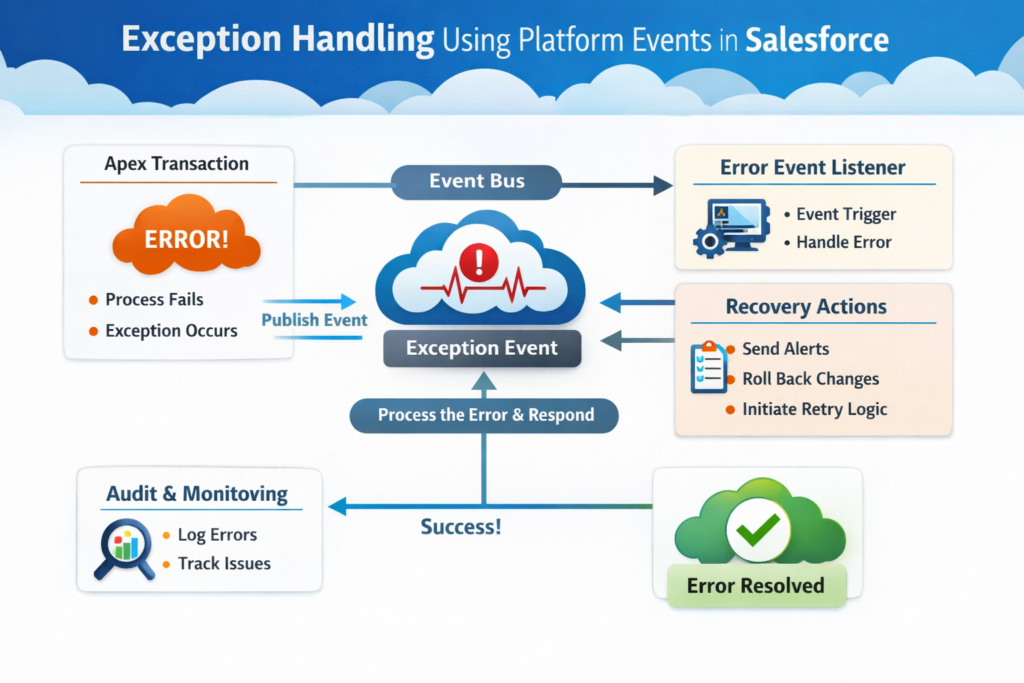
Introduction
In Salesforce, handling errors properly is just as important as writing the main business logic. Many developers rely on traditional try-catch blocks, debug logs, or custom objects to track exceptions. But these approaches often fall short when dealing with large-scale systems, integrations, or asynchronous processes.
This is where Platform Events come into the picture.
Platform Events provide a modern, scalable, and decoupled way to handle exceptions in Salesforce. Instead of handling errors in isolation, you can broadcast them and let different systems or components respond accordingly.
In this blog, we will understand exception handling using Platform Events step by step in simple English, with real-world thinking.
What is Exception Handling?
Exception handling is a way to manage runtime errors so that your application does not fail unexpectedly.
Example:
- API call fails
- DML operation throws error
- Null pointer exception
- Integration timeout
Without proper handling:
- Users see errors
- Data becomes inconsistent
- Debugging becomes difficult
Traditional Exception Handling Problems
Before using Platform Events, developers usually:
- Use try-catch blocks
- Store errors in custom objects
- Check debug logs manually
Issues with this approach:
- Tight coupling between logic and error handling
- Hard to track errors across systems
- Not scalable for integrations
- No real-time monitoring
What are Platform Events?
Platform Events are a Salesforce feature used for event-driven architecture.
They allow you to:
- Send messages (events)
- Listen to events
- Process them asynchronously
Think of it like:
“Something happened → Notify everyone who is interested”
Why Use Platform Events for Exception Handling?
Using Platform Events for exception handling gives you:
1. Decoupling
Your main logic does not worry about how errors are handled.
2. Centralized Error Management
All exceptions can be processed in one place.
3. Real-Time Monitoring
You can trigger alerts, logs, or notifications instantly.
4. Scalability
Works well with integrations and large systems.
Step-by-Step Implementation
Let’s understand how to implement exception handling using Platform Events.
Step 1: Create a Platform Event
Go to Salesforce Setup:
- Search for Platform Events
- Click New Platform Event
Example:
Event Name: Error_Event__e
Add fields like:
Error_Message__c(Text)Class_Name__c(Text)Method_Name__c(Text)Stack_Trace__c(Long Text)Record_Id__c(Text)
This event will carry all error details.
Step 2: Publish Event from Apex (Try-Catch)
Now, modify your Apex code to publish events when an exception occurs.
Example:
Account acc = new Account(Name = null);
insert acc;
} catch (Exception e) {
Error_Event__e eventMsg = new Error_Event__e(
Error_Message__c = e.getMessage(),
Class_Name__c = ‘AccountService’,
Method_Name__c = ‘createAccount’,
Stack_Trace__c = e.getStackTraceString()
);
EventBus.publish(eventMsg);
}
What’s happening here:
- Instead of just logging error
- We are broadcasting the error as an event
Step 3: Create a Platform Event Trigger
Now, we need something that listens to this event.
Example Trigger:
for (Error_Event__e evt : Trigger.New) {
System.debug(‘Error Occurred: ‘ + evt.Error_Message__c);
// You can store in custom object
// Send email alerts
// Call external system
}
}
Step 4: Store Errors in Custom Object (Optional but Recommended)
Create a custom object like Error_Log__c
Fields:
- Error Message
- Class Name
- Method Name
- Stack Trace
Update trigger:
Error_Message__c = evt.Error_Message__c,
Class_Name__c = evt.Class_Name__c,
Method_Name__c = evt.Method_Name__c
);
insert log;
Step 5: Real-Time Notifications
You can extend this further:
- Send Email Alerts
- Push notifications
- Integrate with external monitoring tools
Example:
- Slack notification
- External logging system
Real-Time Use Case
Imagine you are working on:
Integration Scenario
- Salesforce calling external API
- API fails
Instead of:
- Logging error silently
You:
- Publish Platform Event
- Event Trigger:
- Logs error
- Sends alert
- Retries logic
Best Practices
1. Always Keep Events Lightweight
Do not overload with too many fields.
2. Avoid Business Logic in Trigger
Keep it clean and focused on handling errors.
3. Use Custom Metadata for Config
Control behavior without code changes.
4. Add Retry Mechanism
Useful for integration failures.
5. Monitor Event Usage Limits
Platform Events have limits, so design carefully.
Advantages of This Approach
- Clean and maintainable code
- Loose coupling
- Better debugging
- Real-time monitoring
- Works well with microservices architecture
Limitations
- Event delivery is asynchronous
- Requires proper monitoring
- Platform limits apply
Conclusion
Exception handling using Platform Events is a modern and powerful approach in Salesforce development. It moves error handling from a reactive process to a proactive, scalable system.
Instead of hiding errors in logs, you make them visible, trackable, and actionable.
If you are working on integrations, async processing, or large applications, this approach can significantly improve your system reliability.
Final Thought
If you are still using only try-catch blocks and debug logs, it’s time to upgrade your approach.
Start using Platform Events for exception handling and build systems that are not just functional, but also resilient.