
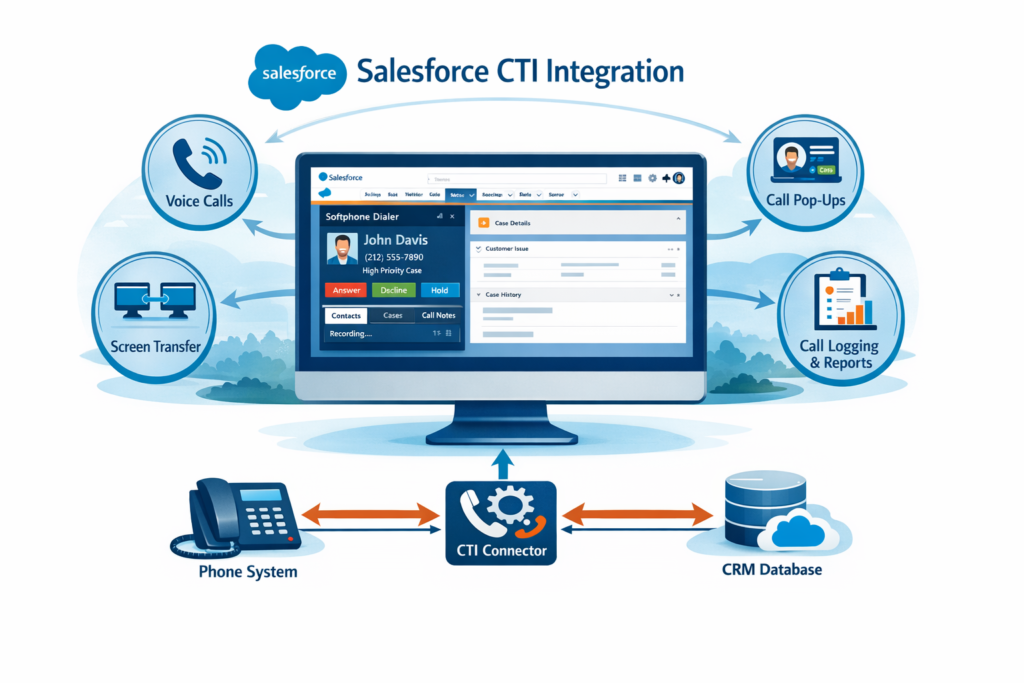
If you’ve ever worked in a sales or support team, you already know the pain of switching between tools during a call. One screen for calls, another for CRM, and half the time you’re asking the customer to repeat basic details.
This is exactly where Salesforce CTI Integration makes life easier.
In this blog, I’ll explain CTI in plain English — what it is, how it works in Salesforce, and why almost every real-world Salesforce project ends up using it.
What is CTI?
CTI stands for Computer Telephony Integration.
In simple terms, CTI connects your phone system with Salesforce so agents can handle calls directly from Salesforce itself.
Instead of:
-
Answering a call on one app
-
Searching customer details in Salesforce
-
Manually logging the call
Everything happens in one place.
What Does Salesforce CTI Integration Actually Do?
When CTI is integrated with Salesforce:
-
Calls come directly inside Salesforce
-
Caller details open automatically (screen pop)
-
Agents can click to call any number
-
Call logs are created without manual work
Salesforce becomes the single screen for agents — calls, customer info, and actions, all together.
How Salesforce CTI Works (Simple Flow)
Here’s how it usually works in real projects:
-
Customer calls the support or sales number
-
CTI system receives the call
-
Salesforce searches records using the phone number
-
Matching Lead / Contact / Case opens automatically
-
Agent answers the call from Salesforce
-
Call details are saved after the call ends
This automatic record opening is what people call Screen Pop.
Types of CTI in Salesforce
Salesforce mainly supports two CTI approaches, but only one is widely used today.
1. Open CTI (Most Used)
Open CTI is the modern way of doing CTI in Salesforce.
Why teams prefer Open CTI:
-
No software installation needed
-
Works directly in the browser
-
Built using JavaScript APIs
-
Fully compatible with Lightning Experience
-
Easy to customize
Most popular telephony tools like Amazon Connect, Five9, and Genesys use Open CTI.
2. Classic CTI (Older Method)
This is the older CTI model used mainly in Salesforce Classic.
Problems with it:
-
Needs local adapter installation
-
Limited customization
-
Not suitable for Lightning
Because of these limitations, Open CTI is the preferred choice now.
What is a Softphone in Salesforce?
A Softphone is the small calling panel you see inside Salesforce.
Using the softphone, agents can:
-
Answer and make calls
-
Hold, mute, or transfer calls
-
See caller details instantly
-
Log call information
It usually appears at the bottom of the Salesforce screen.
Key Features You Get with Salesforce CTI
Screen Pop
Automatically opens the customer’s Lead, Contact, Account, or Case when a call comes in.
Click-to-Call
Click on any phone number in Salesforce to start a call.
Automatic Call Logging
Details like call duration, direction, and agent name are saved automatically.
Call Routing
Calls can be routed based on agent availability, skills, or priority.
Call Recording
Recordings can be linked to Salesforce records for review or training.
Salesforce Objects Commonly Used in CTI
CTI usually interacts with:
-
Lead
-
Contact
-
Account
-
Case
-
Task (for call logs)
-
Custom objects (if required)
Real-World CTI Example
Customer Support Use Case
A customer calls support →
Salesforce opens the existing case →
Agent answers and resolves the issue →
Call details get logged automatically.
No searching, no manual notes, no switching tabs.
Why Companies Use Salesforce CTI
-
Faster call handling
-
Less manual work
-
Better customer experience
-
Higher agent productivity
-
Accurate call history in Salesforce
This is why CTI is almost mandatory in call-center setups.
Popular CTI Providers Used with Salesforce
Some commonly used CTI tools are:
-
Amazon Connect
-
Five9
-
Genesys
-
Aircall
-
RingCentral
-
Twilio
Most of these support Open CTI.
Common Challenges in CTI Projects
Like any integration, CTI has its challenges:
-
Phone number format issues
-
Multiple records matching one number
-
Delays in screen pop
-
Custom logic for different teams
These are usually handled with proper configuration and testing.
Best Practices for Salesforce CTI Integration
From real project experience:
-
Always use Open CTI
-
Standardize phone number formats
-
Handle multiple record matches carefully
-
Avoid heavy logic during screen pop
-
Test thoroughly with real call scenarios
Is CTI Important to Learn for Salesforce?
Absolutely.
If you’re working with:
-
Sales Cloud
-
Service Cloud
-
Support or call-center projects
CTI knowledge is a big plus, both for interviews and real work.
Final Thoughts
Salesforce CTI Integration removes friction between calls and customer data. When done right, it saves time, improves customer experience, and makes agents far more productive.
If you want to work on real Salesforce projects, CTI is something you should definitely understand — not just theoretically, but practically.