
Introduction
Have you ever visited a company’s website where you could raise a support case, track an order, access documents, collaborate with partners, or log in to a personalized portal? If yes, there’s a good chance that portal was built using Salesforce Experience Cloud.
In today’s digital world, customers, partners, employees, and vendors expect quick access to information anytime and from anywhere. Businesses need a platform that helps them connect with different types of users while keeping data secure. That’s exactly where Salesforce Experience Cloud comes in.
If you’re new to Salesforce or planning to become a Salesforce Consultant or Developer, understanding Experience Cloud is an important step in your learning journey.
In this blog, we’ll cover:
- What is Salesforce Experience Cloud?
- Why Salesforce changed the name from Community Cloud
- Key features of Experience Cloud
- Business benefits
- Real-world use cases
- Why companies are adopting Experience Cloud
- Career opportunities
Let’s get started!
What is Salesforce Experience Cloud?
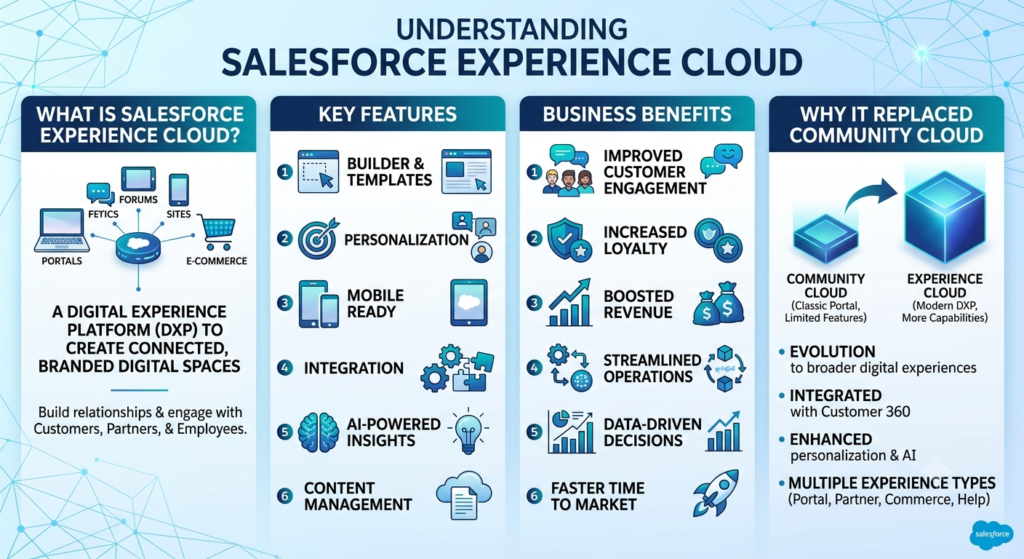
Salesforce Experience Cloud is a digital experience platform that allows organizations to create secure websites, customer portals, partner portals, employee portals, mobile experiences, and online communities without building everything from scratch.
It helps businesses connect with customers, partners, employees, dealers, suppliers, and vendors on one secure platform.
Since Experience Cloud is built on the Salesforce Platform, users can access real-time CRM data while administrators can control exactly what information each user can see.
Think of it as a customized website connected directly to your Salesforce data.
A Simple Real-Life Example
Imagine you purchased a laptop from an electronics company.
Instead of calling customer support every time, you log in to the company’s portal where you can:
- View your orders
- Raise support cases
- Chat with support agents
- Download invoices
- Read help articles
- Track warranty status
This entire portal can be built using Salesforce Experience Cloud.
Similarly, a company can create:
- Customer Portals
- Partner Portals
- Dealer Portals
- Employee Portals
- Vendor Portals
- Student Portals
- Healthcare Patient Portals
All from the same Salesforce platform.
Why Did Salesforce Rename Community Cloud to Experience Cloud?
Many Salesforce beginners ask this question.
Originally, Salesforce launched Community Cloud to help companies build online communities for customers and partners.
Over time, businesses wanted much more than just discussion forums.
They wanted to build:
- Complete websites
- Self-service portals
- Mobile experiences
- Digital storefronts
- Knowledge centers
- Personalized customer journeys
Since the platform had grown far beyond traditional communities, Salesforce renamed Community Cloud to Experience Cloud in 2020.
The new name better represents everything the platform can do.
Simply put:
Community Cloud = Focus on communities
Experience Cloud = Complete digital experiences
The platform became more powerful, but the core technology remained the same.
Who Uses Experience Cloud?
Many different users can access an Experience Cloud site.
Customers
Customers can:
- Raise support cases
- Track orders
- Download invoices
- Access FAQs
- View knowledge articles
Partners
Partners can:
- Register deals
- Manage opportunities
- Collaborate with internal teams
- Access sales materials
- Submit leads
Employees
Employees can:
- View company announcements
- Access HR documents
- Request leave
- Collaborate on projects
- Share knowledge
Vendors and Suppliers
Suppliers can:
- Update delivery information
- Track purchase orders
- Submit invoices
- Manage inventory
Top Features of Salesforce Experience Cloud
Let’s look at the most useful features.
1. Experience Builder
Experience Builder is a drag-and-drop tool that allows you to design websites without writing much code.
You can:
- Add pages
- Create navigation menus
- Insert Salesforce components
- Customize layouts
- Change branding
Even Salesforce Administrators can build professional websites using Experience Builder.
2. Customer Portals
Customers can securely log in and manage their own information.
Examples include:
- Order tracking
- Case management
- Product registration
- Warranty information
- Support articles
This reduces the workload on customer support teams.
3. Partner Portals
Partners can collaborate with your company from anywhere.
They can:
- Register deals
- Manage leads
- View dashboards
- Download marketing materials
- Access sales resources
4. Employee Portals
Organizations use Experience Cloud as an internal company portal where employees can access documents, policies, announcements, and training materials.
5. Salesforce Knowledge Integration
Companies can publish articles that help users solve common problems.
Instead of contacting support, users can search for solutions themselves.
This improves customer satisfaction and reduces support costs.
6. Mobile-Friendly Design
Experience Cloud websites automatically work on desktops, tablets, and mobile phones.
Users enjoy the same experience across all devices.
7. Personalization
Different users can see different content based on:
- User profile
- Role
- Location
- Account
- Permission
This creates a personalized experience for every user.
8. Secure Access
Salesforce provides strong security features such as:
- Role-based access
- Permission Sets
- Sharing Rules
- Authentication
- Single Sign-On (SSO)
- Multi-Factor Authentication (MFA)
Your business data stays protected while users only see what they are authorized to access.
Benefits of Salesforce Experience Cloud
Better Customer Experience
Customers can quickly find information without waiting for support teams.
Faster Support
Knowledge articles and self-service portals reduce support tickets.
Improved Collaboration
Employees, customers, and partners can work together from one platform.
Increased Productivity
Automation and easy access to information save time for everyone.
Easy Customization
Businesses can easily customize the portal according to their branding and business needs.
Seamless Salesforce Integration
Since Experience Cloud is built on Salesforce, it connects directly with:
- Accounts
- Contacts
- Cases
- Opportunities
- Leads
- Custom Objects
There is no need to build complex integrations for basic CRM data.
Scalable Solution
Whether your business has 500 users or 500,000 users, Experience Cloud can scale to meet growing business requirements.
Real-World Use Cases
Customer Support Portal
Customers can:
- Raise cases
- Track case status
- Search knowledge articles
- Chat with agents
Dealer Portal
Dealers can:
- Register opportunities
- Place orders
- View inventory
- Download product catalogs
Banking Portal
Customers can:
- View account information
- Download statements
- Submit service requests
- Access secure documents
Healthcare Portal
Patients can:
- Book appointments
- View medical records
- Download prescriptions
- Communicate with healthcare providers
University Portal
Students can:
- View results
- Register for courses
- Download assignments
- Communicate with faculty
Why Companies Choose Experience Cloud
Companies choose Experience Cloud because it helps them:
- Improve customer satisfaction
- Deliver personalized digital experiences
- Reduce customer support costs
- Increase employee productivity
- Strengthen partner relationships
- Build secure online portals quickly
- Reuse existing Salesforce CRM data
- Scale as the business grows
Instead of managing multiple systems, businesses can keep everything connected on one trusted platform.
Career Opportunities in Experience Cloud
Experience Cloud skills are in high demand.
Common job roles include:
- Salesforce Experience Cloud Developer
- Salesforce Experience Cloud Consultant
- Salesforce Administrator
- Salesforce Technical Lead
- Salesforce Solution Architect
To become an Experience Cloud professional, focus on learning:
- Experience Builder
- Experience Workspace
- User Management
- Sharing Sets
- Apex
- Lightning Web Components (LWC)
- Salesforce Flows
- Salesforce Security Model
- REST APIs
- Single Sign-On (SSO)
Final Thoughts
Salesforce Experience Cloud is much more than a portal-building tool. It is a complete digital experience platform that enables businesses to create secure, engaging, and personalized experiences for customers, partners, employees, and other external users.
The transition from Community Cloud to Experience Cloud reflects Salesforce’s vision of delivering richer digital experiences beyond traditional online communities. With powerful features like Experience Builder, Knowledge Integration, Automation, CRM connectivity, and enterprise-grade security, organizations can build modern portals that improve collaboration and customer satisfaction.
Whether you’re just starting your Salesforce journey or already working as a Salesforce Consultant, learning Experience Cloud is a valuable investment. As more organizations embrace digital transformation, the demand for professionals with Experience Cloud expertise continues to grow.
Start by creating a simple Experience Cloud site in a Salesforce Developer Org, explore the available templates, and practice building customer and partner portals. Hands-on experience will help you understand how this powerful platform can solve real business challenges.
Happy Learning!