
If you’ve just started learning Salesforce or recently joined a Salesforce project, you’ve probably heard the term Sandbox quite often. Developers, administrators, and consultants use sandboxes every day to build, test, and validate changes before they reach the live environment.
But what exactly is a Salesforce Sandbox? Why can’t we make changes directly in Production? And what are the different types of sandboxes available?
Let’s understand everything in simple terms.
What is a Salesforce Sandbox?
A Salesforce Sandbox is a copy of your Salesforce Production environment that is used for development, testing, training, and quality assurance. Think of it as a safe workspace where you can experiment without worrying about affecting your organization’s live data.
Whether you’re creating a new Flow, writing Apex code, building Lightning Web Components (LWC), or testing integrations, all these activities should first be performed in a sandbox.
Simply put, a sandbox lets you test your work before making it available to real users.
Why Do We Need a Sandbox?
Imagine updating a validation rule directly in Production. If something goes wrong, your sales or support team may not be able to create records, resulting in business disruptions.
Using a sandbox helps you:
- Develop new features safely.
- Test automation before deployment.
- Validate integrations with external systems.
- Train users without impacting live data.
- Perform User Acceptance Testing (UAT).
- Identify and fix issues before deployment.
This significantly reduces the risk of introducing errors into your Production environment.
Types of Salesforce Sandboxes
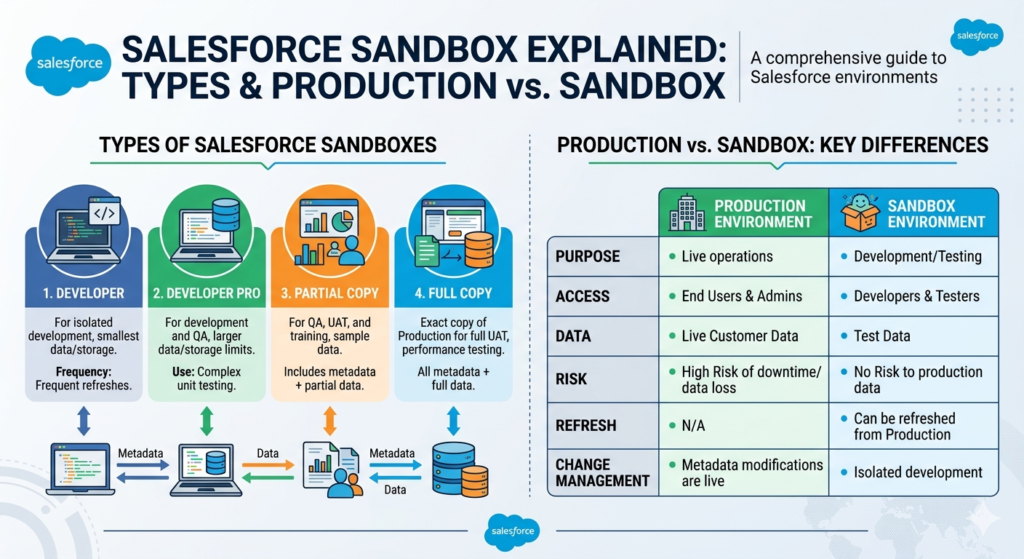
Salesforce provides four main types of sandboxes, each designed for different purposes.
1. Developer Sandbox
The Developer Sandbox is the most commonly used sandbox for individual development work.
It contains:
- Metadata only
- No production data (except a few sample records)
Developers use this sandbox to:
- Write Apex Classes and Triggers
- Build Lightning Web Components
- Create Flows
- Configure objects, fields, and automation
- Perform unit testing
Storage
- 200 MB Data Storage
- 200 MB File Storage
Best For
- Individual development
- Learning Salesforce
- Small feature development
2. Developer Pro Sandbox
Developer Pro works similarly to the Developer Sandbox but provides more storage.
It includes:
- Metadata only
- Larger storage capacity
This sandbox is useful when testing requires a larger volume of sample data.
Storage
- 1 GB Data Storage
- 1 GB File Storage
Best For
- Large development tasks
- Complex testing
- Projects requiring more sample data
3. Partial Copy Sandbox
A Partial Copy Sandbox includes both metadata and a selected portion of Production data.
Instead of copying the entire database, Salesforce copies only the records defined in a Sandbox Template.
This allows developers and testers to work with realistic business data without requiring a full Production copy.
Typical uses include:
- Integration testing
- User Acceptance Testing (UAT)
- Workflow validation
- Business process testing
Storage
- Up to 5 GB of data
Best For
- QA teams
- Business users
- Integration testing
- UAT
4. Full Sandbox
A Full Sandbox is an exact replica of your Production organization.
It includes:
- All metadata
- All production records
- Files
- Attachments
- Documents
Since it closely mirrors Production, it is ideal for final testing before deployment.
Organizations also use Full Sandboxes for performance testing and large-scale user testing.
Best For
- Performance testing
- End-to-end testing
- Regression testing
- Final deployment validation
Salesforce Sandbox Comparison
| Feature | Developer | Developer Pro | Partial Copy | Full |
|---|---|---|---|---|
| Metadata | ✅ | ✅ | ✅ | ✅ |
| Production Data | ❌ | ❌ | Partial | Complete |
| Data Storage | 200 MB | 1 GB | Up to 5 GB | Same as Production |
| Development | ✅ | ✅ | Limited | Limited |
| UAT | ❌ | ❌ | ✅ | ✅ |
| Performance Testing | ❌ | ❌ | ❌ | ✅ |
Production vs. Sandbox
Many beginners get confused between Production and Sandbox. The easiest way to understand the difference is this:
Production is your live Salesforce environment where real users work every day. Every record, automation, and process directly impacts your business.
A Sandbox is a separate testing environment where you can safely build and test changes before deploying them to Production.
| Production | Sandbox |
| Live environment | Testing environment |
| Contains real business data | Contains copied or sample data |
| Used by end users | Used by developers, admins, and testers |
| Changes affect business operations | Changes have no impact on live users |
| High risk if changes are made directly | Safe place to experiment and test |
How Are Changes Moved from Sandbox to Production?
Once testing is complete, changes are deployed to Production using tools such as:
- Change Sets
- Salesforce CLI (SFDX)
- DevOps Center
- ANT Migration Tool
- CI/CD pipelines
This deployment process ensures that only tested and approved changes reach the live environment.
Which Sandbox Should You Use?
Choosing the right sandbox depends on your work.
- Developer Sandbox – Best for individual developers building new features.
- Developer Pro Sandbox – Ideal for projects that require more sample data.
- Partial Copy Sandbox – Suitable for testing business processes and integrations.
- Full Sandbox – Recommended for final validation before Production deployment.
Using the appropriate sandbox improves development efficiency and reduces deployment risks.
Final Thoughts
A Salesforce Sandbox is much more than just a copy of Production—it’s a critical part of every successful Salesforce implementation. It allows teams to innovate, test, and improve applications without affecting business operations.
Whether you’re a Salesforce Administrator, Developer, or Consultant, understanding the different sandbox types and knowing when to use each one is essential. Following a proper development lifecycle helps ensure smoother deployments, fewer production issues, and a better experience for end users.
Investing time in learning how Salesforce Sandboxes work will not only improve your technical skills but also make you more effective in real-world Salesforce projects.