
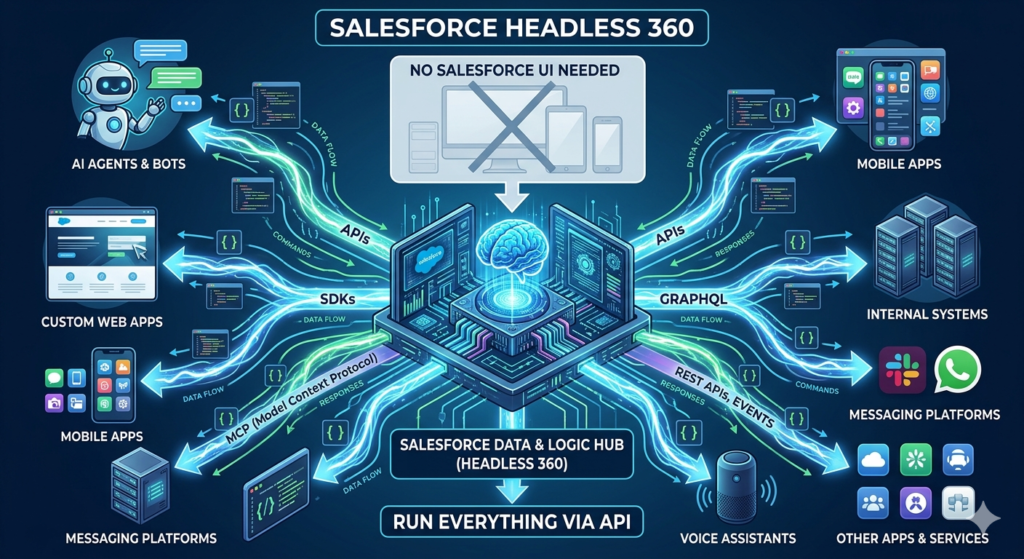
For a long time, when people thought about Salesforce, they imagined dashboards, forms, and a full user interface where teams log in and manage their work. That’s how most of us started — clicking through screens, creating records, running reports.
But things are changing.
Today, many businesses don’t actually need users sitting inside Salesforce all the time. Instead, they want systems to talk to each other directly. They want mobile apps, websites, and external platforms to handle the experience, while Salesforce quietly works in the background.
This is where the idea of Headless Salesforce comes in.
What Does “Headless” Really Mean?
In simple terms, “headless” means separating the frontend (what users see) from the backend (where data and logic live).
So instead of using Salesforce screens:
- You use APIs to create, update, and fetch data
- Your own apps or systems handle the user experience
- Salesforce becomes a powerful engine running behind the scenes
Think of it like this — Salesforce is no longer the “app you use.” It becomes the system that powers your apps.
Why Companies Are Moving Towards Headless Salesforce
This shift isn’t happening just because it sounds modern. It’s happening because of real business needs.
Many companies already have:
- Custom mobile apps
- Customer portals
- Third-party systems
Forcing users to switch between these and Salesforce UI creates friction.
With APIs, everything connects smoothly. Users stay in one interface, and Salesforce does its job in the background.
It also gives teams more control. You’re not limited by standard layouts or page designs. You can build exactly the experience you want.
How Salesforce Works Without a UI
Salesforce already provides strong API support, which makes this approach possible.
Using APIs, you can:
- Create and update records
- Trigger business logic
- Run automations
- Fetch reports and data
All of this can be done without opening the Salesforce interface.
For example, a mobile app can:
- Create a lead
- Convert it into an opportunity
- Assign it to a sales rep
All through API calls, without a single click inside Salesforce.
Real-World Use Case: Mobile-First Field Teams
Let’s say you have a field service team using a custom mobile app.
Instead of asking them to log into Salesforce:
- The app captures job details
- Sends data to Salesforce via API
- Updates work orders automatically
The technician never sees Salesforce, but everything is recorded there.
This makes the experience faster and much more natural for users.
Real-World Use Case: E-commerce Integration
In an e-commerce setup:
- Customers place orders on a website
- The website sends order data to Salesforce
- Salesforce handles customer records, cases, and follow-ups
The customer never interacts with Salesforce directly, but it powers the entire backend process.
Real-World Use Case: Multi-System Automation
Many businesses use multiple tools — marketing platforms, support systems, billing software.
With a headless approach:
- These systems communicate through APIs
- Salesforce acts as a central data hub
- Automations run without manual intervention
This reduces dependency on users and improves overall efficiency.
Benefits of Going Headless with Salesforce
When implemented properly, this approach brings noticeable improvements.
First, it improves user experience. People work in the tools they are comfortable with instead of switching platforms.
Second, it increases speed and performance. APIs are faster than manual actions, especially at scale.
Third, it offers flexibility. You can design any interface you want without being restricted by standard UI components.
And finally, it supports scalability. As your business grows, API-based systems handle higher volumes much more efficiently.
But It’s Not Always the Right Choice
Going headless sounds powerful, but it’s not for everyone.
If your team heavily depends on Salesforce UI for daily work, removing it completely might create confusion.
Also, building and maintaining API-based systems requires strong technical expertise.
So instead of removing the UI entirely, many companies choose a hybrid approach:
- Some processes run via UI
- Others run via APIs
This gives the best of both worlds.
Key Things to Keep in Mind
If you’re planning to explore Headless Salesforce, a few things matter a lot:
Start with a clear use case. Don’t try to move everything at once.
Focus on API design and security. Since everything runs through APIs, they become your backbone.
Make sure your data structure is clean. A messy backend will only create bigger problems when exposed via APIs.
And most importantly, think about the end user. The goal is not to remove UI — it’s to improve how people interact with your system.
Final Thoughts
Salesforce is no longer just a CRM that people log into. It’s evolving into a platform that can run quietly in the background while other systems take the spotlight.
Headless Salesforce is not about removing something — it’s about unlocking new ways to use what you already have.
When done right, it gives businesses the freedom to build faster, connect better, and scale without limitations.