
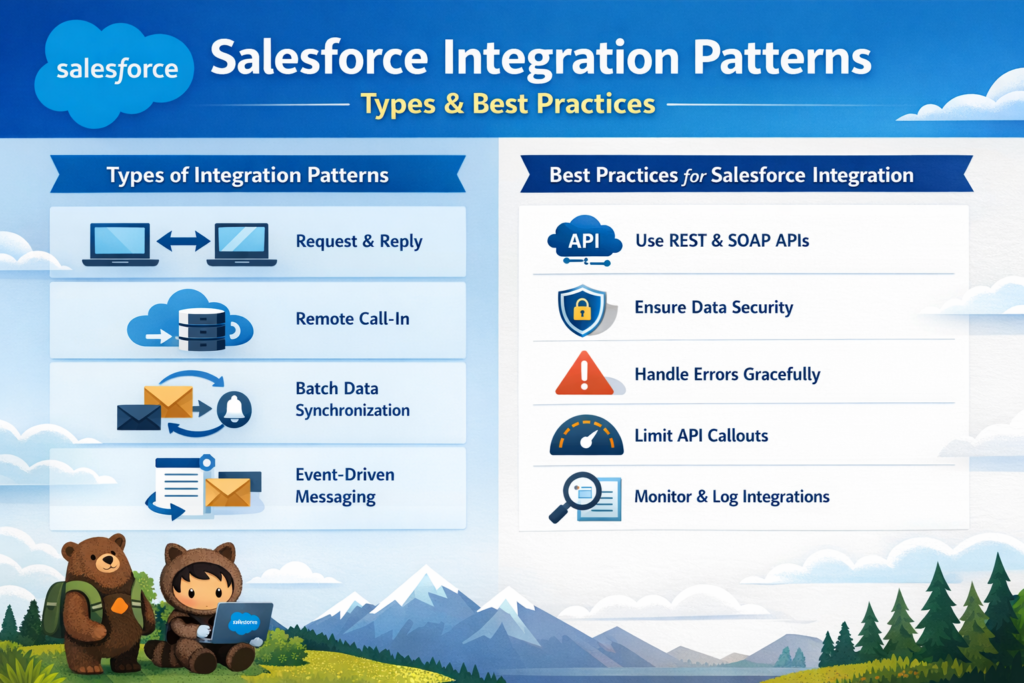
If you’ve ever tried connecting Salesforce with other systems like ERP, legacy apps, or databases, you already know one thing — integration is not just about connecting systems, it’s about connecting them the right way.
Many integrations fail not because of technology, but because of a poor design approach.
This is where Salesforce Integration Patterns come into play.
In this blog, you will learn everything step by step in simple English — what integration patterns are, their types, when to use them, best practices, common mistakes, and how to choose the right one for your business.
What are Salesforce Integration Patterns?
Salesforce Integration Patterns are proven design approaches used to connect Salesforce with other systems in a structured and efficient way.
Think of them as blueprints that help you solve common integration problems like:
- How data should flow
- When data should be updated
- Whether it should be real-time or scheduled
- How systems should communicate with each other
Instead of building integrations randomly, these patterns give you a standard way to design scalable and reliable integrations.
A recent industry report shows that most integration failures happen due to wrong architecture decisions, not technical limitations.
Why Integration Patterns are Important
Before jumping into types, let’s understand why they matter:
- They reduce system complexity
- They improve performance and scalability
- They help avoid data inconsistency
- They make your system future-ready
- They reduce long-term maintenance cost
In short, choosing the right integration pattern can save time, money, and effort.
Types of Salesforce Integration Patterns
Let’s break down the most important integration patterns in a simple and practical way.
1. Request and Reply (Synchronous Integration)
This is a real-time communication pattern.
How it works:
- Salesforce sends a request to another system
- It waits for the response
- Process continues only after getting the reply
Example:
A sales rep checks customer credit during deal creation. Salesforce calls the finance system and waits for the credit score.
When to use:
- When instant response is required
- When user action depends on external data
- Real-time validation scenarios
Technologies used:
- REST API
- SOAP API
Key benefit:
Immediate response and decision-making
2. Fire and Forget (Asynchronous Integration)
This is a one-way communication pattern.
How it works:
- Salesforce sends a message (event)
- It does NOT wait for a response
- Other systems process it later
Example:
When an Opportunity is closed, Salesforce sends an event. Marketing and analytics systems consume it separately.
When to use:
- Background processing
- Notifications or broadcasting events
- When response is not required immediately
Technologies used:
- Platform Events
- Message Queues
- Kafka
Key benefit:
Loose coupling and better performance
3. Batch Data Synchronization
This pattern is used for large data transfers at scheduled intervals.
How it works:
- Data is extracted from source system
- Data is transformed and mapped
- Data is loaded into Salesforce
Example:
Every night, customer data is synced from ERP to Salesforce.
When to use:
- Large data volumes
- Daily or scheduled updates
- Reporting and analytics
Tools used:
- Data Loader
- MuleSoft
- ETL tools
Key benefit:
Efficient handling of bulk data
4. UI Integration
This pattern focuses on user experience.
How it works:
- External application UI is embedded inside Salesforce
- Users can interact without leaving Salesforce
Example:
An insurance agent can view policy details from another system inside Salesforce.
When to use:
- When users need data from multiple systems
- To avoid switching between apps
- For better productivity
Technologies used:
- Lightning Web Components (LWC)
- iFrames
- APIs
Key benefit:
Unified user experience
5. Data Virtualization
This pattern allows you to view external data without storing it in Salesforce.
How it works:
- Salesforce fetches data in real-time using APIs
- Data is displayed but not saved
Example:
Live inventory is shown in Salesforce directly from warehouse system.
When to use:
- Large datasets
- Frequently changing data
- Sensitive data
Key benefit:
No storage usage + real-time access
6. Bi-directional Sync
This is a two-way data synchronization pattern.
How it works:
- Salesforce and external system both update each other
- Changes in one system reflect in another
Example:
Customer data updates in both CRM and marketing platform
When to use:
- Shared data ownership
- Collaborative systems
Challenge:
Data conflicts (same record updated in both systems)
Solution:
Define a system of record to resolve conflicts
Key benefit:
Consistent data across systems
Quick Comparison of Integration Patterns
| Pattern | Best Use Case | Data Speed |
|---|---|---|
| Request & Reply | Real-time user actions | Real-time |
| Fire & Forget | Background processing | Near real-time |
| Batch Sync | Large data transfers | Delayed |
| UI Integration | User experience | On-demand |
| Data Virtualization | Live external data | Real-time |
| Bi-directional Sync | Shared data updates | Near real-time |
How to Choose the Right Integration Pattern
Choosing the right pattern depends on your business needs.
1. Define Your Business Goal
Ask yourself:
- Do I need real-time data? → Use Request-Reply
- Do I need automation? → Use Fire-and-Forget
- Do I need large data sync? → Use Batch
- Do I need UI experience? → Use UI Integration
- Do I need live data without storing? → Use Data Virtualization
2. Check Time Requirements
- Real-time → Request-Reply
- Scheduled → Batch Sync
- Background → Fire-and-Forget
3. Analyze Data Volume
- High volume → Batch
- Low volume → API-based
- Huge read-only data → Virtualization
4. Understand System Dependency
- Tight dependency → Avoid
- Loose coupling → Prefer
Best Practices for Salesforce Integration
1. Design for Loose Coupling
Systems should not depend heavily on each other.
Use asynchronous patterns wherever possible.
2. Plan for Failures
Always assume:
- API may fail
- Network may break
Use:
- Retry mechanisms
- Error handling
- Logging
3. API Governance
Define:
- API versions
- Data formats
- Contracts
This avoids breaking changes.
4. Focus on Observability
Don’t just monitor — analyze:
- Errors
- Performance
- Data flow
5. Define Data Mapping Early
Ensure both systems understand:
- Field names
- Data formats
- Business meaning
Common Mistakes to Avoid
1. Point-to-Point Integration Overload
Connecting systems directly creates a messy architecture.
Solution:
Use middleware like MuleSoft
2. Ignoring Long-Term Cost
Quick solutions often become expensive later.
Solution:
Design for scalability, not speed
3. No System of Record
Not defining data ownership causes conflicts.
Solution:
Decide which system controls which data
Future Trends in Salesforce Integration (2026)
Event-Driven Architecture
- Real-time integrations are becoming standard
- Platform Events and Change Data Capture are widely used
AI-Powered Integration
- Predict integration failures
- Auto-scale systems
- Smart data mapping
Conclusion
Salesforce Integration Patterns are not just technical concepts — they are strategic decisions that define how your entire system behaves.
Choosing the right pattern helps you:
- Build scalable systems
- Maintain clean data
- Improve performance
- Reduce maintenance cost
If you design your integrations carefully today, your Salesforce ecosystem will be ready for tomorrow’s growth.
Final Thoughts
If your integrations feel complex or unmanageable, it’s a sign that your pattern selection needs improvement.
Start simple, choose the right approach, and build a strong foundation.
Because in Salesforce, integration is not just about connecting systems — it’s about connecting them intelligently.