
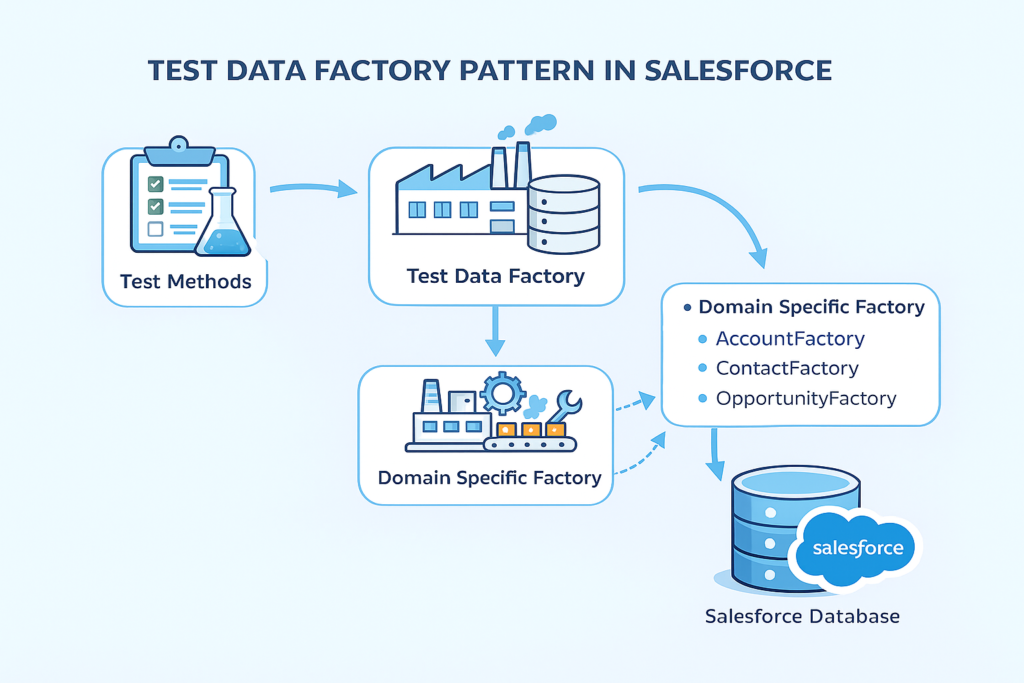
Test Data Factory Pattern in Salesforce (Simple Guide for Real Projects)
If you work on Salesforce development, you already know one painful truth:
Writing test classes is easy. Writing good test classes is hard.
Most Salesforce developers struggle with:
-
Repeated test data code
-
Hardcoded values
-
Failing tests after small changes
-
Confusing and unreadable test classes
This is exactly why Test Data Factory Pattern exists.
In this blog, we will understand Test Data Factory Pattern in Salesforce in simple English, with real-life examples, so that you enjoy reading, learn something useful, and feel confident to use it in real projects.
What is Test Data Factory Pattern?
Test Data Factory Pattern is a design pattern used to:
-
Create reusable test data
-
Avoid duplicate code in test classes
-
Make test classes clean and readable
-
Improve long-term maintainability
In simple words:
“One central class to create test data for all test classes.”
Instead of writing test data again and again in every test class, we create it once and reuse it everywhere.
Why Do We Need Test Data Factory?
Let’s see a common problem
Without Test Data Factory
-
Every test class creates its own:
-
Account
-
Contact
-
Opportunity
-
-
Same code copied everywhere
-
If object field becomes mandatory → all tests fail
With Test Data Factory
-
One place to manage test data
-
Change once → fixed everywhere
-
Clean, short, and readable test classes
This is very important in large Salesforce projects.
Real-Life Example (Simple Scenario)
Assume you are working on a Sales Application where:
-
Account is required
-
Contact is related to Account
-
Opportunity depends on Account
Many test classes need this same data.
Instead of creating it again and again, we use Test Data Factory.
Step 1: Create a Test Data Factory Class
This class will contain static methods to create records.
This class is:
-
Reusable
-
Easy to understand
-
Centralized
Step 2: Use Test Data Factory in Test Class
Now your test class becomes very clean.
Look how simple and readable this is!
Best Practices for Test Data Factory
1. Use Meaningful Method Names
Bad:
Good:
2. Avoid Hardcoding IDs
Never use:
Always generate records dynamically.
3. Keep Factory Logic Simple
-
No business logic
-
No validations
-
Only record creation
Business logic belongs in real classes, not test data factories.
4. Support Bulk Data Creation
Many real scenarios need bulk testing.
5. Use @testSetup When Needed
For common data shared across test methods.
This improves performance and keeps data consistent.
Common Mistakes to Avoid
1. Adding business logic in factory
2. Creating too much unnecessary data
3. Using factory only for one test class
4. Ignoring negative test scenarios
Remember:
Test Data Factory is for support, not complexity.
Benefits You Will See in Real Projects
✔ Faster test writing
✔ Less code duplication
✔ Easier maintenance
✔ Stable test execution
✔ Better code reviews
Most senior developers expect this pattern in enterprise Salesforce orgs.
When Should You Use Test Data Factory?
✔ Multiple test classes
✔ Complex data model
✔ Large team projects
✔ Long-term Salesforce implementations
If your project is small → optional
If your project is enterprise-level → mandatory
Final Thoughts
Test Data Factory Pattern is not just a best practice —
it is a professional Salesforce development habit.
If you want your code to:
-
Look clean
-
Scale well
-
Impress interviewers
-
Survive future changes